Realistic bells sounds!
🟡 Updated this year🖼️ Gallery (3 images)

🔍 Analysis
- 🏆 #57 of 204 audio mods in this game by downloads
📋 About This Mod
Description: Immerse yourself in a realistic sound experience with the Ultra realistic bells sounds pack!. Every bell, chime, and full bell sequence has been recreated with exceptional realism, faithfully capturing the resonance and echo of a real-world bell tower. Key Features: Ultra-realistic sounds for all in-game bells. Detailed chimes and full bell sequences, with natural variations depending on distance and context. Compatible with all modern versions of Minecraft. (from 1.9 to 1.21.10) Lightweight and optimized to avoid affecting game performance. Why Install This Pack? Perfect for enhancing the immersion of your villages, churches, or personal builds. Every chime and bell sequence adds a striking level of realism to your Minecraft world. Example usage with Redstone and Command Blocks: To make bells automatically ring with a Redstone clock, use the command: /playsound bell:audioX master @p ~ ~ ~ Details: X: Replace with the number of the sound you want to play (1, 2, 3, 4…). audio1 and audio2 → designed for big bells. audio3 and audio4 → designed for smaller bells. @p: Targets the nearest player. ~ ~ ~: Plays the sound at the coordinates of the command block. : Maximum distance the sound can be heard (e.g., 100). : Adjusts the pitch (note) of the sound: Values less than 1.0 → lower pitch (deeper sound). Values greater than 1.0 → higher pitch (sharper sound). Example: 0.90 = slightly lower, 1.0 = normal, 1.2 = slightly higher.
Description: Immerse yourself in a realistic sound experience with the Ultra realistic bells sounds pack!. Every bell, chime, and full bell sequence has been recreated with exceptional realism, faithfully capturing the resonance and echo of a real-world bell tower.
Key Features:
Ultra-realistic sounds for all in-game bells.
Detailed chimes and full bell sequences, with natural variations depending on distance and context.
Compatible with all modern versions of Minecraft. (from 1. 9 to 1. 21. 10)
Lightweight and optimized to avoid affecting game performance.
Why Install This Pack? Perfect for enhancing the immersion of your villages, churches, or personal builds. Every chime and bell sequence adds a striking level of realism to your Minecraft world.
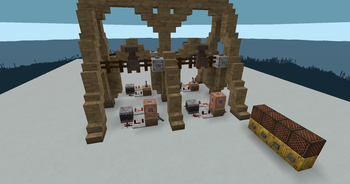
Example usage with Redstone and Command Blocks: To make bells automatically ring with a Redstone clock, use the command:
/playsound bell:audioX master @p ~ ~ ~
X: Replace with the number of the sound you want to play (1, 2, 3, 4…).
audio1 and audio2 → designed for big bells.
audio3 and audio4 → designed for smaller bells.
@p: Targets the nearest player.
~ ~ ~: Plays the sound at the coordinates of the command block.
: Maximum distance the sound can be heard (e.g., 100).
: Adjusts the pitch (note) of the sound:
Values less than 1. 0 → lower pitch (deeper sound).
Values greater than 1. 0 → higher pitch (sharper sound).
Example: 0. 90 = slightly lower, 1. 0 = normal, 1. 2 = slightly higher.
📊 Mod Details
- Game
- Minecraft Resource Packs
- Author
- AnthX4074
- Version
- 0.1
- Downloads
- 351
- Endorsements
- 1
- Category
- audio
- Created
- 11/13/2025
- Updated
- 11/13/2025
- Game Versions
- 1.21.1
- Tags
- audio, blocks, utility
🔧 How to Install Minecraft Resource Packs Mods
Download from Modrinth. Use Prism Launcher or drop into your mods folder.
📖 Full step-by-step install guide for Minecraft Resource Packs →
Visit the official mod page for specific installation instructions for this mod.
🎮 Need cheat codes or console commands? Check ur gaming wiki for Minecraft Resource Packs commands, item IDs, and more.
❓ Frequently Asked Questions
Which Minecraft Resource Packs versions does Realistic bells sounds! support?
The author lists 1.21.1. Other versions may work but are untested by the author.
What is the latest version of Realistic bells sounds!?
Version 0.1, published 2025-11-13 with 351 downloads recorded at the source.
Keep browsing — more Minecraft Resource Packs mods await