Twemoji Visibility
🟡 Updated this year🖼️ Gallery (3 images)

🔍 Analysis
- 👍 0.3% endorsement rate
- 🏆 #32 of 46 64x mods in this game by downloads
📋 About This Mod
# Twemoji Visibility !(https://cdn.modrinth.com/data/WdYcUVh8/images/527aac1cceddf18631799439edd4804915324d2c.png) - Twemoji Visibility is a resource pack that replaces the standard Minecraft emojis with (https://github.com/jdecked/twemoji) emojis, the same ones that Twitter/X and Discord use. ## 📝 Notes **If you are experiencing crashes or other weird behavior while using Twemoji Visibility 1.5 or higher, try using the latest version of 1.4.x.** When downloading the resource pack, it is listed as the Release version. (in green) - There are multiple ways to paste in emojis. - On Windows: you can use Windows + . to open the emoji menu. - On MacOS: you can use Control + Command + Space to open the emoji menu. - You can use the (https://modrinth.com/mod/symbol-chat) mod, which is officially supported by this Resource Pack. - Sequence emojis are not supported by Minecraft, and by extension, this resource pack. - This means that some emojis will come out as multiple parts when attempted to type in. - Flags, skin tones, families, and some other emojis (such as 😶🌫️ and 🐦⬛) do not work properly. - Force Unicode Font must be disabled for emojis to be visible. - Game Menu (Escape) > Options... > Language... > Font Settings... > Force Unicode Font (set to OFF). - If you are using the DiscordSRV plugin on a server, set `EmojiBehavior` to `show` in the config.yml file to force all emojis sent in chat to display as their emoji and not the name. - You must be the host of the server to change this. - The Beta version supports emojis on text that isn't white. - It is considered Beta because emojis may not render correctly in certain places. Please see the release notes to see what is broken. ## ⚖️ License and Credits - The emoji images in this resource pack are used from Twitter's (https://twemoji.twitter.com/) and jdecked's forked (https://github.com/jdecked/twemoji), which are both licensed by (https://creativecommons.org/licenses/by/4.0/). - This resource pack was based on (https://github.com/Androkai/AndrosDiscordEmojis) and both resource packs are also licensed by (https://creativecommons.org/licenses/by/4.0/). Feel free to use and adapt in your own resource pack but give appropriate credit and provde a link to the license. - (https://github.com/Androkai) (the creator of (https://github.com/Androkai/AndrosDiscordEmojis)) gave me permission to make this pack in (https://github.com/Androkai/AndrosDiscordEmojis/issues/4). - The custom shader that allows emojis to keep their color on Signs and Books in the Beta build was created by (https://modrinth.com/user/AlphaLeoli). You can join his discord server (https://discord.gg/gymTft2GbV). He also helped with Symbol Chat support.
# Twemoji Visibility !(https://cdn.modrinth.com/data/WdYcUVh8/images/527aac1cceddf18631799439edd4804915324d2c.png) -
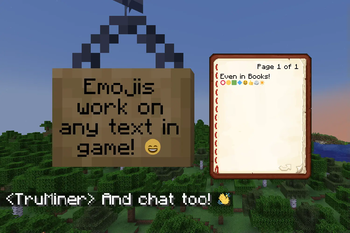
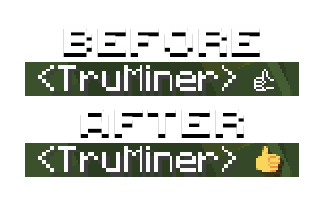
Twemoji Visibility is a resource pack that replaces the standard Minecraft emojis with (https://github.com/jdecked/twemoji) emojis, the same ones that Twitter/X and Discord use.
## 📝 Notes If you are experiencing crashes or other weird behavior while using Twemoji Visibility 1. 5 or higher, try using the latest version of 1. 4.x. When downloading the resource pack, it is listed as the Release version. (in green) - There are multiple ways to paste in emojis. - On Windows: you can use Windows + . to open the emoji menu. - On MacOS: you can use Control + Command + Space to open the emoji menu. - You can use the (https://modrinth.com/mod/symbol-chat) mod, which is officially supported by this Resource Pack. - Sequence emojis are not supported by Minecraft, and by extension, this resource pack. - This means that some emojis will come out as multiple parts when attempted to type in. - Flags, skin tones, families, and some other emojis (such as 😶🌫️ and 🐦⬛) do not work properly. - Force Unicode Font must be disabled for emojis to be visible. - Game Menu (Escape) > Options... > Language... > Font Settings... > Force Unicode Font (set to OFF). - If you are using the DiscordSRV plugin on a server, set `EmojiBehavior` to `show` in the config.yml file to force all emojis sent in chat to display as their emoji and not the name. - You must be the host of the server to change this. - The Beta version supports emojis on text that isn't white. - It is considered Beta because emojis may not render correctly in certain places. Please see the release notes to see what is broken.
## ⚖️ License and Credits - The emoji images in this resource pack are used from Twitter's (https://twemoji.twitter.com/) and jdecked's forked (https://github.com/jdecked/twemoji), which are both licensed by (https://creativecommons.org/licenses/by/4. 0/). - This resource pack was based on (https://github.com/Androkai/AndrosDiscordEmojis) and both resource packs are also licensed by (https://creativecommons.org/licenses/by/4. 0/). Feel free to use and adapt in your own resource pack but give appropriate credit and provde a link to the license. - (https://github.com/Androkai) (the creator of (https://github.com/Androkai/AndrosDiscordEmojis)) gave me permission to make this pack in (https://github.com/Androkai/AndrosDiscordEmojis/issues/4). - The custom shader that allows emojis to keep their color on Signs and Books in the Beta build was created by (https://modrinth.com/user/AlphaLeoli). You can join his discord server (https://discord.gg/gymTft2GbV). He also helped with Symbol Chat support.
📊 Mod Details
- Game
- Minecraft Resource Packs
- Author
- Terminxa
- Version
- 1.9
- Downloads
- 27,783
- Endorsements
- 75
- Category
- 64x
- Created
- 11/12/2022
- Updated
- 11/9/2025
- Game Versions
- 1.21, 1.21.1, 1.21.2, 1.21.3, 1.21.4
- Tags
- 64x, core-shaders, fonts
🔧 How to Install Minecraft Resource Packs Mods
Download from Modrinth. Use Prism Launcher or drop into your mods folder.
📖 Full step-by-step install guide for Minecraft Resource Packs →
Visit the official mod page for specific installation instructions for this mod.
🎮 Need cheat codes or console commands? Check ur gaming wiki for Minecraft Resource Packs commands, item IDs, and more.
❓ Frequently Asked Questions
Which Minecraft Resource Packs versions does Twemoji Visibility support?
The author lists 1.21, 1.21.1, 1.21.2, 1.21.3, 1.21.4, 1.21.5. Other versions may work but are untested by the author.
What is the latest version of Twemoji Visibility?
Version 1.9, published 2025-11-09 with 27,783 downloads recorded at the source.
Keep browsing — more Minecraft Resource Packs mods await