Theosis Gems
🟢 Updated this month🖼️ Gallery (2 images)
🔍 Analysis
- 🏆 #119 of 210 decoration mods in this game by downloads
📋 About This Mod
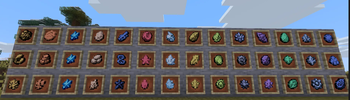
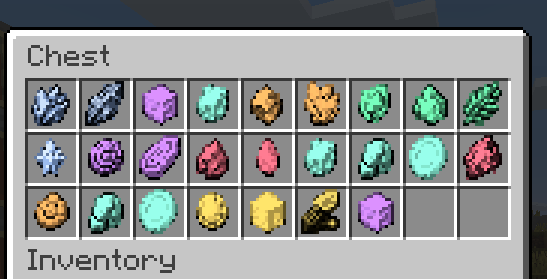
### English **Theosis Resources** is the official companion resource pack for the **(https://modrinth.com/plugin/theosis)** plugin, bringing unique visual designs to all custom gems. !(https://cdn.modrinth.com/data/cached_images/d2eae6ab087b31937342baaf515474925c656b60.png) #### ⚙️ Setup & Requirements * **Requires Plugin:** This pack is strictly designed for Java Edition servers running the **Theosis** plugin. * **Plug & Play:** Just place the resource pack in your client or server options. #### 🛠️ Recommended `gems.yml` Configuration For maximum immersion and the best visual results, we recommend making the following adjustments in your `gems.yml` file: 1 **Enable Item Stacking:** Under `cosmetics:`, change `default_materials` to: ```yaml default_materials: SNORT_POTTERY_SHERD ``` *(By default it is set to `ALL_POTTERY_SHERDS`. Changing it to `SNORT_POTTERY_SHERD` allows gems to stack properly).* 2 **Enhance Texture Clarity:** Change `glint` from `true` to `false`: ```yaml glint: false ``` *(This removes the enchantment glow effect, making the custom gem textures pop much better).* --- ### Versión en Español **Theosis Resources** es el paquete de recursos oficial y complementario para el plugin **Theosis**, añadiendo diseños visuales únicos para todas las gemas. !(https://cdn.modrinth.com/data/cached_images/d2eae6ab087b31937342baaf515474925c656b60.png) #### ⚙️ Configuración y Requisitos * **Requiere Plugin:** Este pack solo es compatible si estás utilizando el plugin **(https://modrinth.com/plugin/theosis)** en Java Edition. * **Instalación Sencilla:** No tienes que hacer nada complejo, solo colocarlo en tu cliente o servidor. #### 🛠️ Configuración recomendada en `gems.yml` Para una mejor inmersión y aprovechar al máximo las texturas, se recomienda realizar los siguientes cambios en el archivo `gems.yml`: 1 **Permitir que las gemas se apilen:** Dentro de `cosmetics:`, cambia la opción `default_materials` a: ```yaml default_materials: SNORT_POTTERY_SHERD ``` *(Viene por defecto en `ALL_POTTERY_SHERDS`; al cambiarlo a `SNORT_POTTERY_SHERD` las gemas se podrán apilar).* 2 **Mejorar el resaltado de la textura:** Cambia `glint` de `true` a `false`: ```yaml glint: false ``` *(Esto remueve el brillo de encantamiento para que el diseño y los detalles de cada gema resalten mucho más).*
### English
Theosis Resources is the official companion resource pack for the *(https://modrinth.com/plugin/theosis)** plugin, bringing unique visual designs to all custom gems. !(https://cdn.modrinth.com/data/cached_images/d2eae6ab087b31937342baaf515474925c656b60.png)
#### ⚙️ Setup & Requirements
Requires Plugin: This pack is strictly designed for Java Edition servers running the Theosis plugin. Plug & Play: Just place the resource pack in your client or server options.
#### 🛠️ Recommended `gems.yml` Configuration
For maximum immersion and the best visual results, we recommend making the following adjustments in your `gems.yml` file:
1 Enable Item Stacking: Under `cosmetics:`, change `default_materials` to: ```yaml default_materials: SNORT_POTTERY_SHERD
(By default it is set to `ALL_POTTERY_SHERDS`. Changing it to `SNORT_POTTERY_SHERD` allows gems to stack properly).
2 Enhance Texture Clarity: Change `glint` from `true` to `false`: ```yaml glint: false
(This removes the enchantment glow effect, making the custom gem textures pop much better).
### Versión en Español
Theosis Resources es el paquete de recursos oficial y complementario para el plugin Theosis, añadiendo diseños visuales únicos para todas las gemas. !(https://cdn.modrinth.com/data/cached_images/d2eae6ab087b31937342baaf515474925c656b60.png)
#### ⚙️ Configuración y Requisitos
Requiere Plugin: Este pack solo es compatible si estás utilizando el plugin *(https://modrinth.com/plugin/theosis)** en Java Edition. Instalación Sencilla: No tienes que hacer nada complejo, solo colocarlo en tu cliente o servidor.
#### 🛠️ Configuración recomendada en `gems.yml`
Para una mejor inmersión y aprovechar al máximo las texturas, se recomienda realizar los siguientes cambios en el archivo `gems.yml`:
1 Permitir que las gemas se apilen: Dentro de `cosmetics:`, cambia la opción `default_materials` a: ```yaml default_materials: SNORT_POTTERY_SHERD
(Viene por defecto en `ALL_POTTERY_SHERDS`; al cambiarlo a `SNORT_POTTERY_SHERD` las gemas se podrán apilar).
2 Mejorar el resaltado de la textura: Cambia `glint` de `true` a `false`: ```yaml glint: false
(Esto remueve el brillo de encantamiento para que el diseño y los detalles de cada gema resalten mucho más).
📊 Mod Details
- Game
- Minecraft Resource Packs
- Author
- KinkinxD
- Version
- 1.0
- Downloads
- 25
- Endorsements
- 0
- Category
- decoration
- Created
- 8/18/2026
- Updated
- 8/17/2026
- Game Versions
- 26.1, 26.1.1, 26.1.2, 26.2
- Tags
- decoration, themed, utility
🔧 How to Install Minecraft Resource Packs Mods
Download from Modrinth. Use Prism Launcher or drop into your mods folder.
📖 Full step-by-step install guide for Minecraft Resource Packs →
Visit the official mod page for specific installation instructions for this mod.
🎮 Need cheat codes or console commands? Check ur gaming wiki for Minecraft Resource Packs commands, item IDs, and more.
❓ Frequently Asked Questions
Which Minecraft Resource Packs versions does Theosis Gems support?
The author lists 26.1, 26.1.1, 26.1.2, 26.2. Other versions may work but are untested by the author.
What is the latest version of Theosis Gems?
Version 1.0, published 2026-08-17 with 25 downloads recorded at the source.
Keep browsing — more Minecraft Resource Packs mods await