THE MJ PACK
🟡 Updated this year🖼️ Gallery (3 images)
🔍 Analysis
- 🏆 #15 of 18 audio mods in this game by downloads
📋 About This Mod
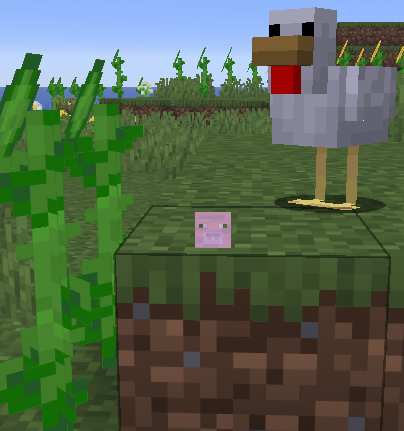
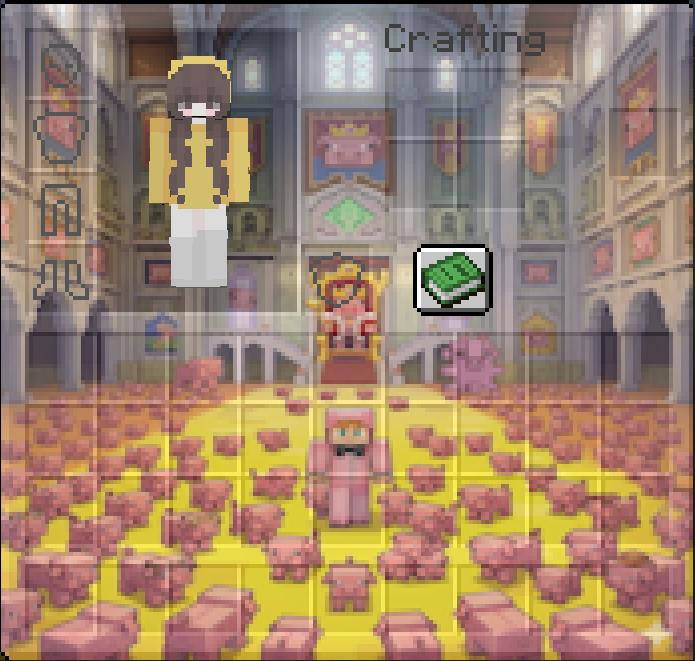
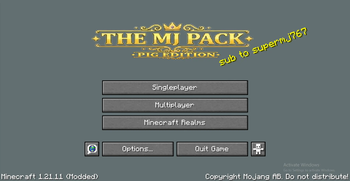
# ✨ Welcome to the Official Suprem767 Resource Pack! This is the ultimate, custom-tailored resource pack designed specifically for **suprem767**'s videos and streams! If you want to experience Minecraft with all the custom UI, funny sounds, and overhauled items seen in the videos, this pack has you covered. --- ## 🎨 What's Included? * **Custom Main Menu:** A fresh, custom-styled title screen right when you boot up the game. * **Overhauled Survival Inventory:** A custom-designed inventory interface to make managing your items look epic. * **Custom Skies:** Overhauled **Sun** and **Moon** textures to give your world a unique look. * **Custom Cursor:** A sleek, custom crosshair (`+` thing) right in the center of your screen. * **Custom Sounds:** Hilarious **pig noises** and custom sound effects (`+ the noise`) packed into your gameplay. * **Textured Items & Gear:** Custom designs for **swords**, raw **porkchops**, and **cooked porkchops**. * **Custom Totem:** A specialized totem to save you in style! --- ## 📥 How to Install 1. Download the latest `.zip` file from the **Files** tab. 2. Launch Minecraft and go to **Options > Resource Packs**. 3. Click **Open Pack Folder** and drop the `.zip` file inside. 4. Move the pack to your active list in-game, hit apply, and enjoy the custom look! --- *Support the channel and enjoy the pack!*
# ✨ Welcome to the Official Suprem767 Resource Pack! This is the ultimate, custom-tailored resource pack designed specifically for suprem767's videos and streams! If you want to experience Minecraft with all the custom UI, funny sounds, and overhauled items seen in the videos, this pack has you covered.
## 🎨 What's Included? Custom Main Menu: A fresh, custom-styled title screen right when you boot up the game. Overhauled Survival Inventory: A custom-designed inventory interface to make managing your items look epic. Custom Skies: Overhauled Sun and Moon textures to give your world a unique look. Custom Cursor: A sleek, custom crosshair (`+` thing) right in the center of your screen. Custom Sounds: Hilarious pig noises and custom sound effects (`+ the noise`) packed into your gameplay. Textured Items & Gear: Custom designs for swords, raw porkchops, and cooked porkchops. Custom Totem: A specialized totem to save you in style!
## 📥 How to Install 1. Download the latest `.zip` file from the Files tab. 2. Launch Minecraft and go to Options > Resource Packs. 3. Click Open Pack Folder and drop the `.zip` file inside. 4. Move the pack to your active list in-game, hit apply, and enjoy the custom look!
- --
- Support the channel and enjoy the pack!*
📊 Mod Details
- Game
- Minecraft Resource Packs
- Author
- oriegalili
- Version
- 1.0.0
- Downloads
- 3
- Endorsements
- 1
- Category
- audio
- Created
- 8/25/2026
- Updated
- 8/15/2026
- Game Versions
- 1.21.11
- Tags
- audio, gui, items
🔧 How to Install Minecraft Resource Packs Mods
Download from Modrinth. Use Prism Launcher or drop into your mods folder.
📖 Full step-by-step install guide for Minecraft Resource Packs →
Visit the official mod page for specific installation instructions for this mod.
🎮 Need cheat codes or console commands? Check ur gaming wiki for Minecraft Resource Packs commands, item IDs, and more.
❓ Frequently Asked Questions
Which Minecraft Resource Packs versions does THE MJ PACK support?
The author lists 1.21.11. Other versions may work but are untested by the author.
What is the latest version of THE MJ PACK?
Version 1.0.0, published 2026-08-15 with 3 downloads recorded at the source.
Keep browsing — more Minecraft Resource Packs mods await