ThaiFontFix-Kanit
🟠 Updated over a year ago🖼️ Gallery (4 images)
🔍 Analysis
- 👍 0.0% endorsement rate
- 🏆 #13 of 42 fonts mods in this game by downloads
📋 About This Mod
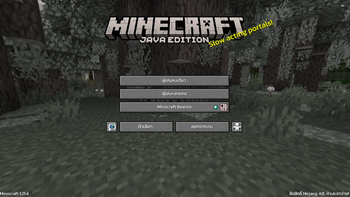
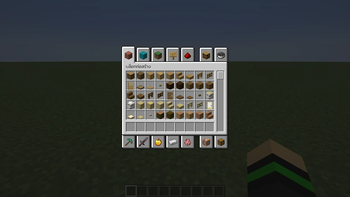
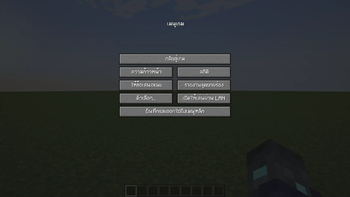
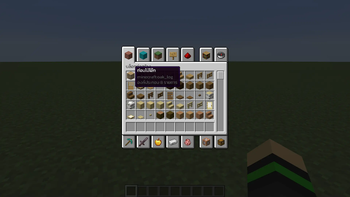
ThaiFontFix =========== Introduction ------------ For **Minecraft Java Edition** only! (สำหรับ **Minecraft Java Edition**) ### Features (คุณสมบัติ) * Float correction (แก้สระลอย) * Make the font easier to read in Thai (ทำให้ฟอนต์ไทยอ่านง่ายขึ้น) ### Font used (ฟอนต์ที่ใช้) * **((https://fonts.google.com/specimen/Kanit))** ### Example (ตัวอย่าง) !(https://cdn.jsdelivr.net/gh/hewkawar/ThaiFontFix@main/image/Kanit-home.png) !(https://cdn.jsdelivr.net/gh/hewkawar/ThaiFontFix@main/image/Kanit-pause_menu.png) !(https://cdn.jsdelivr.net/gh/hewkawar/ThaiFontFix@main/image/Kanit-item_menu.png) !(https://cdn.jsdelivr.net/gh/hewkawar/ThaiFontFix@main/image/Kanit_select_item_menu.png) Installation (วิธีการติดตั้ง) ----------------------------- 1. Download ThaiFontFix-Kanit. (ดาวน์โหลด ThaiFontFix-Kanit) 2. Place the .zip file into the directory where the game is installed, for example: .minecraft\\resourcepacks. (นำไฟล์ .zip ไปใส่ในไดเรคทอรี่ที่ติดตั้งเกม เช่น .minecraft\\resourcepacks) 3. Enable ThaiFontFix-Kanit in the game. (เปิดใช้งาน ThaiFontFix-Kanit ในตัวเกม)
ThaiFontFix ===========
Introduction ------------
For Minecraft Java Edition only! (สำหรับ Minecraft Java Edition)
### Features (คุณสมบัติ)
Float correction (แก้สระลอย) Make the font easier to read in Thai (ทำให้ฟอนต์ไทยอ่านง่ายขึ้น)
### Font used (ฟอนต์ที่ใช้)
*((https://fonts.google.com/specimen/Kanit))**
### Example (ตัวอย่าง)
!(https://cdn.jsdelivr.net/gh/hewkawar/ThaiFontFix@main/image/Kanit-home.png) !(https://cdn.jsdelivr.net/gh/hewkawar/ThaiFontFix@main/image/Kanit-pause_menu.png) !(https://cdn.jsdelivr.net/gh/hewkawar/ThaiFontFix@main/image/Kanit-item_menu.png) !(https://cdn.jsdelivr.net/gh/hewkawar/ThaiFontFix@main/image/Kanit_select_item_menu.png) Installation (วิธีการติดตั้ง) -----------------------------
1. Download ThaiFontFix-Kanit. (ดาวน์โหลด ThaiFontFix-Kanit) 2. Place the .zip file into the directory where the game is installed, for example: .minecraft\\resourcepacks. (นำไฟล์ .zip ไปใส่ในไดเรคทอรี่ที่ติดตั้งเกม เช่น .minecraft\\resourcepacks) 3. Enable ThaiFontFix-Kanit in the game. (เปิดใช้งาน ThaiFontFix-Kanit ในตัวเกม)
📊 Mod Details
- Game
- Minecraft Resource Packs
- Author
- HewkawAr
- Version
- v.1.0.2-1.21.4
- Downloads
- 1,677
- Endorsements
- 0
- Category
- fonts
- Created
- 12/22/2024
- Updated
- 12/20/2024
- Game Versions
- 1.21.4
- Tags
- fonts, locale, vanilla-like
🔧 How to Install Minecraft Resource Packs Mods
Download from Modrinth. Use Prism Launcher or drop into your mods folder.
📖 Full step-by-step install guide for Minecraft Resource Packs →
Visit the official mod page for specific installation instructions for this mod.
🎮 Need cheat codes or console commands? Check ur gaming wiki for Minecraft Resource Packs commands, item IDs, and more.
❓ Frequently Asked Questions
Which Minecraft Resource Packs versions does ThaiFontFix-Kanit support?
The author lists 1.21.4. Other versions may work but are untested by the author.
What is the latest version of ThaiFontFix-Kanit?
Version v.1.0.2-1.21.4, published 2024-12-20 with 1,677 downloads recorded at the source.
Keep browsing — more Minecraft Resource Packs mods await