Texture pack bed wars by Elektron333
🟡 Updated this year🖼️ Gallery (1 images)
🔍 Analysis
- 🏆 #244 of 345 combat mods in this game by downloads
📋 About This Mod
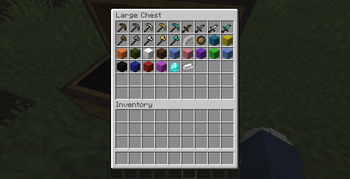
# Elektron333 BedWars Texture Pack ## Latest Update The **Elektron333 BedWars Texture Pack** is designed for players who want a clean, competitive BedWars experience while keeping Minecraft's original style. It replaces selected textures with BedWars-inspired designs, making gameplay feel fresh without changing the core look of the game. Unlike large resource packs that completely overhaul Minecraft, this pack focuses only on the items most commonly used in BedWars, keeping everything else unchanged for a familiar experience. ## ✨ Features * 🛏️ BedWars-style textures * 🧶 New wool textures * 🪓 Redesigned axe and pickaxe * ⚔️ New sword texture * 🔥 Custom fireball * ⛓️ Updated iron ingot * 💎 New diamond texture * 🏹 White bow for a cleaner PvP look * 🎨 Preserves Minecraft's classic aesthetic * 🚀 Lightweight and easy to use ## 📦 Included Textures This texture pack changes the appearance of: * Wool * Axe * Pickaxe * Sword * Fireball * Iron Ingot * Diamond * White Bow Everything else remains unchanged, allowing you to enjoy a familiar Minecraft experience with a BedWars-inspired visual upgrade. ## ⚠️ Known Issue When drawing the bow, the arrow still appears with the default Minecraft texture. I tried to fix this, but unfortunately it isn't possible with the current implementation. I apologize for this minor issue. ## 📥 Installation 1. Download the **Elektron333 BedWars Texture Pack**. 2. Open Minecraft and go to **Options → Resource Packs**. 3. Click **Open Pack Folder**. 4. Move the downloaded `.zip` file into the folder. 5. Enable the texture pack and enjoy your new BedWars-style textures! ## ❤️ Support If you enjoy this texture pack, consider sharing it with your friends and following future updates. Your support helps motivate the development of new textures and improvements. Thank you for downloading **Elektron333 BedWars Texture Pack**. Have fun and good luck in your BedWars matches! ❤️ Support & Follow My Projects If you enjoy this texture pack, consider sharing it with your friends and following my future projects. You can also follow me on CurseForge to stay up to date with my latest texture packs and other Minecraft projects: 🔗 CurseForge Profile: https://www.curseforge.com/members/elektron333/projects Thank you for your support, and have fun playing BedWars! My minecraft profile: https://namemc.com/profile/Elektron2013.1 If you find a bug or have an idea for a new feature or project, feel free to contact me via email: Elektron333Concact@protonmail.com
# Elektron333 BedWars Texture Pack
## Latest Update
The Elektron333 BedWars Texture Pack is designed for players who want a clean, competitive BedWars experience while keeping Minecraft's original style. It replaces selected textures with BedWars-inspired designs, making gameplay feel fresh without changing the core look of the game.
Unlike large resource packs that completely overhaul Minecraft, this pack focuses only on the items most commonly used in BedWars, keeping everything else unchanged for a familiar experience.
## ✨ Features
🛏️ BedWars-style textures 🧶 New wool textures 🪓 Redesigned axe and pickaxe ⚔️ New sword texture 🔥 Custom fireball ⛓️ Updated iron ingot 💎 New diamond texture 🏹 White bow for a cleaner PvP look 🎨 Preserves Minecraft's classic aesthetic 🚀 Lightweight and easy to use
## 📦 Included Textures
This texture pack changes the appearance of:
Wool Axe Pickaxe Sword Fireball Iron Ingot Diamond White Bow
Everything else remains unchanged, allowing you to enjoy a familiar Minecraft experience with a BedWars-inspired visual upgrade.
## ⚠️ Known Issue
When drawing the bow, the arrow still appears with the default Minecraft texture. I tried to fix this, but unfortunately it isn't possible with the current implementation. I apologize for this minor issue.
## 📥 Installation
1. Download the Elektron333 BedWars Texture Pack. 2. Open Minecraft and go to Options → Resource Packs. 3. Click Open Pack Folder. 4. Move the downloaded `.zip` file into the folder. 5. Enable the texture pack and enjoy your new BedWars-style textures!
## ❤️ Support
If you enjoy this texture pack, consider sharing it with your friends and following future updates. Your support helps motivate the development of new textures and improvements.
Thank you for downloading Elektron333 BedWars Texture Pack. Have fun and good luck in your BedWars matches!
❤️ Support & Follow My Projects
If you enjoy this texture pack, consider sharing it with your friends and following my future projects.
You can also follow me on CurseForge to stay up to date with my latest texture packs and other Minecraft projects:
🔗 CurseForge Profile: https://www.curseforge.com/members/elektron333/projects
Thank you for your support, and have fun playing BedWars!
My minecraft profile: https://namemc.com/profile/Elektron2013. 1
If you find a bug or have an idea for a new feature or project, feel free to contact me via email: Elektron333Concact@protonmail.com
📊 Mod Details
- Game
- Minecraft Resource Packs
- Author
- Elektron333
- Version
- 1.21.8
- Downloads
- 450
- Endorsements
- 3
- Category
- combat
- Created
- 8/1/2026
- Updated
- 7/25/2026
- Game Versions
- 1.8.9, 1.10.2, 1.12.2, 1.16.5, 1.17.1
- Tags
- combat, decoration, utility
🔧 How to Install Minecraft Resource Packs Mods
Download from Modrinth. Use Prism Launcher or drop into your mods folder.
📖 Full step-by-step install guide for Minecraft Resource Packs →
Visit the official mod page for specific installation instructions for this mod.
🎮 Need cheat codes or console commands? Check ur gaming wiki for Minecraft Resource Packs commands, item IDs, and more.
❓ Frequently Asked Questions
Which Minecraft Resource Packs versions does Texture pack bed wars by Elektron333 support?
The author lists 1.8.9, 1.10.2, 1.12.2, 1.16.5, 1.17.1, 1.20.1. Other versions may work but are untested by the author.
What is the latest version of Texture pack bed wars by Elektron333?
Version 1.21.8, published 2026-07-25 with 450 downloads recorded at the source.
Keep browsing — more Minecraft Resource Packs mods await