String Highlighter
🟡 Updated this year🖼️ Gallery (1 images)
🔍 Analysis
- 🏆 #156 of 660 16x mods in this game by downloads
📋 About This Mod
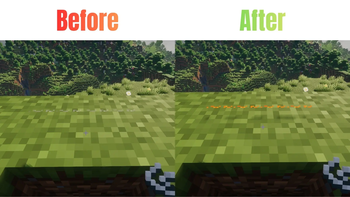
# String Highlighter Tired of tripping over invisible tripwires? Can’t find where you placed your string? **String Highlighter** is a simple, lightweight resource pack that turns hard-to-see gray string into a bright, glowing **orange** color! Now you can see every single piece of placed string instantly. It is perfect for technical players, redstone builders, and anyone who wants to avoid accidental traps. !(https://cdn.modrinth.com/data/cached_images/e8a960661b91404e789e456dfcb679e2408ddeee.jpeg) --- ## Features * **High Visibility**: Changes dull gray placed string to bright neon orange. * **Easy Redstone**: See your tripwire lines clearly from far away. * **PvP Safe**: Never run into a hidden tripwire trap in faction or minigame servers again. * **Pure Vanilla**: Requires zero mods! It works 100% as a standard resource pack. * **Lag Free**: Uses basic textures so your game performance stays perfectly smooth. --- ## 🛠️ Installation ### For Java Edition: 1. Download the `.zip` file for your Minecraft version. 2. Open Minecraft and navigate to `Options` > `Resource Packs` > `Open Pack Folder`. 3. Drop the downloaded `.zip` file into the folder. 4. Activate the pack in-game and move it to the top of your active pack list. ### For Bedrock Edition: 1. Download the `.mcpack` file. 2. Double-click the file to automatically launch Minecraft and import the pack. 3. Go to `Settings` > `Global Resources` > `My Packs` and click **Activate**. --- ## Availability * **Java Edition:** Download right here on Modrinth! * **Bedrock Edition:** Available on our CurseForge page (Bedrock)
# String Highlighter
Tired of tripping over invisible tripwires? Can’t find where you placed your string? String Highlighter is a simple, lightweight resource pack that turns hard-to-see gray string into a bright, glowing orange color!
Now you can see every single piece of placed string instantly. It is perfect for technical players, redstone builders, and anyone who wants to avoid accidental traps.
!(https://cdn.modrinth.com/data/cached_images/e8a960661b91404e789e456dfcb679e2408ddeee.jpeg) ---
## Features
High Visibility: Changes dull gray placed string to bright neon orange. Easy Redstone: See your tripwire lines clearly from far away. PvP Safe: Never run into a hidden tripwire trap in faction or minigame servers again. Pure Vanilla: Requires zero mods! It works 100% as a standard resource pack. Lag Free: Uses basic textures so your game performance stays perfectly smooth.
## 🛠️ Installation
### For Java Edition: 1. Download the `.zip` file for your Minecraft version. 2. Open Minecraft and navigate to `Options` > `Resource Packs` > `Open Pack Folder`. 3. Drop the downloaded `.zip` file into the folder. 4. Activate the pack in-game and move it to the top of your active pack list.
### For Bedrock Edition: 1. Download the `.mcpack` file. 2. Double-click the file to automatically launch Minecraft and import the pack. 3. Go to `Settings` > `Global Resources` > `My Packs` and click Activate.
## Availability Java Edition: Download right here on Modrinth! * Bedrock Edition: Available on our CurseForge page (Bedrock)
📊 Mod Details
- Game
- Minecraft Resource Packs
- Author
- _Legend_
- Version
- 26.1.x
- Downloads
- 136
- Endorsements
- 0
- Category
- 16x
- Created
- 6/9/2026
- Updated
- 6/7/2026
- Game Versions
- 26.1, 26.1.1, 26.1.2
- Tags
- 16x, tweaks, vanilla-like
🔧 How to Install Minecraft Resource Packs Mods
Download from Modrinth. Use Prism Launcher or drop into your mods folder.
📖 Full step-by-step install guide for Minecraft Resource Packs →
Visit the official mod page for specific installation instructions for this mod.
🎮 Need cheat codes or console commands? Check ur gaming wiki for Minecraft Resource Packs commands, item IDs, and more.
❓ Frequently Asked Questions
Which Minecraft Resource Packs versions does String Highlighter support?
The author lists 26.1, 26.1.1, 26.1.2. Other versions may work but are untested by the author.
What is the latest version of String Highlighter?
Version 26.1.x, published 2026-06-07 with 136 downloads recorded at the source.
Keep browsing — more Minecraft Resource Packs mods await