Starry GUI/Hotbar Extra Additions
🟡 Updated this year🖼️ Gallery (3 images)

🔍 Analysis
- 👍 0.4% endorsement rate
- 🏆 #182 of 672 16x mods in this game by downloads
📋 About This Mod
**main pack!! you will need this: (https://modrinth.com/resourcepack/starry-gui-and-hotbar)** versions 1.20.1 and 1.21.11 were selected due to perceived popularity from the main pack, more will be added in the future if requested. since some mods change texture formatting between the two versions, these two pack versions may not work for all respective surrounding game versions. **PLEASE let me know if errors are found.** ----------------- the long-awaited "i'll do this someday!" pack extends the main pack's theme to: appleskin JEI jade sophisticated backpacks + storage tested using the **forge/neoforge** versions of the mods. i am assuming any fabric version's textures are formatted the same. ---------------- How to download: Click 'download texture pack'. Go to your download folder, and copy/cut the zip. Locate your .minecraft resource pack folder, and paste it in. Reload your Minecraft resource packs, and you'll be able to use it! -> Please put this pack above all others in your resource pack menu, or else it will not work. If you need help, DM aelianix on discord or find me elsewhere at https://aelianix.carrd.co! <-
main pack!! you will need this: (https://modrinth.com/resourcepack/starry-gui-and-hotbar)**
versions 1. 20. 1 and 1. 21. 11 were selected due to perceived popularity from the main pack, more will be added in the future if requested.
since some mods change texture formatting between the two versions, these two pack versions may not work for all respective surrounding game versions. PLEASE let me know if errors are found.
-----------------
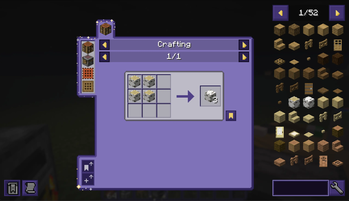
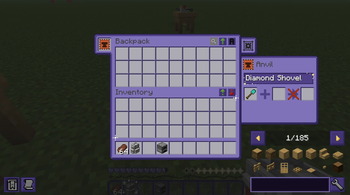
the long-awaited "i'll do this someday!" pack extends the main pack's theme to:
appleskin JEI jade sophisticated backpacks + storage
tested using the forge/neoforge** versions of the mods. i am assuming any fabric version's textures are formatted the same.
- ---------------
- How to download:
Click 'download texture pack'. Go to your download folder, and copy/cut the zip. Locate your .minecraft resource pack folder, and paste it in. Reload your Minecraft resource packs, and you'll be able to use it!
-> Please put this pack above all others in your resource pack menu, or else it will not work. If you need help, DM aelianix on discord or find me elsewhere at https://aelianix.carrd.co! <-
📊 Mod Details
- Game
- Minecraft Resource Packs
- Author
- aelianix
- Version
- 1
- Downloads
- 946
- Endorsements
- 4
- Category
- 16x
- Created
- 6/14/2026
- Updated
- 7/20/2026
- Game Versions
- 1.19.2
- Tags
- 16x, gui, themed
🔧 How to Install Minecraft Resource Packs Mods
Download from Modrinth. Use Prism Launcher or drop into your mods folder.
📖 Full step-by-step install guide for Minecraft Resource Packs →
Visit the official mod page for specific installation instructions for this mod.
🎮 Need cheat codes or console commands? Check ur gaming wiki for Minecraft Resource Packs commands, item IDs, and more.
❓ Frequently Asked Questions
Which Minecraft Resource Packs versions does Starry GUI/Hotbar Extra Additions support?
The author lists 1.19.2. Other versions may work but are untested by the author.
What is the latest version of Starry GUI/Hotbar Extra Additions?
Version 1, published 2026-07-20 with 946 downloads recorded at the source.
Keep browsing — more Minecraft Resource Packs mods await