Snowy Mountains Sky
🟡 Updated this year🖼️ Gallery (8 images)
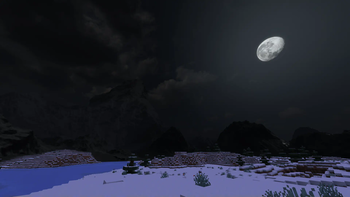
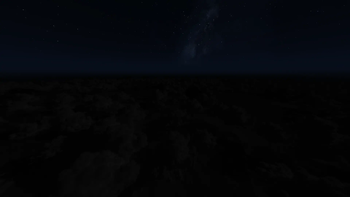
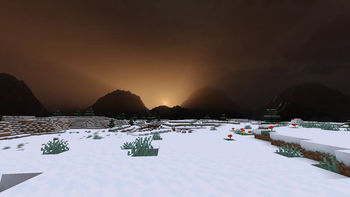
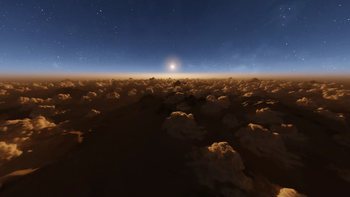
🔍 Analysis
- 👍 0.1% endorsement rate
- 🏆 #42 of 101 environment mods in this game by downloads
📋 About This Mod
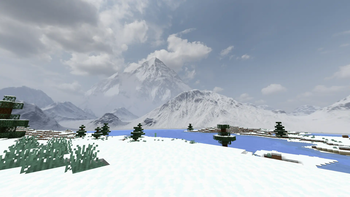
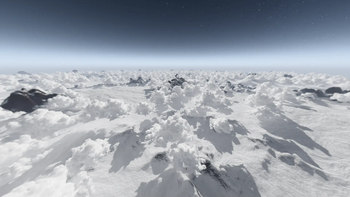
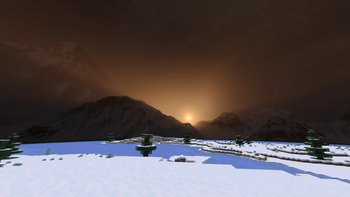
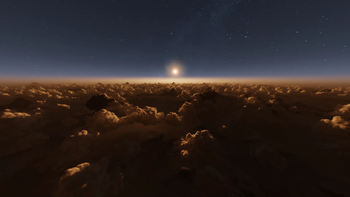
!(https://i.imgur.com/ALmCYVc.png) Snowy Mountains Sky adds breathtaking mountain ranges to your Minecraft skies, immersing you with a gorgeous vista wherever you go. This pack featues skies for all stages of the day, including stunning sunsets with Godray-like effects. There are also skies if you go high up in the world, letting you take a look at all the mountains below you. And during rain or thunder, the sky wil get dark and moody. This pack is completely free, so if you like what you see, and would like to support me, you can (https://www.paypal.com/donate/?hosted_button_id=ND4XEHFD4XS82). Any and all donations are greatly appreciated. Thank you! <details> <summary>README</summary> ### Pick the correct version - **Java vanilla**: These versions are set to "alpha" release type. - **Bedrock**: Download from the (https://www.planetminecraft.com/texture-pack/snowy-mountains-sky-bedrock/). - **Java Modded**: This is the main version of the pack, and is set to "release" type. Select a version and scroll down to see the required mod. If more than one dependency is listed for a version, you only need one. When multiple mods are added as a dependency, that means that the pack will work with all of them, but only one of them is needed to get the pack working. Some mods are available on different versions and mod loaders, so I added support for as many as possible for the widest possible compatibility. Version compatibility is set to the pool of all the mods combined, so what you see is possible to run with at least one of the mods. Check the compatibility table below. - **OptiFine**: Works with all OptiFine versions, and thus also with Skyboxify. ### FYI - This pack is primarily a standalone pack, however it can be used together with my **(https://modrinth.com/resourcepack/hyper-realistic-sky)** pack. Just be sure you put this pack **below** it in the resource pack list. This combo feature only works with the release version of HRS, using Celestial 2.0 or Nuit 1.0. - To use this pack with HRS using Celestial 2.0, you will need to edit HRS. Navigate to **Hyper_Realistic_Sky\assets\celestial\sky\overworld** and rename `sky.json` to `1.json`, and then rename `2.json` to `sky.json`. This will ensure both packs work as intended. If you want to then use the pack alone again, simply undo this change. - Celestial 2.0 requires core shaders to have smooth transitions between different sky layers, which is implemented as a pack overlay in the latest release. Since pack overlays only work from 1.20.2 and above, if you're playing on a version below that, you need to copy the "shaders" folder from "celestial/assets/minecraft/" to "assets/minecraft/". ### Shaders This pack does of course work with shaders, but since each shader works differently and has different settings, you will most likely need to tweak them to get a good look. </details> <details> <summary>Features</summary> !(https://i.imgur.com/zbbXU0i.png) !(https://i.imgur.com/h6TDBeQ.png) !(https://i.imgur.com/eh2EThm.png) !(https://i.imgur.com/ttmRh57.png) </details> <details> <summary>Compatibility table</summary> !(https://i.imgur.com/heOdYlr.png) </details>
!(https://i.imgur.com/ALmCYVc.png)
Snowy Mountains Sky adds breathtaking mountain ranges to your Minecraft skies, immersing you with a gorgeous vista wherever you go. This pack featues skies for all stages of the day, including stunning sunsets with Godray-like effects. There are also skies if you go high up in the world, letting you take a look at all the mountains below you. And during rain or thunder, the sky wil get dark and moody.
This pack is completely free, so if you like what you see, and would like to support me, you can (https://www.paypal.com/donate/?hosted_button_id=ND4XEHFD4XS82). Any and all donations are greatly appreciated. Thank you!
README
### Pick the correct version
- Java vanilla: These versions are set to "alpha" release type.
- Bedrock: Download from the (https://www.planetminecraft.com/texture-pack/snowy-mountains-sky-bedrock/).
- Java Modded: This is the main version of the pack, and is set to "release" type. Select a version and scroll down to see the required mod. If more than one dependency is listed for a version, you only need one. When multiple mods are added as a dependency, that means that the pack will work with all of them, but only one of them is needed to get the pack working. Some mods are available on different versions and mod loaders, so I added support for as many as possible for the widest possible compatibility. Version compatibility is set to the pool of all the mods combined, so what you see is possible to run with at least one of the mods. Check the compatibility table below.
- OptiFine: Works with all OptiFine versions, and thus also with Skyboxify.
- This pack is primarily a standalone pack, however it can be used together with my (https://modrinth.com/resourcepack/hyper-realistic-sky)** pack. Just be sure you put this pack below it in the resource pack list. This combo feature only works with the release version of HRS, using Celestial 2. 0 or Nuit 1. 0.
- To use this pack with HRS using Celestial 2. 0, you will need to edit HRS. Navigate to Hyper_Realistic_Sky\assets\celestial\sky\overworld** and rename `sky.json` to `1.json`, and then rename `2.json` to `sky.json`. This will ensure both packs work as intended. If you want to then use the pack alone again, simply undo this change.
- Celestial 2. 0 requires core shaders to have smooth transitions between different sky layers, which is implemented as a pack overlay in the latest release. Since pack overlays only work from 1. 20. 2 and above, if you're playing on a version below that, you need to copy the "shaders" folder from "celestial/assets/minecraft/" to "assets/minecraft/".
### Shaders This pack does of course work with shaders, but since each shader works differently and has different settings, you will most likely need to tweak them to get a good look.
Features
!(https://i.imgur.com/zbbXU0i.png) !(https://i.imgur.com/h6TDBeQ.png) !(https://i.imgur.com/eh2EThm.png) !(https://i.imgur.com/ttmRh57.png)
Compatibility table
!(https://i.imgur.com/heOdYlr.png)
📊 Mod Details
- Game
- Minecraft Resource Packs
- Author
- UsernameGeri
- Version
- 1.10
- Downloads
- 79,920
- Endorsements
- 91
- Category
- environment
- Created
- 11/18/2023
- Updated
- 2/15/2026
- Game Versions
- 1.16.5, 1.17.1, 1.18, 1.18.1, 1.18.2
- Tags
- environment, realistic, tweaks
🔧 How to Install Minecraft Resource Packs Mods
Download from Modrinth. Use Prism Launcher or drop into your mods folder.
📖 Full step-by-step install guide for Minecraft Resource Packs →
Visit the official mod page for specific installation instructions for this mod.
🎮 Need cheat codes or console commands? Check ur gaming wiki for Minecraft Resource Packs commands, item IDs, and more.
❓ Frequently Asked Questions
Which Minecraft Resource Packs versions does Snowy Mountains Sky support?
The author lists 1.16.5, 1.17.1, 1.18, 1.18.1, 1.18.2, 1.19. Other versions may work but are untested by the author.
What is the latest version of Snowy Mountains Sky?
Version 1.10, published 2026-02-15 with 79,920 downloads recorded at the source.
Keep browsing — more Minecraft Resource Packs mods await