Snow & Moss Overhangs
🟡 Updated this year🖼️ Gallery (2 images)
🔍 Analysis
- 👍 0.3% endorsement rate
- 🏆 #124 of 395 minecraft mods in this game by downloads
📋 About This Mod
<br> <center> <img src="https://cdn.modrinth.com/data/cached_images/257074c282c6678d81c3d568a7d25cbfac747ac9.png" alt="Snow & Moss Overhangs"> <br> <br> <a href="https://modrinth.com/resourcepack/snow-and-moss-overhangs"><img src="https://raw.githubusercontent.com/intergrav/devins-badges/0a3449fd26bf1375d2c5c26f096c8f30aa358766/assets/compact/available/curseforge_vector.svg" alt="Available on Curseforge"></a> <a href="https://discord.gg/Rma6zdg9zS"><img src="https://raw.githubusercontent.com/intergrav/devins-badges/0a3449fd26bf1375d2c5c26f096c8f30aa358766/assets/compact/social/discord-plural_vector.svg" alt="Chat with us on Discord"></a> </center> <br> <hr> <br> !(https://raw.githubusercontent.com/devoxxel/devoxxel-images/refs/heads/main/titles/png/OVERVIEW.png)\ **Snow & Moss Overhangs** adds side overlays to snow similar to the snowy grass blocks as well as to moss / pale moss carpets. <br> <center> **This pack requires Fusion 1.3.0 or higher to work.**\ Download Respackopts to customize the resourcepack in-game _(optional)_. <a href="https://modrinth.com/mod/fusion-connected-textures/versions"><img src="https://raw.githubusercontent.com/CelestialAbyss/badges/d452eae438c1c64229c54b7f78edf8f8b9cb533a/fusion/requires/compact_vector.svg" alt="Download Fusion"></a> <a href="https://modrinth.com/mod/respackopts/versions"><img src="https://raw.githubusercontent.com/devoxxel/devoxxel-images/bf5610243a9d7f9af959c2385c284bc0bb72e138/customize_with_respackopts/compact/compact_vector.svg" alt="Download Respackopts"></a> </center> <br> <hr> <br> !(https://raw.githubusercontent.com/devoxxel/devoxxel-images/refs/heads/main/titles/png/how_to_install.png) 1. **Download (https://modrinth.com/mod/fusion-connected-textures/versions)**. 2. **Download the resourcepack**. The download file should be a `.zip` compressed file with the following naming scheme : `Snow & Moss Overhangs §8.zip`. 3. **Launch Minecraft**. Go to _Options... > Resource Packs... > Open Pack Folder_ 4. A folder should open in the explorer / finder. **Move the downloaded file to the newly opened folder**. 5. The pack should appear in the _Available_ section. **Click on the pack's icon** to move it into the _Selected_ section. Make sure it is at the top to prevent any conflicts with other resourcepacks. 6. **Click on _Done_**. Your pack is successfully installed ! <br> <hr> <br> !(https://raw.githubusercontent.com/devoxxel/devoxxel-images/refs/heads/main/titles/png/in_game_pack_customization.png)\ With **Respackopts**, you can toggle features that you don't like. To do so, **download (https://modrinth.com/mod/respackopts/versions)** (v4.0.0+), (https://modrinth.com/mod/cloth-config) and (https://modrinth.com/mod/libjf). Make sure these 3 mods are installed when you launch the game. In the _Resourcepacks_ page, **you should see a button next to the pack's icon**. Clicking it opens the pack's options panel. ### Available options - **Snow layer overhangs**\ Default : `True`\ Enables snow layer overhangs. - **Snow block overhangs**\ Default : `True`\ Enables snow block and powder snow overhangs. - **Moss carpet overhangs**\ Default : `False`\ Enables moss carpet and pale moss carpet overhangs. <br> <hr> <br> !(https://raw.githubusercontent.com/devoxxel/devoxxel-images/refs/heads/main/titles/png/FAQ.png) ### Why does the pack need a mod to work ? **Because Vanilla Minecraft does not support connected textures required for the resourcepack to work.** That's why you need Fusion, which adds connected textures to the game. ### So why don't other packs require a mod then ? **Other resourcepacks offset the overlay a tiny bit** so it doesn't z-fight with the block under it, but it still occurs when you're looking from afar. Fusion allows cutout connected textures which fixes the issue. ### Is Respackopts required ? **No, it's only optional**. The pack works the same without Respackopts, but you can't toggle any features. <br> <hr> <br> !(https://raw.githubusercontent.com/devoxxel/devoxxel-images/refs/heads/main/titles/png/more_from_devoxxel.png) <center> <a href="https://modrinth.com/resourcepack/deep-origins-overlays"> <table> <tr> <td> <img src="https://cdn.modrinth.com/data/tOCRtfAR/e3632c8071b833841e48c64c9b86696395ddb86d_96.webp" width=100px> </td> <td> <h3>Deep Origins Overlays</h3> <p>Adds subtle transitions to blocks such as dirt and stone. (Requires Fusion)</p> </td> </tr> </table> </a> <br> Click <a href="https://modrinth.com/user/Devoxxel">here</a> to check my profile ! </center> <br> <hr> <sup>**© 2026 Devoxxel**


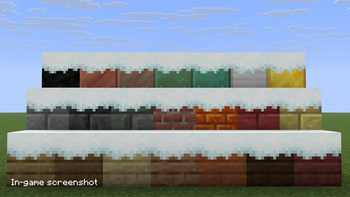
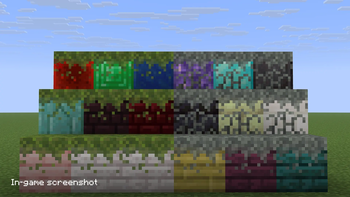
!(https://raw.githubusercontent.com/devoxxel/devoxxel-images/refs/heads/main/titles/png/OVERVIEW.png)\ Snow & Moss Overhangs adds side overlays to snow similar to the snowy grass blocks as well as to moss / pale moss carpets.
This pack requires Fusion 1. 3. 0 or higher to work.\ Download Respackopts to customize the resourcepack in-game _(optional)_.


!(https://raw.githubusercontent.com/devoxxel/devoxxel-images/refs/heads/main/titles/png/how_to_install.png) 1. Download (https://modrinth.com/mod/fusion-connected-textures/versions)**. 2. Download the resourcepack. The download file should be a `.zip` compressed file with the following naming scheme : `Snow & Moss Overhangs §8.zip`. 3. Launch Minecraft. Go to _Options... > Resource Packs... > Open Pack Folder_ 4. A folder should open in the explorer / finder. Move the downloaded file to the newly opened folder. 5. The pack should appear in the _Available_ section. Click on the pack's icon to move it into the _Selected_ section. Make sure it is at the top to prevent any conflicts with other resourcepacks. 6. Click on _Done_. Your pack is successfully installed !
!(https://raw.githubusercontent.com/devoxxel/devoxxel-images/refs/heads/main/titles/png/in_game_pack_customization.png)\ With Respackopts, you can toggle features that you don't like. To do so, download (https://modrinth.com/mod/respackopts/versions)** (v4. 0. 0+), (https://modrinth.com/mod/cloth-config) and (https://modrinth.com/mod/libjf). Make sure these 3 mods are installed when you launch the game. In the _Resourcepacks_ page, you should see a button next to the pack's icon. Clicking it opens the pack's options panel.
### Available options
- Snow layer overhangs\
- Default : `True`\
- Enables snow layer overhangs.
- Snow block overhangs\
- Default : `True`\
- Enables snow block and powder snow overhangs.
- Moss carpet overhangs\
- Default : `False`\
- Enables moss carpet and pale moss carpet overhangs.
!(https://raw.githubusercontent.com/devoxxel/devoxxel-images/refs/heads/main/titles/png/FAQ.png) ### Why does the pack need a mod to work ? Because Vanilla Minecraft does not support connected textures required for the resourcepack to work. That's why you need Fusion, which adds connected textures to the game.
### So why don't other packs require a mod then ? Other resourcepacks offset the overlay a tiny bit so it doesn't z-fight with the block under it, but it still occurs when you're looking from afar. Fusion allows cutout connected textures which fixes the issue.
### Is Respackopts required ? No, it's only optional. The pack works the same without Respackopts, but you can't toggle any features.
!(https://raw.githubusercontent.com/devoxxel/devoxxel-images/refs/heads/main/titles/png/more_from_devoxxel.png)

|
Deep Origins OverlaysAdds subtle transitions to blocks such as dirt and stone. (Requires Fusion) |
Click here to check my profile !
© 2026 Devoxxel
📊 Mod Details
- Game
- Minecraft Resource Packs
- Author
- Devoxxel
- Version
- v1
- Downloads
- 8,886
- Endorsements
- 25
- Category
- minecraft
- Created
- 3/17/2024
- Updated
- 8/20/2026
- Game Versions
- 1.17, 1.17.1, 1.18, 1.18.1, 1.18.2
- Tags
- tweaks, vanilla-like
🔧 How to Install Minecraft Resource Packs Mods
Download from Modrinth. Use Prism Launcher or drop into your mods folder.
📖 Full step-by-step install guide for Minecraft Resource Packs →
Visit the official mod page for specific installation instructions for this mod.
🎮 Need cheat codes or console commands? Check ur gaming wiki for Minecraft Resource Packs commands, item IDs, and more.
❓ Frequently Asked Questions
Which Minecraft Resource Packs versions does Snow & Moss Overhangs support?
The author lists 1.17, 1.17.1, 1.18, 1.18.1, 1.18.2, 1.19. Other versions may work but are untested by the author.
What is the latest version of Snow & Moss Overhangs?
Version v1, published 2026-08-20 with 8,886 downloads recorded at the source.
Keep browsing — more Minecraft Resource Packs mods await