Smooth8x
🟡 Updated this year🖼️ Gallery (3 images)
🔍 Analysis
- 👍 0.0% endorsement rate
- 🏆 #11 of 28 8x- mods in this game by downloads
📋 About This Mod
## Smooth8x Smooth8x is a texture pack created for the purpose of improving performance for low-end computers or for someone who wants to experience Minecraft in a new way. ## How does it improve performance? Smooth8x works by having textures scaled to an 8x8 format instead of the default 16x16. This reduces the consumption of VRAM (Video Random Access Memory), which can lead to better performance or even higher FPS (Frames Per Second) if your GPU (Graphics Processing Unit) is old or does not have a lot of VRAM. ## Installation guide: 1. First, download the texture pack for your Minecraft version. 2. Next, move the .zip file out of your downloads folder, and place it into the "resourcepacks" folder. 3. After that, launch your game and navigate to: "Options -> Resourcepacks" and enable the texture pack. 4. Enjoy the texture pack! (If you get a warning while enabling the texture pack, that says it is broken or outdated, then you can safely ingnore the warning.) ## In-game images: !(https://cdn.modrinth.com/data/cached_images/2d3f84f071588886cb79b49a1a31e95b54d36537.png) !(https://cdn.modrinth.com/data/cached_images/fa09165e9c41477b4da1284edc6b9422f49191eb.png) !(https://cdn.modrinth.com/data/cached_images/db2b85c41b5d5fdd2df3d705740869339ff4df70.png)
## Smooth8x
Smooth8x is a texture pack created for the purpose of improving performance for low-end computers or for someone who wants to experience Minecraft in a new way.
## How does it improve performance?
Smooth8x works by having textures scaled to an 8x8 format instead of the default 16x16. This reduces the consumption of VRAM (Video Random Access Memory), which can lead to better performance or even higher FPS (Frames Per Second) if your GPU (Graphics Processing Unit) is old or does not have a lot of VRAM.
## Installation guide:
1. First, download the texture pack for your Minecraft version. 2. Next, move the .zip file out of your downloads folder, and place it into the "resourcepacks" folder. 3. After that, launch your game and navigate to: "Options -> Resourcepacks" and enable the texture pack. 4. Enjoy the texture pack!
(If you get a warning while enabling the texture pack, that says it is broken or outdated, then you can safely ingnore the warning.)
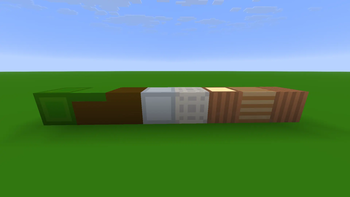
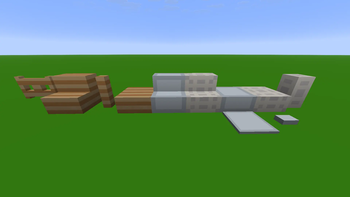
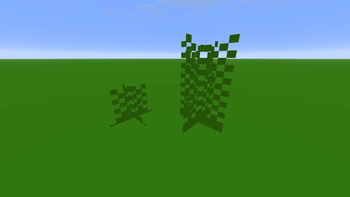
## In-game images:
!(https://cdn.modrinth.com/data/cached_images/2d3f84f071588886cb79b49a1a31e95b54d36537.png)
!(https://cdn.modrinth.com/data/cached_images/fa09165e9c41477b4da1284edc6b9422f49191eb.png)
!(https://cdn.modrinth.com/data/cached_images/db2b85c41b5d5fdd2df3d705740869339ff4df70.png)
📊 Mod Details
- Game
- Minecraft Resource Packs
- Author
- Matthew-Bot-Official
- Version
- 26.2-beta.1.0
- Downloads
- 892
- Endorsements
- 0
- Category
- 8x-
- Created
- 6/9/2026
- Updated
- 7/22/2026
- Game Versions
- 26.2
- Tags
- 8x-, blocks, simplistic
🔧 How to Install Minecraft Resource Packs Mods
Download from Modrinth. Use Prism Launcher or drop into your mods folder.
📖 Full step-by-step install guide for Minecraft Resource Packs →
Visit the official mod page for specific installation instructions for this mod.
🎮 Need cheat codes or console commands? Check ur gaming wiki for Minecraft Resource Packs commands, item IDs, and more.
❓ Frequently Asked Questions
Which Minecraft Resource Packs versions does Smooth8x support?
The author lists 26.2. Other versions may work but are untested by the author.
What is the latest version of Smooth8x?
Version 26.2-beta.1.0, published 2026-07-22 with 892 downloads recorded at the source.
Keep browsing — more Minecraft Resource Packs mods await