Skin Totem 3D Edition 2
🟡 Updated this year🖼️ Gallery (2 images)
🔍 Analysis
- 👍 0.1% endorsement rate
- 🏆 #74 of 344 combat mods in this game by downloads
📋 About This Mod
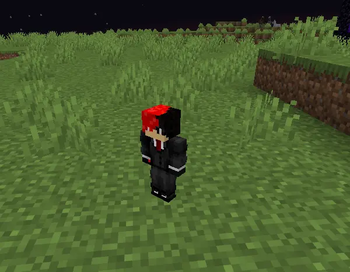
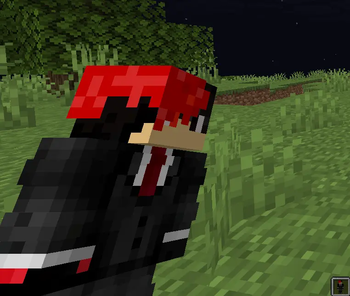
Description Skin Totem 3D 2 is a simple Minecraft resource pack that replaces the Totem of Undying with your own Minecraft skin! Now, when you cheat death, it’s your own face that saves the day. Perfect for adding personality, laughs, or a custom touch to your survival experience. Now with different style from v1. Now the character model is facing away instead of directy facing front. It looks like you are holding a doll instead of the youtuber style in the first version. 📦 Features 1.Replaces Totem of Undying with your player skin 2.Works in all Minecraft versions that support custom resource packs 3.Great for content creators, SMPs, and personal flair 4.Lightweight — no performance impact 5.3D skin totem different from v1 🛠️ How to Install Download and unzip the resource pack Go to: assets > minecraft > textures > item Replace the placeholder file named skin.png with your Minecraft skin Make sure the file is named exactly: skin.png Re-zip the folder (opional but put eveything into a folder if you dont Re-zip) and move it to your resourcepacks folder Launch Minecraft, go to Options > Resource Packs, and enable Skin Totem ✅ Done! Now your totem wears your skin.
Description Skin Totem 3D 2 is a simple Minecraft resource pack that replaces the Totem of Undying with your own Minecraft skin! Now, when you cheat death, it’s your own face that saves the day. Perfect for adding personality, laughs, or a custom touch to your survival experience. Now with different style from v1. Now the character model is facing away instead of directy facing front. It looks like you are holding a doll instead of the youtuber style in the first version.
📦 Features 1. Replaces Totem of Undying with your player skin
2. Works in all Minecraft versions that support custom resource packs
3. Great for content creators, SMPs, and personal flair
4. Lightweight — no performance impact
5. 3D skin totem different from v1
🛠️ How to Install Download and unzip the resource pack
Go to: assets > minecraft > textures > item
Replace the placeholder file named skin.png with your Minecraft skin
Make sure the file is named exactly: skin.png
Re-zip the folder (opional but put eveything into a folder if you dont Re-zip) and move it to your resourcepacks folder
Launch Minecraft, go to Options > Resource Packs, and enable Skin Totem
✅ Done! Now your totem wears your skin.
📊 Mod Details
- Game
- Minecraft Resource Packs
- Author
- Deavelo
- Version
- 0.0.1
- Downloads
- 969
- Endorsements
- 1
- Category
- combat
- Created
- 5/22/2026
- Updated
- 4/24/2026
- Game Versions
- 1.12, 1.12.1, 1.12.2, 1.13, 1.13.1
- Tags
- combat, simplistic, vanilla-like
🔧 How to Install Minecraft Resource Packs Mods
Download from Modrinth. Use Prism Launcher or drop into your mods folder.
📖 Full step-by-step install guide for Minecraft Resource Packs →
Visit the official mod page for specific installation instructions for this mod.
🎮 Need cheat codes or console commands? Check ur gaming wiki for Minecraft Resource Packs commands, item IDs, and more.
❓ Frequently Asked Questions
Which Minecraft Resource Packs versions does Skin Totem 3D Edition 2 support?
The author lists 1.12, 1.12.1, 1.12.2, 1.13, 1.13.1, 1.13.2. Other versions may work but are untested by the author.
What is the latest version of Skin Totem 3D Edition 2?
Version 0.0.1, published 2026-04-24 with 969 downloads recorded at the source.
Keep browsing — more Minecraft Resource Packs mods await