Ruins of the Past
🟡 Updated this year🖼️ Gallery (12 images)
🔍 Analysis
- 👍 4.0% endorsement rate — high engagement, a strong quality signal
- 🏆 #5 of 14 adventure mods in this game by downloads
📋 About This Mod
## Fixed Buugs :D <p align="center" style="text-align: center;"> <a href="https://discord.com/invite/YxRWAPUtDt"><img src="https://raw.githubusercontent.com/lukejw12/uistuff/refs/heads/main/mineraft/icon/discord.png" alt="Discord" style="margin: 5px 10px;"></a> <a href="https://github.com/lukejw12"><img src="https://raw.githubusercontent.com/lukejw12/uistuff/refs/heads/main/mineraft/icon/github.png" alt="GitHub" style="margin: 5px 10px;"></a> <a href="https://ko-fi.com/itsjustluke"><img src="https://raw.githubusercontent.com/lukejw12/uistuff/refs/heads/main/mineraft/icon/kofi.png" alt="Ko-Fi" style="margin: 5px 10px;"></a> </p> <img src="https://raw.githubusercontent.com/lukejw12/uistuff/refs/heads/main/rotp/banner/stretch-icon.png" alt="Icon Seperator" style="margin: 5px 10px;"> <img src="https://raw.githubusercontent.com/lukejw12/uistuff/refs/heads/main/mineraft/text/description.png" alt="Description" style="margin: 5px 10px;"> **Adds mysterious ancient structures, a full pottery system, and rune crafting to your survival world!** This datapack introduces new structures to explore, functional blocks to craft with, and a deep pottery & rune system to master. **Since this is a Datapack and Resource pack, both can be installed once server side and will apply to all players that join, voiding the need for each player to install the pack!** <img src="https://raw.githubusercontent.com/lukejw12/uistuff/refs/heads/main/rotp/banner/stretch.png" alt="Seperator" style="margin: 5px 10px;"> <img src="https://raw.githubusercontent.com/lukejw12/uistuff/refs/heads/main/mineraft/text/features.png" alt="Features" style="margin: 5px 10px;"> > ### Forgotten Structures > - *Explore 3 mysterious structures scattered across your world!* > > - **Mayan Temple** – A jungle pyramid filled with traps and loot > > - **The Crypt** – An underground tomb with new pottery sherds > > - **Desert Dig Site** – An archaeological site where you can discover ancient tablets > ### New Blocks > - *Craft & discover 5 new functional blocks!* > > - **Pedestal** – Display your items, and dye it to match your style > > - **Runestone** – A decorative block > > - **Research Workbench** – Analyze ancient tablets to discover runes or structure maps > > - **Pottery Wheel** – Craft brand new pottery > > - **Runic Altar** – Imbue items with runes using XP > ### Pottery System > - *Create pots with form and function!* > > - 6 base pot types: Thin, Small, Square, Large, Vase, and Slab > > - Dye system with 32 colors > > - Sherds on all 4 sides, with brand new sherds to collect > > - Crafted using bundles, reinforced bundles, Eye of Ender, TNT, and more > ### Rune Crafting > - *Research tablets and apply powerful runes!* > > - Ancient Tablets can be researched to unlock runes or reveal maps to structures > > - Use the Runic Altar to apply runes to items (1 rune per item, permanent) > > - XP is consumed through the transcriber system <img src="https://raw.githubusercontent.com/lukejw12/uistuff/refs/heads/main/rotp/banner/stretch.png" alt="Seperator" style="margin: 5px 10px;"> <img src="https://raw.githubusercontent.com/lukejw12/uistuff/refs/heads/main/mineraft/text/faq.png" alt="Faq" style="margin: 5px 10px;"> #### Q. How do I download the pack? > #### A. Install the datapack in the vanilla world creation menu! ¹ #### Q. I cant find the resource pack! > #### A. Go to the Versions tab, find the **datapack** version you want and click the name, then scroll to the bottom and install the resource pack. ² #### Q. The Transcriber / Rune system feels incomplete? > #### A. The Transcriber is still being actively reworked and will receive updated mechanics in future versions! #### Q. I experienced a bug, what do I do? > #### A. Join the Discord and file a bug report :D <img src="https://raw.githubusercontent.com/lukejw12/uistuff/refs/heads/main/rotp/banner/stretch.png" alt="Seperator" style="margin: 5px 10px;"> <img src="https://raw.githubusercontent.com/lukejw12/uistuff/refs/heads/main/mineraft/text/jointhediscord.png" alt="Join The Discord" style="margin: 5px 10px;"> <details> <summary>¹ How To Download!</summary> Data Pack: 1. Click the latest Datapack version. 2. Scroll down and Download the Primary file. 3. If you want to create a World, go to Singleplayer > Create New World > Data Packs > Open Pack Folder. (It is not recommended to put it in an already existing world!) 4. Copy/Cut and Paste the downloaded file there. 5. Open/Create your world. 6. Note: You need to also install the Required Resource Pack. Required Resource Pack: 1. Click the Datapack featured version. 2. Scroll down and Download the Required Resource Pack. 3. Open Minecraft and go to Options > Resource Packs > Open Pack Folder. 4. Copy/Cut and Paste the downloaded file there. 5. Activate the Resource Pack. (you can reload the resources with f3+t ingame) ## See image below for reference !(https://cdn.modrinth.com/data/cached_images/cfa9150deed9ee84ced1
## Fixed Buugs :D




Adds mysterious ancient structures, a full pottery system, and rune crafting to your survival world! This datapack introduces new structures to explore, functional blocks to craft with, and a deep pottery & rune system to master.
Since this is a Datapack and Resource pack, both can be installed once server side and will apply to all players that join, voiding the need for each player to install the pack!


> ### Forgotten Structures > - Explore 3 mysterious structures scattered across your world! > > - Mayan Temple – A jungle pyramid filled with traps and loot > > - The Crypt – An underground tomb with new pottery sherds > > - Desert Dig Site – An archaeological site where you can discover ancient tablets
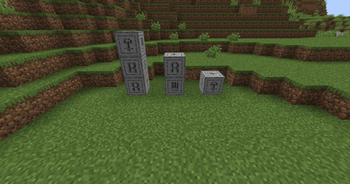
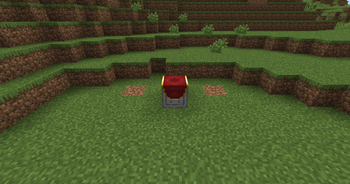
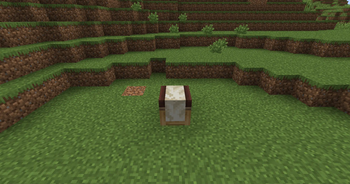
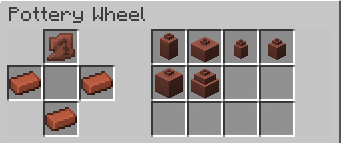
> ### New Blocks > - Craft & discover 5 new functional blocks! > > - Pedestal – Display your items, and dye it to match your style > > - Runestone – A decorative block > > - Research Workbench – Analyze ancient tablets to discover runes or structure maps > > - Pottery Wheel – Craft brand new pottery > > - Runic Altar – Imbue items with runes using XP
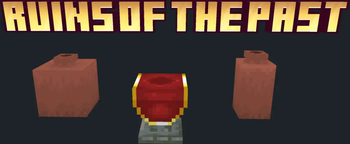
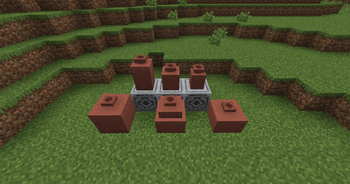
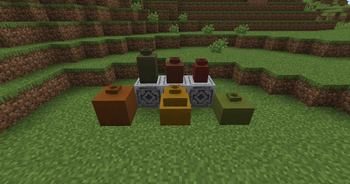
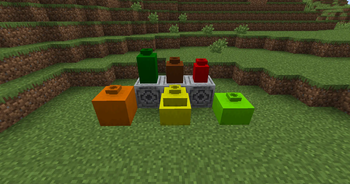
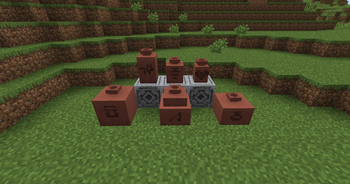
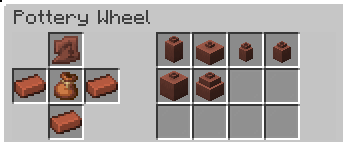
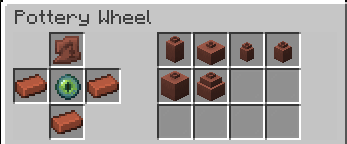
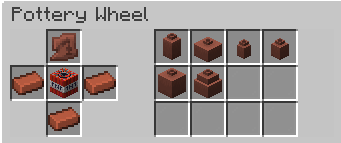
> ### Pottery System > - Create pots with form and function! > > - 6 base pot types: Thin, Small, Square, Large, Vase, and Slab > > - Dye system with 32 colors > > - Sherds on all 4 sides, with brand new sherds to collect > > - Crafted using bundles, reinforced bundles, Eye of Ender, TNT, and more
> ### Rune Crafting > - Research tablets and apply powerful runes! > > - Ancient Tablets can be researched to unlock runes or reveal maps to structures > > - Use the Runic Altar to apply runes to items (1 rune per item, permanent) > > - XP is consumed through the transcriber system

#### Q. How do I download the pack? > #### A. Install the datapack in the vanilla world creation menu! ¹
#### Q. I cant find the resource pack! > #### A. Go to the Versions tab, find the datapack version you want and click the name, then scroll to the bottom and install the resource pack. ²
#### Q. The Transcriber / Rune system feels incomplete? > #### A. The Transcriber is still being actively reworked and will receive updated mechanics in future versions!
#### Q. I experienced a bug, what do I do? > #### A. Join the Discord and file a bug report :D

¹ How To Download!
Data Pack: 1. Click the latest Datapack version. 2. Scroll down and Download the Primary file. 3. If you want to create a World, go to Singleplayer > Create New World > Data Packs > Open Pack Folder. (It is not recommended to put it in an already existing world!) 4. Copy/Cut and Paste the downloaded file there. 5. Open/Create your world. 6. Note: You need to also install the Required Resource Pack.
Required Resource Pack: 1. Click the Datapack featured version. 2. Scroll down and Download the Required Resource Pack. 3. Open Minecraft and go to Options > Resource Packs > Open Pack Folder. 4. Copy/Cut and Paste the downloaded file there. 5. Activate the Resource Pack. (you can reload the resources with f3+t ingame) ## See image below for reference !(https://cdn.modrinth.com/data/cached_images/cfa9150deed9ee84ced1
📊 Mod Details
- Game
- Minecraft Resource Packs
- Author
- _ItsJustLuke
- Version
- 1
- Downloads
- 523
- Endorsements
- 21
- Category
- adventure
- Created
- 8/6/2025
- Updated
- 2/16/2026
- Game Versions
- 1.21.5
- Tags
- adventure, decoration, game-mechanics
🔧 How to Install Minecraft Resource Packs Mods
Download from Modrinth. Use Prism Launcher or drop into your mods folder.
📖 Full step-by-step install guide for Minecraft Resource Packs →
Visit the official mod page for specific installation instructions for this mod.
🎮 Need cheat codes or console commands? Check ur gaming wiki for Minecraft Resource Packs commands, item IDs, and more.
❓ Frequently Asked Questions
Which Minecraft Resource Packs versions does Ruins of the Past support?
The author lists 1.21.5. Other versions may work but are untested by the author.
What is the latest version of Ruins of the Past?
Version 1, published 2026-02-16 with 523 downloads recorded at the source.
Keep browsing — more Minecraft Resource Packs mods await