Realistic Engine Sound
🟢 Updated this month🖼️ Gallery (4 images)
🔍 Analysis
- 🏆 #40 of 168 audio mods in this game by downloads
📋 About This Mod
!(https://img.shields.io/modrinth/dt/realistic-engine-sound?logo=data:image/svg%2bxml;base64,PHN2ZyB4bWxucz0iaHR0cDovL3d3dy53My5vcmcvMjAwMC9zdmciIGhlaWdodD0iMjRweCIgdmlld0JveD0iMCAtOTYwIDk2MCA5NjAiIHdpZHRoPSIyNHB4IiBmaWxsPSIjZTNlM2UzIj48cGF0aCBkPSJNNDgwLTMyMCAyODAtNTIwbDU2LTU4IDEwNCAxMDR2LTMyNmg4MHYzMjZsMTA0LTEwNCA1NiA1OC0yMDAgMjAwWk0yNDAtMTYwcS0zMyAwLTU2LjUtMjMuNVQxNjAtMjQwdi0xMjBoODB2MTIwaDQ4MHYtMTIwaDgwdjEyMHEwIDMzLTIzLjUgNTYuNVQ3MjAtMTYwSDI0MFoiLz48L3N2Zz4=&style=for-the-badge&color=red)
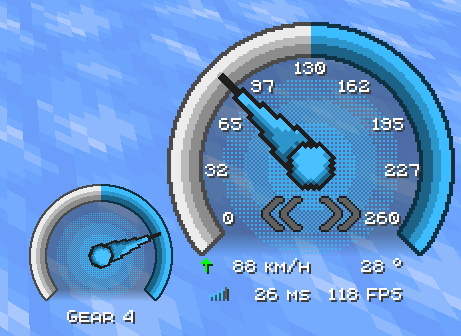
Ever felt like Ice Boat Racing was a bit too silent? Well, no more! This is a texture pack that contains 3 (https://modrinth.com/mod/bb_boat_hud) modules: an Engine Sound, an RMP HUD, and a Speed HUD.
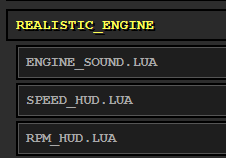
To enable them, type `/bb_boat_hud`. In the web panel, you can add the 3 modules under the `realistic_engine` section.
None of the modules depend on the others. They can be used independently, with their separate configs.
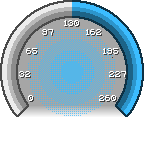
# The Modules - Engine Sound: features a sound that is the `Trackmania 11004RPM Throttle Engine` and 3 types of gear shift sounds, also taken from Trackmania 2020. - Speed HUD: features an animated speedometer with the speed indicator (km/h) and other miscellaneous elements. - RMP HUD: features an animated tachometer with the gear indicator.
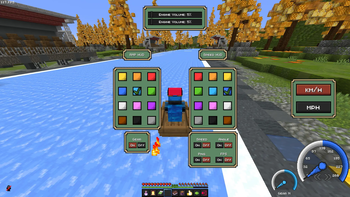
# Customization ## Config Menu Adding (https://modrinth.com/mod/more-bbboathud) mod will also give you access to the config menu, where you can more easily change the config for the Modules.
The resource pack will still work without the mod.
!(https://cdn.modrinth.com/data/cached_images/f5f94c1f45b9fbefe93479171e222d81a429acc0.png)
## Change sounds To change the gear or engine sound, you can make another resource pack with the name that you want, with this folder/file structure:
``` Resource Pack Name/ ├── assets │ └── realistic_engine │ └── sounds │ └── bb_boat_hud_modules │ ├── engine_loop │ ├── gear_shift_down │ └── gear_shift_up └── pack.mcmeta ```
> Note: You need to apply this texture above the `Realistic Engine Sound pack`, and the sounds need to have the same name as the original sound and have the `.ogg` extension.
!(https://cdn.modrinth.com/data/cached_images/9bee6b4f1d1307cd7562e3d89565298df85cb6ad.png)
## Settings The settings used in the image and in the video are:
### Speed HUD ``` Anchor Position: Bottom Right X Offset: - 75 Y Offset: - 85 ```
### RMP HUD ``` Anchor Position: Bottom Right X Offset: - 180 Y Offset: - 40 ```
📊 Mod Details
- Game
- Minecraft Resource Packs
- Author
- NapsterNPT
- Version
- 1.21.4
- Downloads
- 35
- Endorsements
- 0
- Category
- audio
- Created
- 8/21/2026
- Updated
- 8/31/2026
- Game Versions
- 1.21.1, 1.21.4
- Tags
- audio, gui
🔧 How to Install Minecraft Resource Packs Mods
Download from Modrinth. Use Prism Launcher or drop into your mods folder.
📖 Full step-by-step install guide for Minecraft Resource Packs →
Visit the official mod page for specific installation instructions for this mod.
🎮 Need cheat codes or console commands? Check ur gaming wiki for Minecraft Resource Packs commands, item IDs, and more.
❓ Frequently Asked Questions
Which Minecraft Resource Packs versions does Realistic Engine Sound support?
The author lists 1.21.1, 1.21.4. Other versions may work but are untested by the author.
What is the latest version of Realistic Engine Sound?
Version 1.21.4, published 2026-08-31 with 35 downloads recorded at the source.
Keep browsing — more Minecraft Resource Packs mods await