Powdered Snow Highlighter
🟡 Updated this year🖼️ Gallery (1 images)
🔍 Analysis
- 🏆 #21 of 297 combat mods in this game by downloads
📋 About This Mod
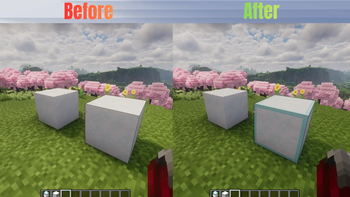
## About This Pack Tired of falling into hidden traps and freezing to death? This lightweight texture pack highlights **Powdered Snow** blocks, making them instantly visible so you can safely navigate snowy biomes, mountains, and PvP traps. ## Features * Clearly outlines/highlights Powdered Snow blocks. * Works perfectly in Survival, Hardcore, and PvP scenarios. * Lightweight and optimized (no FPS drops). ## Compatibility * **Mod Compatibility:** Works with or without OptiFine / Iris. ## 📥 Availability * **Java Edition:** Download right here on Modrinth! * **Bedrock Edition:** Available on our CurseForge page (Windows, Mobile, Xbox, PlayStation). --- ## 🛠️ How to Install ### For Java Edition (Modrinth) 1. Download the `.zip` file from the **Versions** tab. 2. Open Minecraft and go to **Options** > **Resource Packs** > **Open Pack Folder**. 3. Drag and drop the downloaded `.zip` file into that folder. 4. Select the pack from the "Available" list in Minecraft and move it to "Selected". ### For Bedrock Edition (CurseForge) 1. Download the `.mcpack` file from the **Files** tab. 2. Double-click or tap on the downloaded file. 3. Minecraft will open automatically and import the pack. 4. Go to **Settings** > **Global Resources** > **My Packs**, click on this pack, and select **Activate**.
## About This Pack Tired of falling into hidden traps and freezing to death? This lightweight texture pack highlights Powdered Snow blocks, making them instantly visible so you can safely navigate snowy biomes, mountains, and PvP traps.
## Features Clearly outlines/highlights Powdered Snow blocks. Works perfectly in Survival, Hardcore, and PvP scenarios. Lightweight and optimized (no FPS drops).
## Compatibility Mod Compatibility: Works with or without OptiFine / Iris.
## 📥 Availability Java Edition: Download right here on Modrinth! Bedrock Edition: Available on our CurseForge page (Windows, Mobile, Xbox, PlayStation).
## 🛠️ How to Install
### For Java Edition (Modrinth) 1. Download the `.zip` file from the Versions tab. 2. Open Minecraft and go to Options > Resource Packs > Open Pack Folder. 3. Drag and drop the downloaded `.zip` file into that folder. 4. Select the pack from the "Available" list in Minecraft and move it to "Selected".
### For Bedrock Edition (CurseForge) 1. Download the `.mcpack` file from the Files tab. 2. Double-click or tap on the downloaded file. 3. Minecraft will open automatically and import the pack. 4. Go to Settings > Global Resources > My Packs, click on this pack, and select Activate.
📊 Mod Details
- Game
- Minecraft Resource Packs
- Author
- _Legend_
- Version
- 1.0.0
- Downloads
- 243
- Endorsements
- 1
- Category
- combat
- Created
- 6/4/2026
- Updated
- 6/2/2026
- Game Versions
- 26.1, 26.1.1, 26.1.2
- Tags
- combat, tweaks, utility
🔧 How to Install Minecraft Resource Packs Mods
Download from Modrinth. Use Prism Launcher or drop into your mods folder.
📖 Full step-by-step install guide for Minecraft Resource Packs →
Visit the official mod page for specific installation instructions for this mod.
🎮 Need cheat codes or console commands? Check ur gaming wiki for Minecraft Resource Packs commands, item IDs, and more.
❓ Frequently Asked Questions
Which Minecraft Resource Packs versions does Powdered Snow Highlighter support?
The author lists 26.1, 26.1.1, 26.1.2. Other versions may work but are untested by the author.
What is the latest version of Powdered Snow Highlighter?
Version 1.0.0, published 2026-06-02 with 243 downloads recorded at the source.
Keep browsing — more Minecraft Resource Packs mods await