Plastic+
🟠 Updated over a year ago🖼️ Gallery (2 images)
🔍 Analysis
- 👍 0.2% endorsement rate
- 🏆 #510 of 644 16x mods in this game by downloads
📋 About This Mod
Fullpack from 1.0.0 to 1.21.X will take time. # About: Plastic+ is a continuation of the Legacy Console Edition Plastic texture pack, preserving its original simplistic design and bright colours. This pack adds plastic-themed textures to blocks, items, entities and the UI. _Originally created by 4J for the Legacy Console edition._ **How to install:** ------------------------------------------------------------------------------------- On Modrinth App simply click the "Install" or "Add to an instance" button. For Minecraft 1.5.2 and below: 1. Download Plastic+ 2. Go to %appdata% 3. Copy .zip to /Roaming/.minecraft/texturepacks 4. Launch Minecraft and select Plastic+ For Minecraft 1.6.1 and above: 1. Download Plastic+ 2. Go to %appdata% 3. Copy .zip to /Roaming/.minecraft/resourcepacks 4. Launch Minecraft and select Plastic+ **Mods supported::** ------------------------------------------------------------------------------------- N/A ## FAQ: **Can I use this in a video/modpack?** Yes just credit me. **Any issues?** Let us know in the (https://discord.gg/EaFmMmy884) ### **NOTE: This pack is still being updated (I forgot about it but im back). So be sure to download the latest version for bug fixes.**
Fullpack from 1. 0. 0 to 1. 21. X will take time.
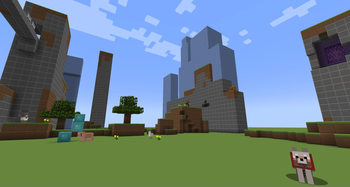
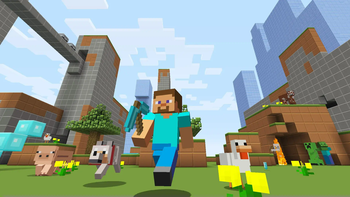
Plastic+ is a continuation of the Legacy Console Edition Plastic texture pack, preserving its original simplistic design and bright colours.
This pack adds plastic-themed textures to blocks, items, entities and the UI.
_Originally created by 4J for the Legacy Console edition._
How to install: ------------------------------------------------------------------------------------- On Modrinth App simply click the "Install" or "Add to an instance" button.
For Minecraft 1. 5. 2 and below: 1. Download Plastic+ 2. Go to %appdata% 3. Copy .zip to /Roaming/.minecraft/texturepacks 4. Launch Minecraft and select Plastic+
For Minecraft 1. 6. 1 and above: 1. Download Plastic+ 2. Go to %appdata% 3. Copy .zip to /Roaming/.minecraft/resourcepacks 4. Launch Minecraft and select Plastic+ Mods supported:: ------------------------------------------------------------------------------------- N/A
## FAQ: Can I use this in a video/modpack?
Yes just credit me.
Any issues?
Let us know in the (https://discord.gg/EaFmMmy884)
### NOTE: This pack is still being updated (I forgot about it but im back). So be sure to download the latest version for bug fixes.
📊 Mod Details
- Game
- Minecraft Resource Packs
- Author
- TFT
- Version
- 1.1.4
- Downloads
- 5,166
- Endorsements
- 10
- Category
- 16x
- Created
- 6/8/2024
- Updated
- 4/13/2025
- Game Versions
- 1.2.1, 1.2.2, 1.2.3, 1.2.4, 1.2.5
- Tags
- 16x, simplistic, themed
🔧 How to Install Minecraft Resource Packs Mods
Download from Modrinth. Use Prism Launcher or drop into your mods folder.
📖 Full step-by-step install guide for Minecraft Resource Packs →
Visit the official mod page for specific installation instructions for this mod.
🎮 Need cheat codes or console commands? Check ur gaming wiki for Minecraft Resource Packs commands, item IDs, and more.
❓ Frequently Asked Questions
Which Minecraft Resource Packs versions does Plastic+ support?
The author lists 1.2.1, 1.2.2, 1.2.3, 1.2.4, 1.2.5. Other versions may work but are untested by the author.
What is the latest version of Plastic+?
Version 1.1.4, published 2025-04-13 with 5,166 downloads recorded at the source.
Keep browsing — more Minecraft Resource Packs mods await