PixelFocus XShape
🟡 Updated this year🖼️ Gallery (1 images)
🔍 Analysis
- 🏆 #351 of 675 16x mods in this game by downloads
📋 About This Mod
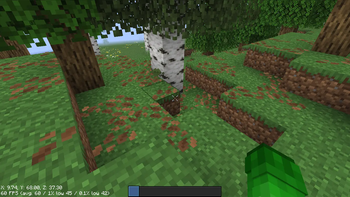
# PixelFocus XShape V1 !(https://cdn.modrinth.com/data/cached_images/13f22b6627e4942ef9730225940b233b7e13fd76.png) ## Overview PixelFocus XShape V1 is a custom Minecraft crosshair resource pack featuring a unique X-shaped design. The crosshair is carefully crafted to provide excellent visibility without cluttering the center of your screen, helping you maintain focus on targets, blocks, and important gameplay elements. Whether you're exploring, building, speedrunning, or engaging in intense PvP battles, this crosshair offers a clean and modern appearance that enhances your overall Minecraft experience. ## Features - Unique X-shaped crosshair design - Minimalist and distraction-free appearance - Improved center-screen visibility - Great for PvP, survival, and competitive gameplay - Lightweight and performance-friendly - Compatible with Minecraft's modern UI system - Clean white styling for maximum contrast ## Why Choose PixelFocus XShape? The XShape design creates natural visual guidance toward the center of your screen while keeping the exact aiming point easy to identify. This helps improve target tracking and precision without overwhelming the HUD. Its balanced symmetry gives Minecraft a fresh modern feel while maintaining full usability across different game modes. ## Compatibility - Minecraft Java Edition - Supports modern Minecraft versions - Easy installation as a standard resource pack ## Installation 1. Download the resource pack. 2. Open Minecraft. 3. Navigate to **Options → Resource Packs**. 4. Click **Open Pack Folder**. 5. Move the downloaded ZIP file into the folder. 6. Enable **PixelFocus XShape V1** from the Resource Pack menu. 7. Enjoy your new crosshair. ## Perfect For - PvP Players - Competitive Gamers - Survival Worlds - Speedrunners - Content Creators - Players who prefer minimalist HUD designs Enhance your Minecraft experience with a sleek X-shaped crosshair that combines style, clarity, and precision.
# PixelFocus XShape V1
!(https://cdn.modrinth.com/data/cached_images/13f22b6627e4942ef9730225940b233b7e13fd76.png)
## Overview
PixelFocus XShape V1 is a custom Minecraft crosshair resource pack featuring a unique X-shaped design. The crosshair is carefully crafted to provide excellent visibility without cluttering the center of your screen, helping you maintain focus on targets, blocks, and important gameplay elements.
Whether you're exploring, building, speedrunning, or engaging in intense PvP battles, this crosshair offers a clean and modern appearance that enhances your overall Minecraft experience.
## Features
- Unique X-shaped crosshair design
- Minimalist and distraction-free appearance
- Improved center-screen visibility
- Great for PvP, survival, and competitive gameplay
- Lightweight and performance-friendly
- Compatible with Minecraft's modern UI system
- Clean white styling for maximum contrast
## Why Choose PixelFocus XShape?
The XShape design creates natural visual guidance toward the center of your screen while keeping the exact aiming point easy to identify. This helps improve target tracking and precision without overwhelming the HUD.
Its balanced symmetry gives Minecraft a fresh modern feel while maintaining full usability across different game modes.
## Compatibility
- Minecraft Java Edition
- Supports modern Minecraft versions
- Easy installation as a standard resource pack
## Installation
1. Download the resource pack. 2. Open Minecraft. 3. Navigate to Options → Resource Packs. 4. Click Open Pack Folder. 5. Move the downloaded ZIP file into the folder. 6. Enable PixelFocus XShape V1 from the Resource Pack menu. 7. Enjoy your new crosshair.
## Perfect For
- PvP Players
- Competitive Gamers
- Survival Worlds
- Speedrunners
- Content Creators
- Players who prefer minimalist HUD designs
Enhance your Minecraft experience with a sleek X-shaped crosshair that combines style, clarity, and precision.
📊 Mod Details
- Game
- Minecraft Resource Packs
- Author
- Novaxi
- Version
- 1
- Downloads
- 195
- Endorsements
- 1
- Category
- 16x
- Created
- 6/6/2026
- Updated
- 5/31/2026
- Game Versions
- 1.6.1, 1.6.2, 1.6.4, 13w38a, 13w38b
- Tags
- 16x, utility, vanilla-like
🔧 How to Install Minecraft Resource Packs Mods
Download from Modrinth. Use Prism Launcher or drop into your mods folder.
📖 Full step-by-step install guide for Minecraft Resource Packs →
Visit the official mod page for specific installation instructions for this mod.
🎮 Need cheat codes or console commands? Check ur gaming wiki for Minecraft Resource Packs commands, item IDs, and more.
❓ Frequently Asked Questions
Which Minecraft Resource Packs versions does PixelFocus XShape support?
The author lists 1.6.1, 1.6.2, 1.6.4, 13w38a, 13w38b, 13w38c. Other versions may work but are untested by the author.
What is the latest version of PixelFocus XShape?
Version 1, published 2026-05-31 with 195 downloads recorded at the source.
Keep browsing — more Minecraft Resource Packs mods await