Pickaxe Efficiency Indicator
🟡 Updated this year🖼️ Gallery (12 images)











🔍 Analysis
- 🏆 #360 of 482 minecraft mods in this game by downloads
📋 About This Mod
<p align="center"> <img src="https://cdn.modrinth.com/data/cached_images/154333e300c5664c0e0beed95b73b95967de772e.webp" alt="Pickaxe Efficiency Indicator Title" > </p> Pickaxe Efficiency Indicator is a simple texture pack that adds a visual indicator on the pickaxe to show its Efficiency enchantment level—all in vanilla Minecraft, with no mods required. --- <p align="center"> <a href="https://modrinth.com/resourcepack/pickaxe-efficiency-indicator" rel="noopener nofollow ugc"> <img src="https://i.imgur.com/tkYBV4Y.png" alt="Modrinth Icon" width="50"> </a> <a href="https://www.curseforge.com/minecraft/texture-packs/pickaxe-efficiency-indicator" rel="noopener nofollow ugc"> <img src="https://i.imgur.com/DKccFbz.png" alt="CurseForge Icon" width="50"> </a> <a href="https://www.planetminecraft.com/texture-pack/pickaxe-efficiency-indicator/" rel="noopener nofollow ugc"> <img src="https://i.imgur.com/dJ2b3lN.png" alt="PMC Icon" width="50"> </a> <a href="https://discord.gg/CPBFV3dytW" rel="noopener nofollow ugc"> <img src="https://raw.githubusercontent.com/PrecisionZero/PrecisionStudios/refs/heads/main/Modrinth%20Elements/DiscordIcon.png" alt="Discord Icon" width="50"> </a> </p> --- <p align="center"> <img src="https://cdn.modrinth.com/data/cached_images/67a7b8e9c7f67bc0b6f490061d7754188c347a3f.webp" alt="Pickaxe Efficiency Indicator Featured Image" > </p> --- !(https://cdn.modrinth.com/data/cached_images/eac285a42f9130f864bb729b8ca1c9273d6f13a6.webp) Indicators on the pickaxe change color depending on the strength of Efficiency - **Efficiency I** — Red - **Efficiency II** — Orange - **Efficiency III** — Yellow - **Efficiency IV** — Green - **Efficiency V** — Aqua The Indicators are located in the places in the above image. --- !(https://cdn.modrinth.com/data/cached_images/c12e5077b76ab02690c0629d8247316d279a65e2.webp) - The indicators go from red (weakest) to aqua (strongest) - This gradual shift in color allows players to understand the efficiency level of the pickaxe increases naturally - The indicators are placed in the perfect positions that allow players to immediately notice it without ruining the vanilla feel. --- !(https://cdn.modrinth.com/data/cached_images/073d2b8394638fc33ec6a8d30d53dcdc97e990cd.webp) ### Cards | Efficiency I | Efficiency II | |--------|---------| | <img src="https://cdn.modrinth.com/data/cached_images/b4dbdf14a06d305dfe5e36785ff5dd92139e34a3.webp" alt="Pickaxe Efficiency I" width="400"> | <img src="https://cdn.modrinth.com/data/cached_images/a3a5c8dd466b519483a1c6afec48040d638c5668.webp" alt="Pickaxe Efficiency II" width="400"> | | (https://cdn.modrinth.com/data/cached_images/b4dbdf14a06d305dfe5e36785ff5dd92139e34a3.webp) | (https://cdn.modrinth.com/data/cached_images/a3a5c8dd466b519483a1c6afec48040d638c5668.webp) | | Efficiency III | Efficiency IV | Efficiency V | |--------|---------|-----------| | <img src="https://cdn.modrinth.com/data/cached_images/046bf1a5db6554a78808e98941e2f12f405fd6e4.webp" alt="Pickaxe Efficiency III" width="400"> | <img src="https://cdn.modrinth.com/data/cached_images/5fdabd0d37958ab42b4fd404d4c133dedd185441.webp" alt="Pickaxe Efficiency IV" width="400"> | <img src="https://cdn.modrinth.com/data/cached_images/be922f3b1186eea7c770b3cf4d06da5e7e4ba203.webp" alt="Pickaxe Efficiency V" width="400"> | | (https://cdn.modrinth.com/data/cached_images/046bf1a5db6554a78808e98941e2f12f405fd6e4.webp) | (https://cdn.modrinth.com/data/cached_images/5fdabd0d37958ab42b4fd404d4c133dedd185441.webp) | (https://cdn.modrinth.com/data/cached_images/be922f3b1186eea7c770b3cf4d06da5e7e4ba203.webp) | ### Screenshots | Efficiency I | Efficiency II | |--------|---------| | <img src="https://cdn.modrinth.com/data/cached_images/948a290aa8d95ea1e0d3dd477b7a444fa3a08828.webp" alt="Pickaxe Efficiency I" width="400"> | <img src="https://cdn.modrinth.com/data/cached_images/620f2fa77de27341c9c06c2f9212452c1ec9ee0a.webp" alt="Pickaxe Efficiency II" width="400"> | | (https://cdn.modrinth.com/data/cached_images/948a290aa8d95ea1e0d3dd477b7a444fa3a08828.webp) | (https://cdn.modrinth.com/data/cached_images/620f2fa77de27341c9c06c2f9212452c1ec9ee0a.webp) | | Efficiency III | Efficiency IV | Efficiency V | |--------|---------|-----------| | <img src="https://cdn.modrinth.com/data/cached_images/7300fa5caffe56c7f38d97d6579881b7215f2722.webp" alt="Pickaxe Efficiency III" width="400"> | <img src="https://cdn.modrinth.com/data/cached_images/bfc9e8d57808ab4c219aeb457445bbc4e0f23bd9.webp" alt="Pickaxe Efficiency IV" width="400"> | <img src="https://cdn.modrinth.com/data/cached_images/d29ca589ad79175dff8893349c38600ce6bf781b.webp" alt="Pickaxe Efficiency V" width="400"> | | (https://cdn.modrinth.com/data/cached_images/7300f

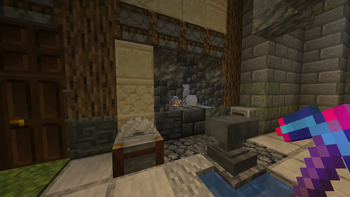
Pickaxe Efficiency Indicator is a simple texture pack that adds a visual indicator on the pickaxe to show its Efficiency enchantment level—all in vanilla Minecraft, with no mods required.




!(https://cdn.modrinth.com/data/cached_images/eac285a42f9130f864bb729b8ca1c9273d6f13a6.webp)
Indicators on the pickaxe change color depending on the strength of Efficiency
- Efficiency I — Red
- Efficiency II — Orange
- Efficiency III — Yellow
- Efficiency IV — Green
- Efficiency V — Aqua
The Indicators are located in the places in the above image.
!(https://cdn.modrinth.com/data/cached_images/c12e5077b76ab02690c0629d8247316d279a65e2.webp)
- The indicators go from red (weakest) to aqua (strongest)
- This gradual shift in color allows players to understand the efficiency level of the pickaxe increases naturally
- The indicators are placed in the perfect positions that allow players to immediately notice it without ruining the vanilla feel.
!(https://cdn.modrinth.com/data/cached_images/073d2b8394638fc33ec6a8d30d53dcdc97e990cd.webp)
| Efficiency I | Efficiency II |
|--------|---------|
|  |
|  |
| (https://cdn.modrinth.com/data/cached_images/b4dbdf14a06d305dfe5e36785ff5dd92139e34a3.webp) | (https://cdn.modrinth.com/data/cached_images/a3a5c8dd466b519483a1c6afec48040d638c5668.webp) |
|
| (https://cdn.modrinth.com/data/cached_images/b4dbdf14a06d305dfe5e36785ff5dd92139e34a3.webp) | (https://cdn.modrinth.com/data/cached_images/a3a5c8dd466b519483a1c6afec48040d638c5668.webp) |
| Efficiency III | Efficiency IV | Efficiency V |
|--------|---------|-----------|
|  |
|  |
|  |
| (https://cdn.modrinth.com/data/cached_images/046bf1a5db6554a78808e98941e2f12f405fd6e4.webp) | (https://cdn.modrinth.com/data/cached_images/5fdabd0d37958ab42b4fd404d4c133dedd185441.webp) | (https://cdn.modrinth.com/data/cached_images/be922f3b1186eea7c770b3cf4d06da5e7e4ba203.webp) |
|
| (https://cdn.modrinth.com/data/cached_images/046bf1a5db6554a78808e98941e2f12f405fd6e4.webp) | (https://cdn.modrinth.com/data/cached_images/5fdabd0d37958ab42b4fd404d4c133dedd185441.webp) | (https://cdn.modrinth.com/data/cached_images/be922f3b1186eea7c770b3cf4d06da5e7e4ba203.webp) |
### Screenshots
| Efficiency I | Efficiency II |
|--------|---------|
|  |
|  |
| (https://cdn.modrinth.com/data/cached_images/948a290aa8d95ea1e0d3dd477b7a444fa3a08828.webp) | (https://cdn.modrinth.com/data/cached_images/620f2fa77de27341c9c06c2f9212452c1ec9ee0a.webp) |
|
| (https://cdn.modrinth.com/data/cached_images/948a290aa8d95ea1e0d3dd477b7a444fa3a08828.webp) | (https://cdn.modrinth.com/data/cached_images/620f2fa77de27341c9c06c2f9212452c1ec9ee0a.webp) |
| Efficiency III | Efficiency IV | Efficiency V |
|--------|---------|-----------|
|  |
|  |
|  |
| (https://cdn.modrinth.com/data/cached_images/7300f
|
| (https://cdn.modrinth.com/data/cached_images/7300f
📊 Mod Details
- Game
- Minecraft Resource Packs
- Author
- PrecisionZero
- Version
- 1.0.0
- Downloads
- 17
- Endorsements
- 0
- Category
- minecraft
- Created
- 8/20/2026
- Updated
- 8/12/2026
- Game Versions
- 1.21.4, 1.21.5, 1.21.6, 1.21.7, 1.21.8
- Tags
- tweaks, utility, vanilla-like
🔧 How to Install Minecraft Resource Packs Mods
Download from Modrinth. Use Prism Launcher or drop into your mods folder.
📖 Full step-by-step install guide for Minecraft Resource Packs →
Visit the official mod page for specific installation instructions for this mod.
🎮 Need cheat codes or console commands? Check ur gaming wiki for Minecraft Resource Packs commands, item IDs, and more.
❓ Frequently Asked Questions
Which Minecraft Resource Packs versions does Pickaxe Efficiency Indicator support?
The author lists 1.21.4, 1.21.5, 1.21.6, 1.21.7, 1.21.8, 1.21.9. Other versions may work but are untested by the author.
What is the latest version of Pickaxe Efficiency Indicator?
Version 1.0.0, published 2026-08-12 with 17 downloads recorded at the source.
Keep browsing — more Minecraft Resource Packs mods await