Physics Mod Pro Chinese Translate 物理模組完整簡繁中文翻譯
🟡 Updated this year🖼️ Gallery (4 images)

🔍 Analysis
- 👍 0.0% endorsement rate
- 🏆 #11 of 31 locale mods in this game by downloads
📋 About This Mod
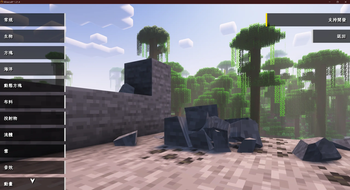
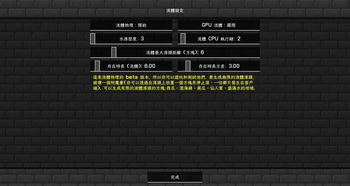
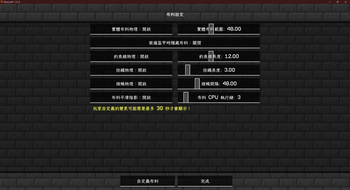
# 🌍 Physics Mod Pro 完整簡繁中文翻譯資源包 > **讓你的麥塊物理體驗更上一層樓,輕鬆調整各項進階物理參數!** > 這是一款專為 **Physics Mod Pro(物理模組專業版)** 設計的完整簡繁中文在地化翻譯資源包。完美解決遊戲內繁雜選單、專業版驗證、布料、液體、崩塌等各項進階物理參數的語言障礙。 --- ### ✨ 特色亮點 * **🌐 雙語系完美支援:** 完整收錄 `zh_tw`(繁體中文)與 `zh_cn`(簡體中文),配合遊戲語言設定自動適應。 * **🛠️ 100% 完整覆蓋:** 包含常規設定、物理崩塌、海洋/雪地/布料物理、自定義玩家/生物物理等。連深奧的相容性錯誤警告與 Pro 版驗證流程皆已全面中文化! * **📏 超強相容性:** 支援資源包格式 (Pack Format) 15 至 100,相容於多個 Minecraft 主流版本,避免出現「版本不相容」的警示。 * **✍️ 精確術語校對:** 由 **CDD** 與 **Yi Sang** 聯手精細翻譯,融合台灣與大陸常用麥塊術語,語意自然流暢、貼合遊戲語境。 --- ### 📦 安裝步驟 1. **安裝模組:** 請確保你已先行安裝 ((https://www.patreon.com/c/Haubna/home)) 模組。 2. **放入資源包:** * 啟動 Minecraft,打開 `設定` -> `資源包` -> `開啟資源包資料夾`。 * 將本資源包(檔案夾或 `.zip` 壓縮檔)放入該資料夾中。 3. **啟用與排序:** 在資源包列表中將本資源包移動至**右側(已載入)**,並**移至最頂端**以確保翻譯優先覆蓋。 4. **享受遊戲:** 點擊「完成」載入,即可享受全中文的物理模組設定介面! --- ### ⚠️ 注意事項 * 本資源包僅為 **語言翻譯包**,不包含 Physics Mod Pro 模組本體。 * 如果遇到部分文字未翻譯,請確認本資源包是否處於資源包清單的最上層。 --- ### 🤝 貢獻與致謝 * **翻譯作者:** CDD, Yi Sang * **模組原作者:** Haubna (Physics Mod) # 🌍 Physics Mod Pro Chinese Translation Pack (Simplified & Traditional) > **Unlock the full physics configuration menu in Chinese!** > This translation resource pack provides full Traditional Chinese (`zh_tw`) and Simplified Chinese (`zh_cn`) localizations for **Physics Mod Pro**. Say goodbye to language barriers when adjusting cloth, liquid, collapse, and ragdoll configurations. --- ### ✨ Key Features * **🌐 Full Chinese Localization:** Perfectly supports both `zh_tw` (Taiwan/HK) and `zh_cn` (Mainland China). * **🛠️ 100% Coverage:** Covers all GUI menus, config parameters, error tips, and even the Patreon Pro key verification process. * **📏 Great Compatibility:** Built with pack formats 15 to 100, ensuring maximum compatibility across various Minecraft versions. * **✍️ Natural Translation:** Carefully translated by **CDD** and **Yi Sang** using accurate Minecraft community terminology. --- ### 📦 Installation Guide 1. Make sure you have installed the ((https://www.patreon.com/c/Haubna/home)) mod. 2. Put this resource pack folder (or `.zip` file) into your `resourcepacks` directory. 3. Open Minecraft, go to Options -> Resource Packs, move this pack to the top of your active list. 4. Click Done and enjoy! --- ### 🤝 Credits * **Translators:** CDD, Yi Sang * **Mod Creator:** Haubna (Physics Mod)
# 🌍 Physics Mod Pro 完整簡繁中文翻譯資源包
> 讓你的麥塊物理體驗更上一層樓,輕鬆調整各項進階物理參數! > 這是一款專為 Physics Mod Pro(物理模組專業版) 設計的完整簡繁中文在地化翻譯資源包。完美解決遊戲內繁雜選單、專業版驗證、布料、液體、崩塌等各項進階物理參數的語言障礙。
🌐 雙語系完美支援: 完整收錄 `zh_tw`(繁體中文)與 `zh_cn`(簡體中文),配合遊戲語言設定自動適應。 🛠️ 100% 完整覆蓋: 包含常規設定、物理崩塌、海洋/雪地/布料物理、自定義玩家/生物物理等。連深奧的相容性錯誤警告與 Pro 版驗證流程皆已全面中文化! 📏 超強相容性: 支援資源包格式 (Pack Format) 15 至 100,相容於多個 Minecraft 主流版本,避免出現「版本不相容」的警示。 ✍️ 精確術語校對: 由 CDD 與 Yi Sang 聯手精細翻譯,融合台灣與大陸常用麥塊術語,語意自然流暢、貼合遊戲語境。
### 📦 安裝步驟
1. 安裝模組: 請確保你已先行安裝 ((https://www.patreon.com/c/Haubna/home)) 模組。 2. 放入資源包: 啟動 Minecraft,打開 `設定` -> `資源包` -> `開啟資源包資料夾`。 將本資源包(檔案夾或 `.zip` 壓縮檔)放入該資料夾中。 3. 啟用與排序: 在資源包列表中將本資源包移動至右側(已載入),並移至最頂端以確保翻譯優先覆蓋。 4. 享受遊戲: 點擊「完成」載入,即可享受全中文的物理模組設定介面!
### ⚠️ 注意事項
本資源包僅為 語言翻譯包,不包含 Physics Mod Pro 模組本體。 如果遇到部分文字未翻譯,請確認本資源包是否處於資源包清單的最上層。
### 🤝 貢獻與致謝
翻譯作者: CDD, Yi Sang 模組原作者: Haubna (Physics Mod)
# 🌍 Physics Mod Pro Chinese Translation Pack (Simplified & Traditional)
> Unlock the full physics configuration menu in Chinese! > This translation resource pack provides full Traditional Chinese (`zh_tw`) and Simplified Chinese (`zh_cn`) localizations for Physics Mod Pro. Say goodbye to language barriers when adjusting cloth, liquid, collapse, and ragdoll configurations.
### ✨ Key Features
🌐 Full Chinese Localization: Perfectly supports both `zh_tw` (Taiwan/HK) and `zh_cn` (Mainland China). 🛠️ 100% Coverage: Covers all GUI menus, config parameters, error tips, and even the Patreon Pro key verification process. 📏 Great Compatibility: Built with pack formats 15 to 100, ensuring maximum compatibility across various Minecraft versions. ✍️ Natural Translation: Carefully translated by CDD and Yi Sang using accurate Minecraft community terminology.
### 📦 Installation Guide
1. Make sure you have installed the ((https://www.patreon.com/c/Haubna/home)) mod. 2. Put this resource pack folder (or `.zip` file) into your `resourcepacks` directory. 3. Open Minecraft, go to Options -> Resource Packs, move this pack to the top of your active list. 4. Click Done and enjoy!
### 🤝 Credits
Translators: CDD, Yi Sang Mod Creator: Haubna (Physics Mod)
📊 Mod Details
- Game
- Minecraft Resource Packs
- Author
- Yi_Sang
- Version
- v1.0.0
- Downloads
- 894
- Endorsements
- 0
- Category
- locale
- Created
- 7/3/2026
- Updated
- 6/28/2026
- Game Versions
- 1.20, 1.20.1, 23w31a, 23w32a, 23w33a
- Tags
- locale, modded
🔧 How to Install Minecraft Resource Packs Mods
Download from Modrinth. Use Prism Launcher or drop into your mods folder.
📖 Full step-by-step install guide for Minecraft Resource Packs →
Visit the official mod page for specific installation instructions for this mod.
🎮 Need cheat codes or console commands? Check ur gaming wiki for Minecraft Resource Packs commands, item IDs, and more.
❓ Frequently Asked Questions
Which Minecraft Resource Packs versions does Physics Mod Pro Chinese Translate 物理模組完整簡繁中文翻譯 support?
The author lists 1.20, 1.20.1, 23w31a, 23w32a, 23w33a, 23w35a. Other versions may work but are untested by the author.
What is the latest version of Physics Mod Pro Chinese Translate 物理模組完整簡繁中文翻譯?
Version v1.0.0, published 2026-06-28 with 894 downloads recorded at the source.
Keep browsing — more Minecraft Resource Packs mods await