Patrix CTM Compatibility Override
🟡 Updated this year🖼️ Gallery (2 images)
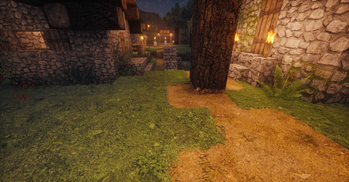
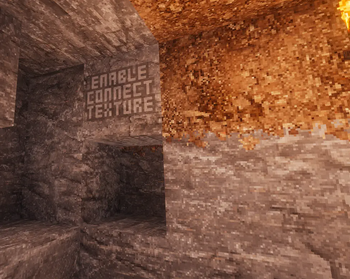
🔍 Analysis
- 👍 0.1% endorsement rate
- 🏆 #67 of 70 32x mods in this game by downloads
📋 About This Mod
# Patrix CTM Override (32x pack) **A tiny compatibility resource pack that replaces Patrix’s “ENABLE CONNECT TEXTURE” placeholders with real textures for mods that don’t use CTM.** > **IMPORTANT NOTE** : you first need to have working connected textures before considering using this pack. **It is possible that you don't need it at all !** (see gallery) > Enabling connected textures is usually done by adding the "Continuity" mod (https://modrinth.com/mod/continuity), and enabling "Default Connected Textures" resource pack. > > Then, if you see working connected textures but still see the “ENABLE CONNECT TEXTURE” placeholder (check the gallery here), only then you can consider adding this package. > --- This listing ships **only the 32x override** as an example. If you use **64x / 128x / 256x**, please **build your own** override with the scripts on GitHub. **GitHub (source & build scripts):** https://github.com/koorg/Patrix-CTM-Compatibility-Override Building code license : MIT. Textures licence : All Rights Reserved - ARR (see https://modrinth.com/resourcepack/patrix-32x) --- ## What this pack fixes (in plain English) If you ever see textures that literally say **“ENABLE CONNECT TEXTURE”**, it’s not a bug in Patrix. Patrix uses **Connected Textures (CTM)** (via **Continuity** on Fabric or OptiFine-style CTM). Those warning images live in a few vanilla texture slots on purpose. When CTM is active, the game replaces them with the gorgeous Patrix tiles. Some mods **do not use CTM** for certain effects (e.g., **Physics Mod** debris/particles, some minimaps, thumbnails, or UI previews). Those mods grab the **vanilla texture** directly—so they end up showing the **“ENABLE CONNECT TEXTURE”** placeholder. **This override pack swaps those placeholders back to proper textures** (stone, grass top, etc.) so **non-CTM renderers** stop showing the warning image, while the **world** still benefits from full Patrix + CTM visuals. > This is **not** limited to Physics Mod. Any mod that bypasses CTM can show the placeholder; this pack helps with the most common cases. --- ## Requirements - **Minecraft Java** (modern versions compatible with your Patrix release) - **Patrix 32x** (this pack is designed to sit on top of Patrix) - A CTM solution for your loader: - **Fabric/Quilt:** **Continuity** recommended - **OptiFine-style CTM** also works if that’s your setup > You don’t need to change your CTM setup; this pack only improves how **non-CTM** renderers look. --- ## Installation 1. **Install Patrix 32x** as usual. 2. Download **Patrix_32x_CTMOverride.zip** from this Modrinth page. 3. Put it into your `resourcepacks` folder. 4. In Minecraft, open **Options → Resource Packs** and set the **load order (top → bottom)**: 1) **Patrix_32x_CTMOverride.zip** ← **place this at the very top** 2) Patrix 32x 3) Any other packs 4) Default 5. Press **F3 + T** to reload resources (or restart the game). That’s it. Debris/particles/thumbnails from non-CTM mods should now look like real Patrix textures instead of the warning image. --- ## What’s inside A **small fallback set** of textures (e.g., `stone.png`, `grass_block_top.png`) placed in the **vanilla** texture locations. World rendering still uses CTM like before; only non-CTM paths use these fallbacks. --- ## Only 32x is included here - This Modrinth page **only provides the 32x override** as an example for end users. - If you own **Patrix 64x / 128x / 256x**, please **build your own override** using the scripts on GitHub (see "View Source" or link above) The scripts are simple to run and will generate a matching override for your resolution. --- ## When you still see “ENABLE CONNECT TEXTURE” Try these quick checks: - Make sure **Patrix_32x_CTMOverride.zip** is **above** Patrix in the Resource Packs list. - Press **F3 + T** to reload textures (or restart). - This pack is matching the 32x pack, but also works as-is if you are using 64x, 128x or 256x. - Ensure your CTM solution (e.g., **Continuity**) is installed and enabled. - Some mods cache textures; a game restart can help. - The block you’re seeing might not be covered by this minimal override—this pack focuses on the **most common placeholders**. --- ## FAQ **Does this enable CTM?** No. It just makes **non-CTM** renders look normal by providing proper fallback textures. **Is this only for Physics Mod?** No. Physics Mod is a common example (debris/particles), but **any mod** that bypasses CTM can benefit. **Performance impact?** Negligible. This is a tiny resource pack. **Forge/Fabric/Quilt?** It’s a standard resource pack—**loader-agnostic**. For CTM features, use **Continuity** on Fabric/Quilt or an OptiFine-style CTM solution. --- ## Credits & permissions - **Patrix** — you need a legitimate copy of the Patrix pack (32x is available on modrinth, others via Patrix Patreon). - **Continuity** (Fabric) or equivalent CTM pipelines. This listin
# Patrix CTM Override (32x pack)
A tiny compatibility resource pack that replaces Patrix’s “ENABLE CONNECT TEXTURE” placeholders with real textures for mods that don’t use CTM.
> IMPORTANT NOTE : you first need to have working connected textures before considering using this pack. It is possible that you don't need it at all ! (see gallery) > Enabling connected textures is usually done by adding the "Continuity" mod (https://modrinth.com/mod/continuity), and enabling "Default Connected Textures" resource pack. > > Then, if you see working connected textures but still see the “ENABLE CONNECT TEXTURE” placeholder (check the gallery here), only then you can consider adding this package. > ---
This listing ships only the 32x override as an example. If you use 64x / 128x / 256x, please build your own override with the scripts on GitHub.
GitHub (source & build scripts): https://github.com/koorg/Patrix-CTM-Compatibility-Override
Building code license : MIT.
Textures licence : All Rights Reserved - ARR (see https://modrinth.com/resourcepack/patrix-32x)
## What this pack fixes (in plain English)
If you ever see textures that literally say “ENABLE CONNECT TEXTURE”, it’s not a bug in Patrix. Patrix uses Connected Textures (CTM) (via Continuity on Fabric or OptiFine-style CTM). Those warning images live in a few vanilla texture slots on purpose. When CTM is active, the game replaces them with the gorgeous Patrix tiles.
Some mods do not use CTM for certain effects (e.g., Physics Mod debris/particles, some minimaps, thumbnails, or UI previews). Those mods grab the vanilla texture directly—so they end up showing the “ENABLE CONNECT TEXTURE” placeholder.
This override pack swaps those placeholders back to proper textures (stone, grass top, etc.) so non-CTM renderers stop showing the warning image, while the world still benefits from full Patrix + CTM visuals.
> This is not limited to Physics Mod. Any mod that bypasses CTM can show the placeholder; this pack helps with the most common cases.
## Requirements
- Minecraft Java (modern versions compatible with your Patrix release)
- Patrix 32x (this pack is designed to sit on top of Patrix)
- A CTM solution for your loader:
- - Fabric/Quilt: Continuity recommended
- - OptiFine-style CTM also works if that’s your setup
> You don’t need to change your CTM setup; this pack only improves how non-CTM renderers look.
## Installation
1. Install Patrix 32x as usual. 2. Download Patrix_32x_CTMOverride.zip from this Modrinth page. 3. Put it into your `resourcepacks` folder. 4. In Minecraft, open Options → Resource Packs and set the load order (top → bottom): 1) Patrix_32x_CTMOverride.zip ← place this at the very top 2) Patrix 32x 3) Any other packs 4) Default 5. Press F3 + T to reload resources (or restart the game).
That’s it. Debris/particles/thumbnails from non-CTM mods should now look like real Patrix textures instead of the warning image.
## What’s inside
A small fallback set of textures (e.g., `stone.png`, `grass_block_top.png`) placed in the vanilla texture locations. World rendering still uses CTM like before; only non-CTM paths use these fallbacks.
## Only 32x is included here
- This Modrinth page only provides the 32x override as an example for end users.
- If you own Patrix 64x / 128x / 256x, please build your own override using the scripts on GitHub (see "View Source" or link above)
The scripts are simple to run and will generate a matching override for your resolution.
## When you still see “ENABLE CONNECT TEXTURE”
Try these quick checks:
- Make sure Patrix_32x_CTMOverride.zip is above Patrix in the Resource Packs list.
- Press F3 + T to reload textures (or restart).
- This pack is matching the 32x pack, but also works as-is if you are using 64x, 128x or 256x.
- Ensure your CTM solution (e.g., Continuity) is installed and enabled.
- Some mods cache textures; a game restart can help.
- The block you’re seeing might not be covered by this minimal override—this pack focuses on the most common placeholders.
Does this enable CTM? No. It just makes non-CTM renders look normal by providing proper fallback textures.
Is this only for Physics Mod? No. Physics Mod is a common example (debris/particles), but any mod that bypasses CTM can benefit.
Performance impact? Negligible. This is a tiny resource pack.
Forge/Fabric/Quilt? It’s a standard resource pack—loader-agnostic. For CTM features, use Continuity on Fabric/Quilt or an OptiFine-style CTM solution.
## Credits & permissions
- Patrix — you need a legitimate copy of the Patrix pack (32x is available on modrinth, others via Patrix Patreon).
- Continuity (Fabric) or equivalent CTM pipelines.
This listin
📊 Mod Details
- Game
- Minecraft Resource Packs
- Author
- Koorg
- Version
- 1.0
- Downloads
- 15,607
- Endorsements
- 9
- Category
- 32x
- Created
- 9/8/2025
- Updated
- 9/29/2025
- Game Versions
- 1.19.4
- Tags
- 32x, tweaks, vanilla-like
🔧 How to Install Minecraft Resource Packs Mods
Download from Modrinth. Use Prism Launcher or drop into your mods folder.
📖 Full step-by-step install guide for Minecraft Resource Packs →
Visit the official mod page for specific installation instructions for this mod.
🎮 Need cheat codes or console commands? Check ur gaming wiki for Minecraft Resource Packs commands, item IDs, and more.
❓ Frequently Asked Questions
Which Minecraft Resource Packs versions does Patrix CTM Compatibility Override support?
The author lists 1.19.4. Other versions may work but are untested by the author.
What is the latest version of Patrix CTM Compatibility Override?
Version 1.0, published 2025-09-29 with 15,607 downloads recorded at the source.
Keep browsing — more Minecraft Resource Packs mods await