GreenScreen Painting
🟡 Updated this year🖼️ Gallery (3 images)
🔍 Analysis
- 🏆 #196 of 210 decoration mods in this game by downloads
📋 About This Mod
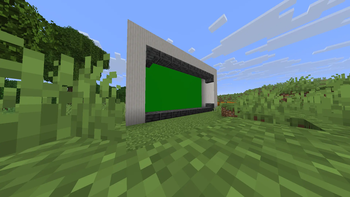
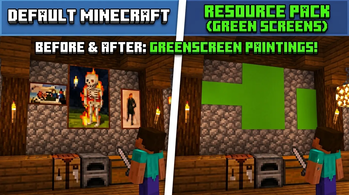
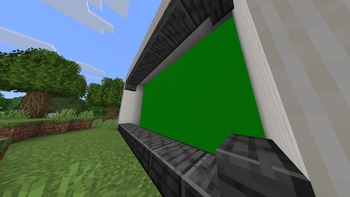
GreenScreen Paintings A simple, lightweight utility resource pack that transforms all vanilla Minecraft paintings into solid, borderless green screens. Perfect for content creators, video editors, and animators who want to easily key out in-game frames and drop in their own custom video clips, memes, or custom artwork! ## Key Features **Borderless Design**: Replaces the standard wooden borders with seamless, edge-to-edge chroma key green. **Flawless Chroma Keying**: Uses a precise, solid green hex code optimized for clean selection in editing software like Premiere Pro, DaVinci Resolve, and CapCut. **100% Vanilla Compatible**: Works completely fine on standard vanilla clients. No OptiFine, custom shaders, or backend mods required. **Ultra Lightweight**: Extremely tiny file size that won't impact game performance or frame rates. ## How to Use **Place & Frame**: Craft and place any standard painting on a wall inside your world. **Record**: Record your gameplay footage or take screenshots focusing on the green screen canvas. **Key it Out**: Drop the footage into your preferred video editor, apply a Chroma Key / Ultra Key effect to the green area, and place your custom video or image on the track underneath! ## Categories & Details **Category**: Decoration, Tweaks, Utility **Resolution**: 16x16 (Vanilla Standard) **Compatibility**: Works across all modern versions of Minecraft Java Edition. **Note**: If you want to use this for high-end cinematic close-ups, make sure your video rendering resolution in-game is scaled up to keep the edges perfectly sharp for your editor's color sampler! ## Clips <iframe width="560" height="315" src="https://www.youtube-nocookie.com/embed/nUTvxsO1G9M" title="YouTube video player" frameborder="0" allow="accelerometer; autoplay; clipboard-write; encrypted-media; gyroscope; picture-in-picture; web-share" allowfullscreen></iframe> ## Screenshots !(https://cdn.modrinth.com/data/cached_images/62e4adc4f76ab0597423ecfb41088dc440d0ba7b.png) !(https://cdn.modrinth.com/data/cached_images/7f244d24075327a79db265c5a7b999568fcb104a.png)
GreenScreen Paintings A simple, lightweight utility resource pack that transforms all vanilla Minecraft paintings into solid, borderless green screens. Perfect for content creators, video editors, and animators who want to easily key out in-game frames and drop in their own custom video clips, memes, or custom artwork!
## Key Features Borderless Design: Replaces the standard wooden borders with seamless, edge-to-edge chroma key green.
Flawless Chroma Keying: Uses a precise, solid green hex code optimized for clean selection in editing software like Premiere Pro, DaVinci Resolve, and CapCut.
100% Vanilla Compatible: Works completely fine on standard vanilla clients. No OptiFine, custom shaders, or backend mods required.
Ultra Lightweight: Extremely tiny file size that won't impact game performance or frame rates.
## How to Use Place & Frame: Craft and place any standard painting on a wall inside your world.
Record: Record your gameplay footage or take screenshots focusing on the green screen canvas.
Key it Out: Drop the footage into your preferred video editor, apply a Chroma Key / Ultra Key effect to the green area, and place your custom video or image on the track underneath!
## Categories & Details Category: Decoration, Tweaks, Utility
Resolution: 16x16 (Vanilla Standard)
Compatibility: Works across all modern versions of Minecraft Java Edition.
## Clips
## Screenshots !(https://cdn.modrinth.com/data/cached_images/62e4adc4f76ab0597423ecfb41088dc440d0ba7b.png) !(https://cdn.modrinth.com/data/cached_images/7f244d24075327a79db265c5a7b999568fcb104a.png)
📊 Mod Details
- Game
- Minecraft Resource Packs
- Author
- parxYT
- Version
- 26.1.2
- Downloads
- 11
- Endorsements
- 1
- Category
- decoration
- Created
- 7/5/2026
- Updated
- 7/4/2026
- Game Versions
- 26.1.2
- Tags
- decoration, tweaks, utility
🔧 How to Install Minecraft Resource Packs Mods
Download from Modrinth. Use Prism Launcher or drop into your mods folder.
📖 Full step-by-step install guide for Minecraft Resource Packs →
Visit the official mod page for specific installation instructions for this mod.
🎮 Need cheat codes or console commands? Check ur gaming wiki for Minecraft Resource Packs commands, item IDs, and more.
❓ Frequently Asked Questions
Which Minecraft Resource Packs versions does GreenScreen Painting support?
The author lists 26.1.2. Other versions may work but are untested by the author.
What is the latest version of GreenScreen Painting?
Version 26.1.2, published 2026-07-04 with 11 downloads recorded at the source.
Keep browsing — more Minecraft Resource Packs mods await