No Nether Particle
🟡 Updated this year🖼️ Gallery (3 images)
🔍 Analysis
- 👍 0.1% endorsement rate
- 🏆 #12 of 66 environment mods in this game by downloads
📋 About This Mod
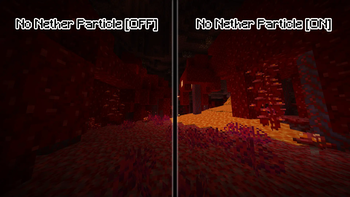
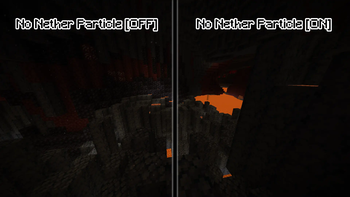
# No Nether Particle A simple resource pack made to get rid of the (sometimes annoying) environment particles from the nether. Note that this resource pack **does not disable** the nether particles, it merely **renders them invisible**; Don't expect any performance improvements from this resource pack! Older versions of No Nether Particle should keep on working with newer versions of Minecraft (unless the particle system changes), but if you don't want to have the "(Made for an older version of Minecraft)" warning, install the version that has the tag for the Minecraft version you're using. **Tip:** If you're using the (Fabric) mods "Sodium" & "Sodium Extra", you can turn off particles in the settings. This way, the particles won't render at all and you'll therefore get a significant performance boost whilst in the Nether, and you won't need to install this resource pack alongside it. The particles are called: "Ash", "Crimson Spore", "Warped Spore" & "White Ash". Yes you can use this resource pack in your modpack. I will not be updating this resource pack to snapshot versions of Minecraft, though, like I said before, this resource pack should keep on working even with versions it doesn't officially support, the only caveat being you might get a warning in the resource pack menu. ## Installation ### For 1.20.x (releases with support for ONLY 1.20.x) To install the resource pack, simply download the .zip file, extract it, and move the folder "§3No Nether Particle §6" to **.../.minecraft/resourcepacks**, or wherever your minecraft installation is located. ### For 1.21 and above & 1.19.4 and below To install the resource pack, simply download the .zip file and move it to **.../.minecraft/resourcepacks**, or wherever your minecraft installation is located. If you want to remove the '.zip' extension in your resource pack selection screen, extract the downloaded .zip file and put that in your resource pack folder instead.
# No Nether Particle
A simple resource pack made to get rid of the (sometimes annoying) environment particles from the nether.
Note that this resource pack does not disable the nether particles, it merely renders them invisible; Don't expect any performance improvements from this resource pack!
Older versions of No Nether Particle should keep on working with newer versions of Minecraft (unless the particle system changes), but if you don't want to have the "(Made for an older version of Minecraft)" warning, install the version that has the tag for the Minecraft version you're using.
Tip: If you're using the (Fabric) mods "Sodium" & "Sodium Extra", you can turn off particles in the settings. This way, the particles won't render at all and you'll therefore get a significant performance boost whilst in the Nether, and you won't need to install this resource pack alongside it. The particles are called: "Ash", "Crimson Spore", "Warped Spore" & "White Ash".
Yes you can use this resource pack in your modpack.
I will not be updating this resource pack to snapshot versions of Minecraft, though, like I said before, this resource pack should keep on working even with versions it doesn't officially support, the only caveat being you might get a warning in the resource pack menu.
## Installation
### For 1. 20.x (releases with support for ONLY 1. 20.x) To install the resource pack, simply download the .zip file, extract it, and move the folder "§3No Nether Particle §6[...]" to .../.minecraft/resourcepacks, or wherever your minecraft installation is located.
### For 1. 21 and above & 1. 19. 4 and below To install the resource pack, simply download the .zip file and move it to .../.minecraft/resourcepacks, or wherever your minecraft installation is located. If you want to remove the '.zip' extension in your resource pack selection screen, extract the downloaded .zip file and put that in your resource pack folder instead.
📊 Mod Details
- Game
- Minecraft Resource Packs
- Author
- Foyleth
- Version
- v2.1
- Downloads
- 10,938
- Endorsements
- 12
- Category
- environment
- Created
- 2/28/2024
- Updated
- 4/14/2026
- Game Versions
- 1.20.2, 23w42a, 23w43a, 23w43b, 23w44a
- Tags
- environment
🔧 How to Install Minecraft Resource Packs Mods
Download from Modrinth. Use Prism Launcher or drop into your mods folder.
📖 Full step-by-step install guide for Minecraft Resource Packs →
Visit the official mod page for specific installation instructions for this mod.
🎮 Need cheat codes or console commands? Check ur gaming wiki for Minecraft Resource Packs commands, item IDs, and more.
❓ Frequently Asked Questions
Which Minecraft Resource Packs versions does No Nether Particle support?
The author lists 1.20.2, 23w42a, 23w43a, 23w43b, 23w44a, 23w45a. Other versions may work but are untested by the author.
What is the latest version of No Nether Particle?
Version v2.1, published 2026-04-14 with 10,938 downloads recorded at the source.
Keep browsing — more Minecraft Resource Packs mods await