Nether Ores into Netherrack
🟠 Updated over a year ago🖼️ Gallery (2 images)
🔍 Analysis
- 👍 0.1% endorsement rate
- 🏆 #111 of 190 blocks mods in this game by downloads
📋 About This Mod
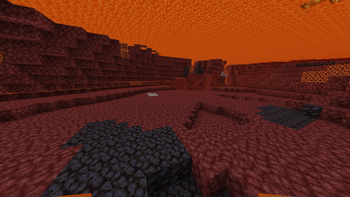
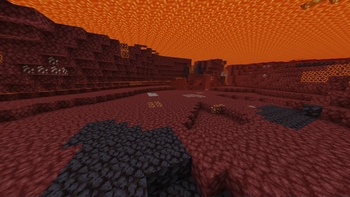
**⚠️ These pictures were taken with a mod that removes lava fog!** You’ll need to remove the lava fog in order to properly use this resource pack. <br><br> There are also resource packs to: - Have the most optimize Netherite Lava mining Setup → (https://modrinth.com/resourcepack/full-netherite-lava-mining-setup) - Make everything look like Netherrack except Netherite → (https://modrinth.com/resourcepack/netherite-lava-mining) - Make only Netherite appear blue → (https://modrinth.com/resourcepack/full-blue-netherite) - Hide only Gravel → (https://modrinth.com/resourcepack/gravel-into-netherack) Check my profile for tons of packs like these! <br><br> **Got an issue or a question? → Send me a message on Discord: enigmusse** By the way, I'm also on the Modrinth and CurseForge Discord servers. <br><br> **How to use it?** 1. Copy it into the resource packs folder of your Minecraft instance. 2. Open the escape menu, click **Resource Packs**, and select **"Nether Ores into Netherrack”** ! <br><br> **Important:** As mentioned above, you need to remove the lava fog. Here are a few mods that can help : - Clear Water → https://modrinth.com/mod/clear-water - See Through Water/Lava → https://modrinth.com/mod/see-through-waterlava **⚠️ Don’t forget to configure the mod settings so you can actually see through lava!** <br><br> **Compatibility Notice** The resource pack functions correctly despite the compatibility warning. Simply confirm by selecting **Yes** when prompted. To suppress this notification completely, install the mod: - (https://modrinth.com/mod/no-resource-pack-warnings) Without this solution, I'd need to create and upload a separate archive for nearly every minor Minecraft version — even though the textures remain unchanged — leading to unnecessary extra work.
⚠️ These pictures were taken with a mod that removes lava fog!
You’ll need to remove the lava fog in order to properly use this resource pack.
There are also resource packs to:
- Have the most optimize Netherite Lava mining Setup → (https://modrinth.com/resourcepack/full-netherite-lava-mining-setup)
- Make everything look like Netherrack except Netherite → (https://modrinth.com/resourcepack/netherite-lava-mining)
- Make only Netherite appear blue → (https://modrinth.com/resourcepack/full-blue-netherite)
- Hide only Gravel → (https://modrinth.com/resourcepack/gravel-into-netherack)
Check my profile for tons of packs like these!
Got an issue or a question? → Send me a message on Discord: enigmusse
By the way, I'm also on the Modrinth and CurseForge Discord servers.
How to use it?
1. Copy it into the resource packs folder of your Minecraft instance. 2. Open the escape menu, click Resource Packs, and select "Nether Ores into Netherrack” !
Important:
As mentioned above, you need to remove the lava fog.
Here are a few mods that can help :
- Clear Water → https://modrinth.com/mod/clear-water
- See Through Water/Lava → https://modrinth.com/mod/see-through-waterlava
⚠️ Don’t forget to configure the mod settings so you can actually see through lava!
Compatibility Notice
The resource pack functions correctly despite the compatibility warning. Simply confirm by selecting Yes when prompted.
To suppress this notification completely, install the mod:
- (https://modrinth.com/mod/no-resource-pack-warnings)
Without this solution, I'd need to create and upload a separate archive for nearly every minor Minecraft version — even though the textures remain unchanged — leading to unnecessary extra work.
📊 Mod Details
- Game
- Minecraft Resource Packs
- Author
- Enigmusse
- Version
- 1.0
- Downloads
- 1,339
- Endorsements
- 2
- Category
- blocks
- Created
- 10/23/2024
- Updated
- 10/21/2024
- Game Versions
- 1.13, 1.13.1, 1.13.2, 1.14, 1.14.1
- Tags
- blocks, simplistic, utility
🔧 How to Install Minecraft Resource Packs Mods
Download from Modrinth. Use Prism Launcher or drop into your mods folder.
📖 Full step-by-step install guide for Minecraft Resource Packs →
Visit the official mod page for specific installation instructions for this mod.
🎮 Need cheat codes or console commands? Check ur gaming wiki for Minecraft Resource Packs commands, item IDs, and more.
❓ Frequently Asked Questions
Which Minecraft Resource Packs versions does Nether Ores into Netherrack support?
The author lists 1.13, 1.13.1, 1.13.2, 1.14, 1.14.1, 1.14.2. Other versions may work but are untested by the author.
What is the latest version of Nether Ores into Netherrack?
Version 1.0, published 2024-10-21 with 1,339 downloads recorded at the source.
Keep browsing — more Minecraft Resource Packs mods await