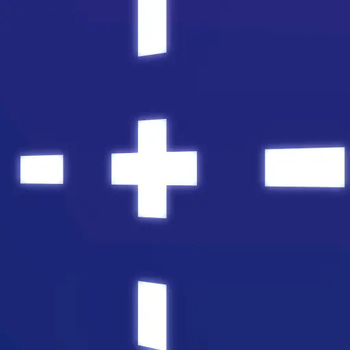
more crosshairs
🟠 Updated over a year ago🖼️ Gallery (11 images)










🔍 Analysis
- 👍 0.2% endorsement rate
- 🏆 #59 of 229 gui mods in this game by downloads
📋 About This Mod
This **resource pack** introduces 57 **unique** crosshairs to Minecraft, _giving_ _players_ a **fresh** and **customizable** experience when aiming. Whether you're looking for a **clean**, minimalistic crosshair or something more complex and creative, this pack has something for everyone. Choose from a variety of styles to **enhance** your gameplay and add a personal touch to your world! ### Features: 57 Custom Crosshairs with different designs and styles. ## how to change the crosshair Locate the "All Crosshairs" Folder: Inside the resource pack go to assets\minecraft\texures\gui\sprites\hud folder, you will find a folder named "all crosshairs". This folder contains all 57 custom crosshairs. Pick a Crosshair: Inside the "all crosshairs" folder, you will see all the available crosshair images (each file is named something like crosshair1.png, crosshair2.png, etc.). Select and Replace: To change your crosshair, simply choose the one you want to use. Copy your chosen crosshair image (e.g., crosshair1.png). Go to the assets\minecraft\textures\gui\sprites\hud folder Delete the existing crosshair.png file and paste your new crosshair image into this folder, renaming it to crosshair.png. Enjoy Your New Crosshair: Once you've replaced the crosshair, load up Minecraft or press f3+t to reload resourcepack and you'll see your new crosshair in the game You can always change your crosshair by following these steps again and selecting a new one from the "all crosshairs" folder. You can also edit the crosshairs to create your own designs if you’re comfortable with any image editing software.
This resource pack introduces 57 unique crosshairs to Minecraft, _giving_ _players_ a fresh and customizable experience when aiming. Whether you're looking for a clean, minimalistic crosshair or something more complex and creative, this pack has something for everyone. Choose from a variety of styles to enhance your gameplay and add a personal touch to your world!
### Features:
57 Custom Crosshairs with different designs and styles.
## how to change the crosshair
Locate the "All Crosshairs" Folder: Inside the resource pack go to assets\minecraft\texures\gui\sprites\hud folder, you will find a folder named "all crosshairs". This folder contains all 57 custom crosshairs.
Pick a Crosshair: Inside the "all crosshairs" folder, you will see all the available crosshair images (each file is named something like crosshair1.png, crosshair2.png, etc.).
Select and Replace:
To change your crosshair, simply choose the one you want to use. Copy your chosen crosshair image (e.g., crosshair1.png). Go to the assets\minecraft\textures\gui\sprites\hud folder Delete the existing crosshair.png file and paste your new crosshair image into this folder, renaming it to crosshair.png. Enjoy Your New Crosshair: Once you've replaced the crosshair, load up Minecraft or press f3+t to reload resourcepack and you'll see your new crosshair in the game
You can always change your crosshair by following these steps again and selecting a new one from the "all crosshairs" folder. You can also edit the crosshairs to create your own designs if you’re comfortable with any image editing software.
📊 Mod Details
- Game
- Minecraft Resource Packs
- Author
- imZynk
- Version
- 0.1
- Downloads
- 1,723
- Endorsements
- 3
- Category
- gui
- Created
- 3/23/2025
- Updated
- 3/16/2025
- Game Versions
- 1.21
- Tags
- gui, tweaks, vanilla-like
🔧 How to Install Minecraft Resource Packs Mods
Download from Modrinth. Use Prism Launcher or drop into your mods folder.
📖 Full step-by-step install guide for Minecraft Resource Packs →
Visit the official mod page for specific installation instructions for this mod.
🎮 Need cheat codes or console commands? Check ur gaming wiki for Minecraft Resource Packs commands, item IDs, and more.
❓ Frequently Asked Questions
Which Minecraft Resource Packs versions does more crosshairs support?
The author lists 1.21. Other versions may work but are untested by the author.
What is the latest version of more crosshairs?
Version 0.1, published 2025-03-16 with 1,723 downloads recorded at the source.
Keep browsing — more Minecraft Resource Packs mods await