MONZAdot Totem
🟡 Updated this year🖼️ Gallery (1 images)
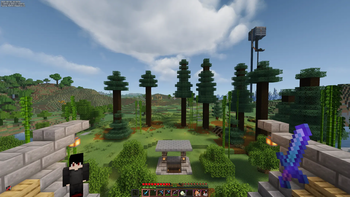
🔍 Analysis
- 🏆 #16 of 252 combat mods in this game by downloads
📋 About This Mod
MONZAdot - Custom Skin Totem Minecraft Java Edition 26.2 (resource pack format 88) ====================================================================== WHAT'S IN THIS PACK -------------------- - Totem of Undying = a small 3D figure built from a real skin texture, instead of the flat gold icon. - Totem-pop particles (the swirling glitter effect) recolored to match the pack's cover art palette: reds, oranges, gold, magenta, and cyan. - Shield blocking + shield glitter effects, carried over and updated to the current item-model format. - Totem pop animation and first-person hold size shrunk down so it doesn't block your view mid-fight (good for PvP). First-person scale (0.3) and third-person scale (0.55) are kept in sync with the Dense Item pack's current handheld values, so if you run both packs together, the totem and your other held items feel like they belong to the same visual style rather than one looking oddly larger or smaller than the other. - Pack icon = your cover art. HOW TO SWAP YOUR SKIN, ANY TIME --------------------------------- There's no in-game menu for this on Java (that's a Bedrock-only feature), but swapping skins takes under a minute: 1. Unzip this pack folder somewhere. 2. Go to: assets/minecraft/textures/item/totem/ 3. You'll see two files: steve.png (wide/default arms) and alex.png (slim arms). Replace whichever matches your new skin's arm type with your new 64x64 skin PNG, keeping the same file name. 4. If you're switching from steve.png to alex.png (or back), open: assets/minecraft/models/item/totem_of_undying.json and change the two lines near the top: "skin": "minecraft:item/totem/steve" "particle": "minecraft:item/totem/steve" to "alex" instead of "steve" (or vice versa). If you're just replacing the skin image but keeping the same arm type, you don't need to touch the JSON at all - just overwrite the PNG and re-zip. 5. Re-zip the folder (select all contents, not the outer folder itself, and compress to .zip) and drop it back into your resourcepacks folder, replacing the old one. Press F3+T in-game or restart to reload. Slim vs wide is about arm width in the actual skin file (slim = 3px arms, wide = 4px arms) - if you're not sure which your skin is, wide (Steve) is the more common default. WHY THE TEXTURE FOLDER MATTERS -------------------------------- The skin textures must stay under textures/item/... Minecraft's Java client only auto-loads item-model textures from a specific set of folders (mainly "item" and "block"). Putting them anywhere else makes them silently fail to load, showing the purple/black "missing texture" checker instead of your skin. NOTES ----- - Skin file must be 64x64 pixels, standard Minecraft skin layout. - Only the base layer is rendered (no hat/jacket/sleeve overlay layer), to keep the model simple. - pack_format 88 = Minecraft 26.2. supported_formats keeps it from showing an "incompatible" warning on nearby versions either.
MONZAdot - Custom Skin Totem Minecraft Java Edition 26. 2 (resource pack format 88) ======================================================================
WHAT'S IN THIS PACK -------------------- - Totem of Undying = a small 3D figure built from a real skin texture, instead of the flat gold icon. - Totem-pop particles (the swirling glitter effect) recolored to match the pack's cover art palette: reds, oranges, gold, magenta, and cyan. - Shield blocking + shield glitter effects, carried over and updated to the current item-model format. - Totem pop animation and first-person hold size shrunk down so it doesn't block your view mid-fight (good for PvP). First-person scale (0. 3) and third-person scale (0. 55) are kept in sync with the Dense Item pack's current handheld values, so if you run both packs together, the totem and your other held items feel like they belong to the same visual style rather than one looking oddly larger or smaller than the other. - Pack icon = your cover art.
HOW TO SWAP YOUR SKIN, ANY TIME --------------------------------- There's no in-game menu for this on Java (that's a Bedrock-only feature), but swapping skins takes under a minute:
1. Unzip this pack folder somewhere. 2. Go to: assets/minecraft/textures/item/totem/ 3. You'll see two files: steve.png (wide/default arms) and alex.png (slim arms). Replace whichever matches your new skin's arm type with your new 64x64 skin PNG, keeping the same file name. 4. If you're switching from steve.png to alex.png (or back), open: assets/minecraft/models/item/totem_of_undying.json and change the two lines near the top: "skin": "minecraft:item/totem/steve" "particle": "minecraft:item/totem/steve" to "alex" instead of "steve" (or vice versa). If you're just replacing the skin image but keeping the same arm type, you don't need to touch the JSON at all - just overwrite the PNG and re-zip. 5. Re-zip the folder (select all contents, not the outer folder itself, and compress to .zip) and drop it back into your resourcepacks folder, replacing the old one. Press F3+T in-game or restart to reload.
Slim vs wide is about arm width in the actual skin file (slim = 3px arms, wide = 4px arms) - if you're not sure which your skin is, wide (Steve) is the more common default.
WHY THE TEXTURE FOLDER MATTERS -------------------------------- The skin textures must stay under textures/item/... Minecraft's Java client only auto-loads item-model textures from a specific set of folders (mainly "item" and "block"). Putting them anywhere else makes them silently fail to load, showing the purple/black "missing texture" checker instead of your skin.
NOTES ----- - Skin file must be 64x64 pixels, standard Minecraft skin layout. - Only the base layer is rendered (no hat/jacket/sleeve overlay layer), to keep the model simple. - pack_format 88 = Minecraft 26. 2. supported_formats keeps it from showing an "incompatible" warning on nearby versions either.
📊 Mod Details
- Game
- Minecraft Resource Packs
- Author
- MONZA.
- Version
- 26.2-final
- Downloads
- 41
- Endorsements
- 0
- Category
- combat
- Created
- 8/4/2026
- Updated
- 8/1/2026
- Game Versions
- 26.2
- Tags
- combat, equipment, vanilla-like
🔧 How to Install Minecraft Resource Packs Mods
Download from Modrinth. Use Prism Launcher or drop into your mods folder.
📖 Full step-by-step install guide for Minecraft Resource Packs →
Visit the official mod page for specific installation instructions for this mod.
🎮 Need cheat codes or console commands? Check ur gaming wiki for Minecraft Resource Packs commands, item IDs, and more.
❓ Frequently Asked Questions
Which Minecraft Resource Packs versions does MONZAdot Totem support?
The author lists 26.2. Other versions may work but are untested by the author.
What is the latest version of MONZAdot Totem?
Version 26.2-final, published 2026-08-01 with 41 downloads recorded at the source.
Keep browsing — more Minecraft Resource Packs mods await