ModularPacks-Resources
🟡 Updated this year🖼️ Gallery (4 images)
🔍 Analysis
- 🏆 #29 of 77 32x mods in this game by downloads
📋 About This Mod
# ModularPacks Resources <img src="https://img.shields.io/badge/Minecraft-1.21.10+-brightgreen?style=flat-square" alt="Minecraft"> <img src="https://img.shields.io/badge/type-Resource Pack-blue?style=flat-square" alt="Pack Type"> <img src="https://img.shields.io/badge/for-ModularPacks-orange?style=flat-square" alt="For Plugin"> <img src="https://img.shields.io/badge/status-active_development-purple?style=flat-square" alt="Status"> <img src="https://img.shields.io/badge/license-MIT-lightgrey?style=flat-square" alt="License"> <br> ModularPacks Resources is the official resource pack for the ModularPacks Paper plugin. Instead of leaving backpacks and upgrades as generic vanilla-looking items, this pack gives them a consistent visual identity with custom models and themed textures. The goal is to make backpack progression and installed modules easier to read at a glance while keeping all gameplay logic on the plugin side. This pack is built to complement ModularPacks, not replace it. The plugin handles backpack identity, storage, module behavior, and data. The resource pack handles visual presentation. ## Features - Custom backpack item visuals - Custom module and medallion visuals - Model mapping designed around ModularPacks item definitions - Improved visual clarity for module-heavy backpacks - Vanilla-client friendly resource-pack workflow - Designed to stay in sync with ongoing ModularPacks development <details> <summary><strong>Requirements and installation</strong></summary> ## Requirements - Minecraft Java Edition with resource packs enabled - A server running the ModularPacks plugin - Recommended: matching versions of plugin and resource pack ## Installation 1. Download the resource pack. 2. Place it in your client resource packs folder, or let your server distribute it. 3. Enable the pack in Minecraft. 4. Join a server running ModularPacks. 5. Verify that ModularPacks CustomModelData values are configured as expected. If models do not appear correctly, check: - Pack load order - Resource pack conflicts - Server-side ModularPacks config values for model data </details> <details> <summary><strong>Design goals and compatibility</strong></summary> ## What this pack is for Many server plugins focus on features first and visuals later. ModularPacks Resources is meant to close that gap by giving backpacks and upgrades a cohesive in-game look that matches the plugin’s modular design. The intention is not to force one style, but to provide an official baseline that feels intentional, readable, and expandable. ## Compatibility notes - This is a resource pack, not a gameplay plugin - No client mod loader is required - Works alongside the ModularPacks plugin on vanilla clients Intended for servers that want the full visual ModularPacks experience </details> <details> <summary><strong>Related project</strong></summary> ## ModularPacks plugin This resource pack is made for the ModularPacks plugin, which can be found (https://modrinth.com/plugin/modularpacks). </details>
# ModularPacks Resources





ModularPacks Resources is the official resource pack for the ModularPacks Paper plugin.
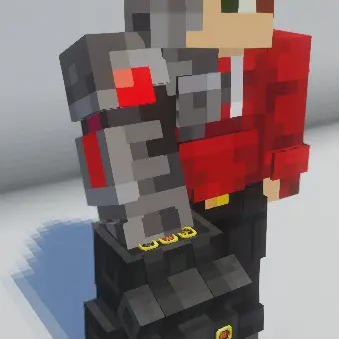
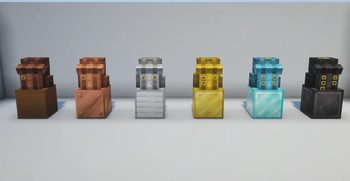
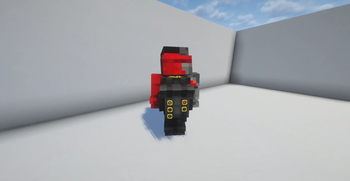
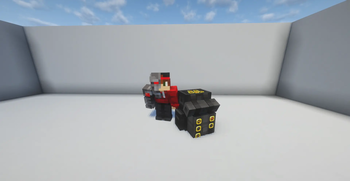
Instead of leaving backpacks and upgrades as generic vanilla-looking items, this pack gives them a consistent visual identity with custom models and themed textures. The goal is to make backpack progression and installed modules easier to read at a glance while keeping all gameplay logic on the plugin side.
This pack is built to complement ModularPacks, not replace it. The plugin handles backpack identity, storage, module behavior, and data. The resource pack handles visual presentation.
## Features - Custom backpack item visuals - Custom module and medallion visuals - Model mapping designed around ModularPacks item definitions - Improved visual clarity for module-heavy backpacks - Vanilla-client friendly resource-pack workflow - Designed to stay in sync with ongoing ModularPacks development
Requirements and installation
## Requirements - Minecraft Java Edition with resource packs enabled - A server running the ModularPacks plugin - Recommended: matching versions of plugin and resource pack
## Installation 1. Download the resource pack. 2. Place it in your client resource packs folder, or let your server distribute it. 3. Enable the pack in Minecraft. 4. Join a server running ModularPacks. 5. Verify that ModularPacks CustomModelData values are configured as expected. If models do not appear correctly, check:
- Pack load order
- Resource pack conflicts
- Server-side ModularPacks config values for model data
-
Design goals and compatibility
## What this pack is for Many server plugins focus on features first and visuals later. ModularPacks Resources is meant to close that gap by giving backpacks and upgrades a cohesive in-game look that matches the plugin’s modular design.
The intention is not to force one style, but to provide an official baseline that feels intentional, readable, and expandable.
## Compatibility notes
- This is a resource pack, not a gameplay plugin
- No client mod loader is required
- Works alongside the ModularPacks plugin on vanilla clients
Intended for servers that want the full visual ModularPacks experience
Related project
## ModularPacks plugin This resource pack is made for the ModularPacks plugin, which can be found (https://modrinth.com/plugin/modularpacks).
📊 Mod Details
- Game
- Minecraft Resource Packs
- Author
- TooterTutor
- Version
- 1.0.2
- Downloads
- 339
- Endorsements
- 0
- Category
- 32x
- Created
- 6/10/2026
- Updated
- 7/24/2026
- Game Versions
- 1.21, 1.21.1, 1.21.2, 1.21.3, 1.21.4
- Tags
- 32x, items, tweaks
🔧 How to Install Minecraft Resource Packs Mods
Download from Modrinth. Use Prism Launcher or drop into your mods folder.
📖 Full step-by-step install guide for Minecraft Resource Packs →
Visit the official mod page for specific installation instructions for this mod.
🎮 Need cheat codes or console commands? Check ur gaming wiki for Minecraft Resource Packs commands, item IDs, and more.
❓ Frequently Asked Questions
Which Minecraft Resource Packs versions does ModularPacks-Resources support?
The author lists 1.21, 1.21.1, 1.21.2, 1.21.3, 1.21.4, 1.21.5. Other versions may work but are untested by the author.
What is the latest version of ModularPacks-Resources?
Version 1.0.2, published 2026-07-24 with 339 downloads recorded at the source.
Keep browsing — more Minecraft Resource Packs mods await