minecraft snapshots
🟠 Updated over a year ago🖼️ Gallery (7 images)
🔍 Analysis
- 🏆 #210 of 352 minecraft mods in this game by downloads
📋 About This Mod
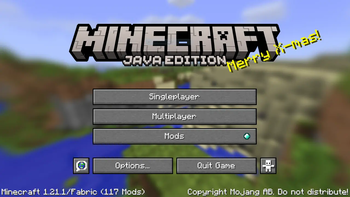
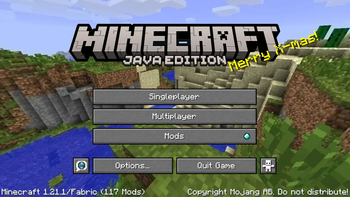
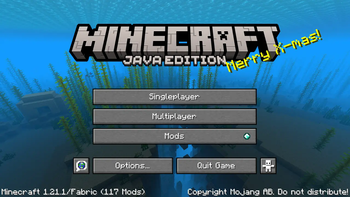
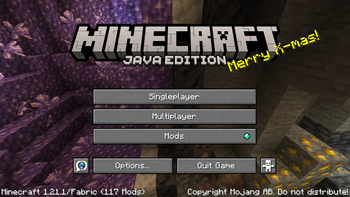
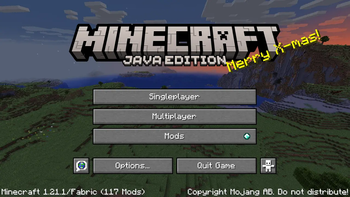
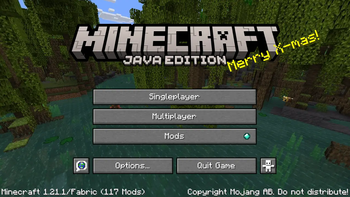
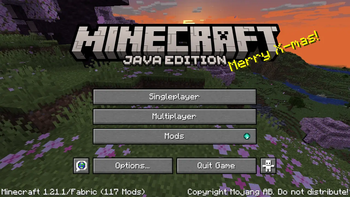
# Update Jan 6, 2026 I completely forgot this existed and to be honest it doesn't matter to me so I'm archiving it. Don't expect any help if you encounter issues! AFAIK it should work fine still. # minecraft snapshots every past Minecraft panorama, classic-1.20. At some point i should add the rest of the panoramas (1.21, 1.21.4, 1.21.5, 1.21.6), but i don't feel like it rn. made for the Vistas mod, won't work without it. ## how to install 1. you will need the (https://modrinth.com/mod/vistas) mod installed in Minecraft, since a vanilla resource pack can only have one panorama. i listed the Vistas mod as a dependency on the releases to make it absolutely clear. 2. just drop it in your `resourcepacks` folder like any other resource pack. 3. after loading it, Vistas will choose a random panorama from the pack and show it on the title screen every time you launch the game. ## setting a specific panorama if you want to set a specific panorama instead, go into the config for the Vistas mod, and enter the id for the panorama you want: - classic unblurred: `minecraft_snapshots:classic` - classic blurred: `minecraft_snapshots:classic_blur` - update aquatic (1.13): `minecraft_snapshots:ocean` - village and pillage (1.14): `minecraft_snapshots:village` - buzzy bees (1.15): `minecraft_snapshots:bees` - nether (1.16): `minecraft_snapshots:nether` - caves & cliffs, pt 1 (1.17): `minecraft_snapshots:caves` - caves & cliffs, pt 2 (1.18): `minecraft_snapshots:caves_2` - the wild (1.19): `minecraft_snapshots:wild` - trails & tales (1.20): `minecraft_snapshots:trails_and_tales` - more coming Soon™ ## credits n stuff The blurred classic, aquatic, village and pillage, buzzy bees, nether, and caves and cliffs pt 1 panoramas are taken from the (https://drive.google.com/file/d/13HYHr_7rhxlNmkLMh390jujWaEv3CM-J/view?usp=sharing) resource pack by TerraformersMC. all other resources were downloaded from the (https://minecraft.fandom.com/wiki/Panorama). Minecraft Snapshots © 2024 by (https://modrinth.com/user/EJSnow) is licensed under CC BY-NC-SA 4.0
# Update Jan 6, 2026 I completely forgot this existed and to be honest it doesn't matter to me so I'm archiving it. Don't expect any help if you encounter issues! AFAIK it should work fine still.
# minecraft snapshots every past Minecraft panorama, classic-1. 20. At some point i should add the rest of the panoramas (1. 21, 1. 21. 4, 1. 21. 5, 1. 21. 6), but i don't feel like it rn. made for the Vistas mod, won't work without it.
## how to install 1. you will need the (https://modrinth.com/mod/vistas) mod installed in Minecraft, since a vanilla resource pack can only have one panorama. i listed the Vistas mod as a dependency on the releases to make it absolutely clear. 2. just drop it in your `resourcepacks` folder like any other resource pack. 3. after loading it, Vistas will choose a random panorama from the pack and show it on the title screen every time you launch the game.
## setting a specific panorama if you want to set a specific panorama instead, go into the config for the Vistas mod, and enter the id for the panorama you want:
- classic unblurred: `minecraft_snapshots:classic`
- classic blurred: `minecraft_snapshots:classic_blur`
- update aquatic (1. 13): `minecraft_snapshots:ocean`
- village and pillage (1. 14): `minecraft_snapshots:village`
- buzzy bees (1. 15): `minecraft_snapshots:bees`
- nether (1. 16): `minecraft_snapshots:nether`
- caves & cliffs, pt 1 (1. 17): `minecraft_snapshots:caves`
- caves & cliffs, pt 2 (1. 18): `minecraft_snapshots:caves_2`
- the wild (1. 19): `minecraft_snapshots:wild`
- trails & tales (1. 20): `minecraft_snapshots:trails_and_tales`
- more coming Soon™
## credits n stuff The blurred classic, aquatic, village and pillage, buzzy bees, nether, and caves and cliffs pt 1 panoramas are taken from the (https://drive.google.com/file/d/13HYHr_7rhxlNmkLMh390jujWaEv3CM-J/view?usp=sharing) resource pack by TerraformersMC. all other resources were downloaded from the (https://minecraft.fandom.com/wiki/Panorama). Minecraft Snapshots © 2024 by (https://modrinth.com/user/EJSnow) is licensed under CC BY-NC-SA 4. 0
📊 Mod Details
- Game
- Minecraft Resource Packs
- Author
- EJSnow
- Version
- 2
- Downloads
- 184
- Endorsements
- 3
- Category
- minecraft
- Created
- 12/29/2024
- Updated
- 3/3/2025
- Game Versions
- 1.18, 1.18.1, 1.18.2, 1.19, 1.19.1
- Tags
- modded, tweaks, vanilla-like
🔧 How to Install Minecraft Resource Packs Mods
Download from Modrinth. Use Prism Launcher or drop into your mods folder.
📖 Full step-by-step install guide for Minecraft Resource Packs →
Visit the official mod page for specific installation instructions for this mod.
🎮 Need cheat codes or console commands? Check ur gaming wiki for Minecraft Resource Packs commands, item IDs, and more.
❓ Frequently Asked Questions
Which Minecraft Resource Packs versions does minecraft snapshots support?
The author lists 1.18, 1.18.1, 1.18.2, 1.19, 1.19.1, 1.19.2. Other versions may work but are untested by the author.
What is the latest version of minecraft snapshots?
Version 2, published 2025-03-03 with 184 downloads recorded at the source.
Keep browsing — more Minecraft Resource Packs mods await