Windows 95 Plus!
🟡 Updated this year🖼️ Gallery (3 images)
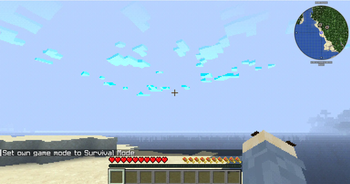
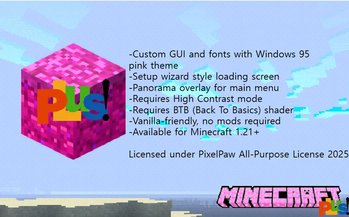
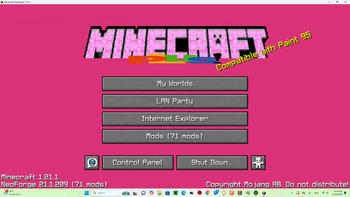
🔍 Analysis
- 🏆 #17 of 41 fonts mods in this game by downloads
📋 About This Mod
!(https://cdn.modrinth.com/data/cached_images/9dc72708d2051ba3e47e746052eb36c9a1b7018c.png)
# Minecraft 95 Plus
Welcome to Minecraft 95 Plus — a vanilla-friendly resource pack that transforms Minecraft into a nostalgic throwback to Windows 95 + Microsoft Plus!
This pack adds: - 🖥️ Windows 95–inspired UI - 🎨 Pink retro aesthetic - 📂 Setup Wizard–style loading screen - 🟪 High Contrast visuals - 🕹️ Retro performance modes (requires FPS cap + shader setup)
## 🎮 Retro Experience Guide
All modes require: - ✅ High Contrast ON - ✅ BTB Shader (Back To Basics, PS1-style)
### Modes: - Win95 Emulation Mode → 10 FPS cap - Pentium III Mode → 20 FPS cap - CRT Smooth Mode → 30 FPS cap - Windows ME Chaos Mode → Random stutters + fake crash vibes (Coming soon...)
## 📦 Compatibility - ✔️ Works with Minecraft 1. 21+ - ✔️ No mods required (resource pack only) - ⚡ For the full retro vibe, use with Iris/Oculus shaders + BTB Shader.
## 📸 Screenshots !(https://cdn.modrinth.com/data/cached_images/eb46647e4b46a01b83c8df415d896c18d2b551b3.png) !(https://cdn.modrinth.com/data/cached_images/2405a8f70dc9aedc3d913df18103fe1d01d2be7f.png) ---
## 📥 Installation 1. Download the `.zip` file. 2. Place it in your Minecraft `resourcepacks` folder. 3. Enable it in the Resource Packs menu. 4. (Optional but recommended) Enable High Contrast + BTB Shader for the full experience.
## 🔗 Distribution - Available on Modrinth and CurseForge. - Free to use, but please credit if showcased in videos/streams.
👾 Step back in time — Minecraft has never looked this retro and cursed before.
📊 Mod Details
- Game
- Minecraft Resource Packs
- Author
- PixelpawP
- Version
- 1.0.0
- Downloads
- 340
- Endorsements
- 2
- Category
- fonts
- Created
- 9/19/2025
- Updated
- 9/19/2025
- Game Versions
- 1.21, 1.21.1, 1.21.2, 1.21.3, 1.21.4
- Tags
- fonts, gui, themed
🔧 How to Install Minecraft Resource Packs Mods
Download from Modrinth. Use Prism Launcher or drop into your mods folder.
📖 Full step-by-step install guide for Minecraft Resource Packs →
Visit the official mod page for specific installation instructions for this mod.
🎮 Need cheat codes or console commands? Check ur gaming wiki for Minecraft Resource Packs commands, item IDs, and more.
❓ Frequently Asked Questions
Which Minecraft Resource Packs versions does Windows 95 Plus! support?
The author lists 1.21, 1.21.1, 1.21.2, 1.21.3, 1.21.4, 1.21.5. Other versions may work but are untested by the author.
What is the latest version of Windows 95 Plus!?
Version 1.0.0, published 2025-09-19 with 340 downloads recorded at the source.
Keep browsing — more Minecraft Resource Packs mods await