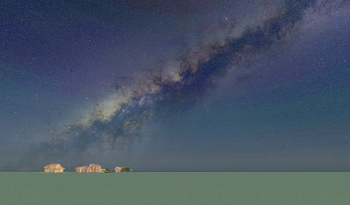
Baiyu Milky Way Skybox
🟡 Updated this year🖼️ Gallery (7 images)

🔍 Analysis
- 👍 0.1% endorsement rate
- 🏆 #493 of 644 16x mods in this game by downloads
📋 About This Mod
## Introduction This is a Milky Way space skybox based on the FabricSkyboxes mod. The resource was converted from the Scientific Sky Simulator and currently only provides a night starfield sky effect. Skyboxes for sunrise or rainy weather are not included at this time. !(https://cdn.modrinth.com/data/FeKYQvEa/images/59a1e346483d2ff570ab3adebd7daaca0cd29186.png) ## Dependencies Need **Nuit** (formerly FabricSkyboxes) : (https://modrinth.com/mod/nuit) --- ## Quick Start ### 1.1 Install Nuit ### 1.2 Download resource Download the latest resource, place it in the folder ``\resourcepacks\`` ## Advanced ### 2.1 Extract Extract ``\resourcepacks\Baiyu Milky Way Skybox.zip`` to ``\resourcepacks\Baiyu Milky Way Skybox\``. Open the folder ``\resourcepacks\Baiyu Milky Way Skybox\assets\nuit\sky\`` ,edit ``sky6_starfield.json``. !(https://cdn.modrinth.com/data/FeKYQvEa/images/37fadff3e5f035dfb33c31ec447b1e4f860704db.png) ### 2.2 simplest, during the Winter Solstice In fact, I do not know whether this specifically refers to the Winter Solstice or January 1st. ```json "mapping": { "0": }, "axis": { "0": } ``` latitude: your located latitude. Positive for North, negative for South (e.g., 22.54 for 22.54°N, -33.87 for 33.87°S). Leave the other two numbers (0.0) unchanged. #### 2.2.1 Example Shenzhen (approx. 22.54°N) Latitude = 22.54 mapping: axis: -90 + 22.54 = -67.46, so use ```json "mapping": { "0": }, "axis": { "0": } ``` #### 2.2.1 Example Sydney (approx. 33.87°S) Latitude = -33.87 (remember the minus sign for South) mapping: axis: -90 + (-33.87) = -123.87, so use ```json "mapping": { "0": }, "axis": { "0": } ``` ### 2.3 during the Summer Solstice This configuration sets the initial sky to the **Summer Solstice** (around June 21). The second number in `mapping` is fixed at `180.0` to represent the half‑year phase shift. ```json "mapping": { "0": }, "axis": { "0": } ``` - `latitude`: your located latitude. Positive for North, negative for South. - Leave the other two numbers (`0.0`) unchanged. #### 2.3.1 Example Shenzhen (approx. 22.54°N) Latitude = 22.54 `mapping`: `axis`: -90 + 22.54 = -67.46, so use ```json "mapping": { "0": }, "axis": { "0": } ``` #### 2.3.2 Example Sydney (approx. 33.87°S) Latitude = -33.87 (remember the minus sign for South) mapping: axis: -90 + (-33.87) = -123.87, so use ```json "mapping": { "0": }, "axis": { "0": } ``` ### 2.4 On any day of the year idk.I've been deriving it for several days, but I still don't know how to tackle it. The mapping is really strange; x, y, and z seem to be coupled.But the celestial sphere rotates a bit more each day—that is, it turns just over 360° daily, so you can wait for the in-game time to pass, and the celestial sphere will also change at the same fixed time each day accordingly.
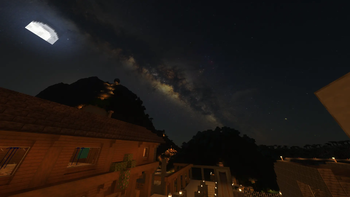
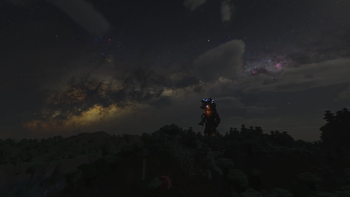
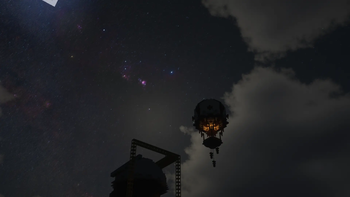
## Introduction This is a Milky Way space skybox based on the FabricSkyboxes mod. The resource was converted from the Scientific Sky Simulator and currently only provides a night starfield sky effect. Skyboxes for sunrise or rainy weather are not included at this time.
!(https://cdn.modrinth.com/data/FeKYQvEa/images/59a1e346483d2ff570ab3adebd7daaca0cd29186.png)
## Dependencies Need Nuit (formerly FabricSkyboxes) : (https://modrinth.com/mod/nuit)
## Quick Start
### 1. 1 Install Nuit
### 1. 2 Download resource Download the latest resource, place it in the folder ``\resourcepacks\``
## Advanced
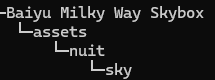
### 2. 1 Extract Extract ``\resourcepacks\Baiyu Milky Way Skybox.zip`` to ``\resourcepacks\Baiyu Milky Way Skybox\``. Open the folder ``\resourcepacks\Baiyu Milky Way Skybox\assets\nuit\sky\`` ,edit ``sky6_starfield.json``.
!(https://cdn.modrinth.com/data/FeKYQvEa/images/37fadff3e5f035dfb33c31ec447b1e4f860704db.png)
### 2. 2 simplest, during the Winter Solstice
In fact, I do not know whether this specifically refers to the Winter Solstice or January 1st.
```json "mapping": { "0": }, "axis": { "0": [-90 + latitude, 0. 0, 0. 0] } ``` latitude: your located latitude. Positive for North, negative for South (e.g., 22. 54 for 22. 54°N, -33. 87 for 33. 87°S). Leave the other two numbers (0. 0) unchanged.
#### 2. 2. 1 Example Shenzhen (approx. 22. 54°N)
Latitude = 22. 54 mapping: axis: -90 + 22. 54 = -67. 46, so use [-67. 46, 0. 0, 0]
```json "mapping": { "0": }, "axis": { "0": [-67. 46, 0. 0, 0] } ``` #### 2. 2. 1 Example Sydney (approx. 33. 87°S)
Latitude = -33. 87 (remember the minus sign for South) mapping: [-33. 87, 0. 0, 0] axis: -90 + (-33. 87) = -123. 87, so use [-123. 87, 0. 0, 0]
```json "mapping": { "0": [-33. 87, 0. 0, 0] }, "axis": { "0": [-123. 87, 0. 0, 0] } ``` ### 2. 3 during the Summer Solstice
This configuration sets the initial sky to the Summer Solstice (around June 21). The second number in `mapping` is fixed at `180. 0` to represent the half‑year phase shift.
```json "mapping": { "0": }, "axis": { "0": [-90 + latitude, 0. 0, 0. 0] } ``` - `latitude`: your located latitude. Positive for North, negative for South. - Leave the other two numbers (`0. 0`) unchanged.
#### 2. 3. 1 Example Shenzhen (approx. 22. 54°N)
Latitude = 22. 54 `mapping`: `axis`: -90 + 22. 54 = -67. 46, so use [-67. 46, 0. 0, 0]
```json "mapping": { "0": }, "axis": { "0": [-67. 46, 0. 0, 0] } ```
#### 2. 3. 2 Example Sydney (approx. 33. 87°S)
Latitude = -33. 87 (remember the minus sign for South) mapping: axis: -90 + (-33. 87) = -123. 87, so use [-123. 87, 0. 0, 0]
```json "mapping": { "0": }, "axis": { "0": [-123. 87, 0. 0, 0] } ```
### 2. 4 On any day of the year idk. I've been deriving it for several days, but I still don't know how to tackle it. The mapping is really strange; x, y, and z seem to be coupled. But the celestial sphere rotates a bit more each day—that is, it turns just over 360° daily, so you can wait for the in-game time to pass, and the celestial sphere will also change at the same fixed time each day accordingly.
📊 Mod Details
- Game
- Minecraft Resource Packs
- Author
- Baiyu
- Version
- 1.1
- Downloads
- 5,324
- Endorsements
- 6
- Category
- 16x
- Created
- 1/31/2026
- Updated
- 7/15/2026
- Game Versions
- 1.20, 1.20.1, 1.20.2, 1.20.3, 1.20.4
- Tags
- 16x, environment, realistic
🔧 How to Install Minecraft Resource Packs Mods
Download from Modrinth. Use Prism Launcher or drop into your mods folder.
📖 Full step-by-step install guide for Minecraft Resource Packs →
Visit the official mod page for specific installation instructions for this mod.
🎮 Need cheat codes or console commands? Check ur gaming wiki for Minecraft Resource Packs commands, item IDs, and more.
❓ Frequently Asked Questions
Which Minecraft Resource Packs versions does Baiyu Milky Way Skybox support?
The author lists 1.20, 1.20.1, 1.20.2, 1.20.3, 1.20.4, 1.20.5. Other versions may work but are untested by the author.
What is the latest version of Baiyu Milky Way Skybox?
Version 1.1, published 2026-07-15 with 5,324 downloads recorded at the source.
Keep browsing — more Minecraft Resource Packs mods await