Lullycraft
🟡 Updated this year🖼️ Gallery (9 images)
🔍 Analysis
- 🏆 #637 of 675 16x mods in this game by downloads
📋 About This Mod
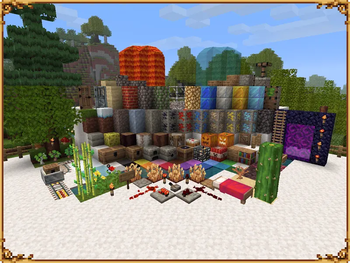
!(https://cdn.modrinth.com/data/cached_images/ea1d99bf15c9c4ab185e61dd93e2ebe56d09ac1c.png) ### A 16x16 Texture Pack for Old Minecraft !(https://cdn.modrinth.com/data/cached_images/2360fcaeec2650cfca1f7de59c44b0e6b5354d37.png) # Features
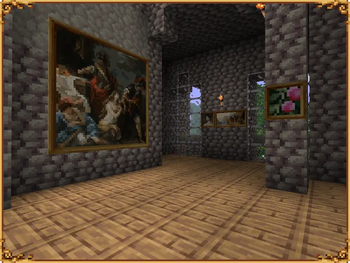
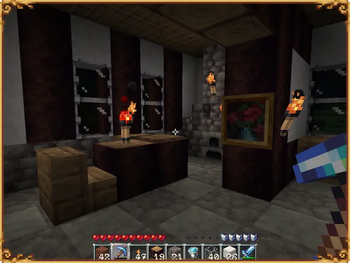
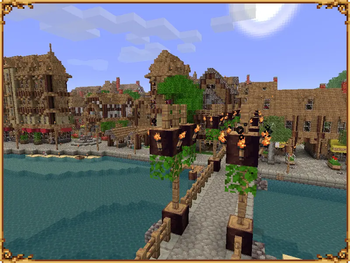
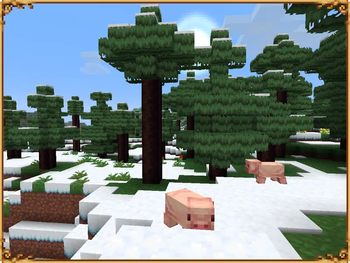
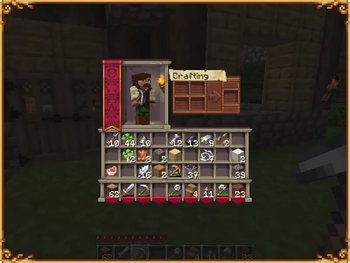
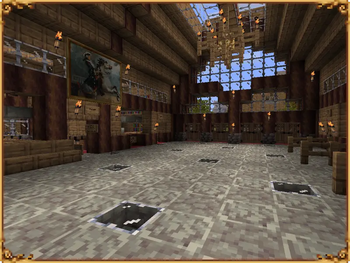
- Complete visual overhaul inspired by Renaissance and Baroque aesthetics
- Every block and item redesigned
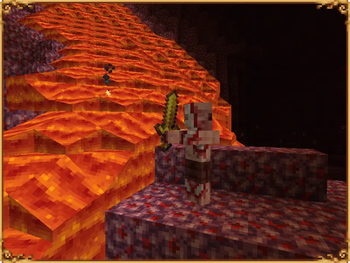
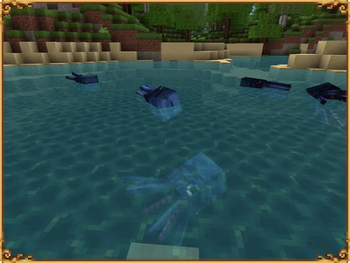
- Hand-pixelled animations (water, lava, fire, portal)
- Custom particles effects
- Pixel Art Renaissance and Baroque paintings
- Redesigned mobs, particles, clouds, font, UI and more…
The idea for this Texture Pack came from my rediscovery of beta Minecraft, which I’ve always appreciated for its simple and elegant gameplay. I want to contribute to keeping it alive and create something reminiscent of older packs for the growing community of Old Minecraft enjoyers. I hope you enjoy using it and appreciate the work put into it.
# How to install
This texture pack is designed for Minecraft Beta 1. 7. 3 (released July 8, 2011). It is not compatible with newer versions, particularly anything beyond Release 1. 4. 7.
The pack can be used on a vanilla installation of Beta 1. 7. 3. However, without additional tools you will experience missing textures, missing custom font and poorer performance.
For the best visual experience and performance, _it is strongly recommended to use a third-party launcher_ like Prism Launcher along with the OptiFine mod, as modding in the Official launcher is difficult.
Recommended Setup
1. Install Prism Launcher
- _Manages different Minecraft versions (instances) and modpacks_
- Download: (https://prismlauncher.org/)
- Launch App and add your Minecraft account (top-right icon)
2. Install the Beta Unleashed Modpack - _Includes Minecraft Beta 1. 7. 3, OptiFine and Gameplay improvements_ - Download: (https://www.reddit.com/r/BetaUnleashed/) - Drag the downloaded file into Prism Launcher to install
3. Install the Texture Pack - Right-Click the Beta Unleashed instance > _Edit > Texture Packs > Add File_ - Add the Texture pack .zip file
4. Enable Animations - Some animations are disabled by default. - Launch Beta Unleashed → _Options → Video Settings → Animations_ - Water Animated: _ON_ - Lava Animated: _ON_
Alternative Installation Method
1. Manual OptiFine Installation (Prism Launcher)
- (https://prismlauncher.org/)
- (https://optifine.net/adloadx?f=beta_OptiFine_1. 7. 3_HD_S_G.zip)
- (https://github.com/FarnGitHub/Farn_Minecraft_Mod_Collection/raw/refs/heads/old/OptifineLongDistancePatchSmoothV2.zip)
2. Install Minecraft Beta 1. 7. 3 and install Optifine - In Prism Launcher: _Add Instance → enable Beta → select b1. 7. 3 → OK_ - Right-click created instance → _Edit → Version → Add to minecraft.jar_ - Add OptiFine .zip file (and optional patch) - Then install the texture pack using the same methods described above.
# License & Usage
All rights reserved.
Lullycraft and all of its assets are the property of the creator. This pack is provided for personal use only. By downloading or using it, you agree to the following terms:
You may: - Use the pack for personal gameplay - Use the pack in videos (youtube...), streams, or other online content (credit is appreciated) - Share screenshots or other content featuring the pack online - Share official download links - Request permission for inclusion in modpacks or other projects
You may not: - Redistribute or reupload the pack, in whole or in part, on any platform - Modify, edit, or create derivative works from the pack or its assets - Include the pack in modpacks or public distributions without permission - Use the pack or its assets for any commercial purpose - Place the pack behind ad links, paywalls, or monetized downloads
If you are unsure whether your use falls within these guidelines, feel free to ask for permission.
Texture Pack created by NerethMC (Prestigious-Yard5283 on reddit)
Inspired by classic Minecraft texture packs
Created using Aseprite, PhotoFiltre Studio and GIMP
Thanks for the community for feedback and support
If you enjoy the texture pack and would like to support the project, you can do so here:
https://ko-fi.com/nerethmc
Don't feel obligated. The pack is free and will remain so. But any support is appreciated and could encourage further work on this project or other projects.
📊 Mod Details
- Game
- Minecraft Resource Packs
- Author
- NerethMC
- Version
- 0.1
- Downloads
- 158
- Endorsements
- 12
- Category
- 16x
- Created
- 7/20/2026
- Updated
- 7/20/2026
- Game Versions
- b1.7, b1.7.2, b1.7.3
- Tags
- 16x, blocks, themed
🔧 How to Install Minecraft Resource Packs Mods
Download from Modrinth. Use Prism Launcher or drop into your mods folder.
📖 Full step-by-step install guide for Minecraft Resource Packs →
Visit the official mod page for specific installation instructions for this mod.
🎮 Need cheat codes or console commands? Check ur gaming wiki for Minecraft Resource Packs commands, item IDs, and more.
❓ Frequently Asked Questions
Which Minecraft Resource Packs versions does Lullycraft support?
The author lists b1.7, b1.7.2, b1.7.3. Other versions may work but are untested by the author.
What is the latest version of Lullycraft?
Version 0.1, published 2026-07-20 with 158 downloads recorded at the source.
Keep browsing — more Minecraft Resource Packs mods await