Kris's texts
🟡 Updated this year🖼️ Gallery (5 images)
🔍 Analysis
- 🏆 #8 of 86 locale mods in this game by downloads
📋 About This Mod
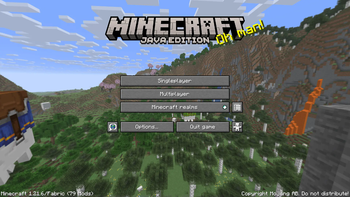
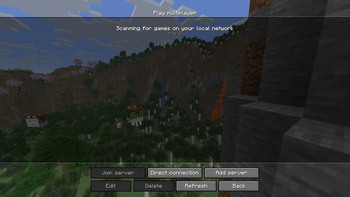
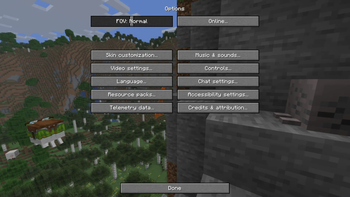
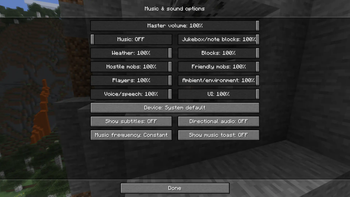
# Sentence case language pack A lightweight resource pack for **Minecraft Java Edition 1.21.11** that converts the default **English (US)** language file from widespread Title Case to consistent, readable **sentence case**. This pack replaces **only** `en_us.json`. No textures, models, sounds, or gameplay mechanics are changed. ## Purpose Minecraft’s default UI capitalizes nearly everything (“Diamond Sword”, “Monster Hunter”), which is visually loud and inconsistent with normal English usage. This pack aims to: - Improve readability - Make UI text feel more natural - Preserve Minecraft’s established terminology and proper nouns - Stay stylistically consistent across the entire game ## What this pack changes Only text capitalization is modified. Specifically: - Item and block names - UI labels, menus, and buttons - Advancement titles and descriptions - Tooltips, subtitles, and system messages No wording, punctuation, or formatting logic is altered. ## Capitalization rules used This pack follows a **strict and consistent rule set**: ### Sentence case - Most strings use sentence case: - “Diamond sword” - “Pause menu” - “Monster hunter” - “Crafting a new look” ### Proper nouns preserved The following always remain capitalized: - **Minecraft**, **Mojang**, **Microsoft** - **Java** (e.g. “Java Virtual Machine”) - **Realm / Realms** - **Snapshot / Snapshots** - **PvP** - **The Nether**, **The End**, **Overworld** - **Ender** (always capitalized) ### Mob names in sentences - **Generic mobs are lowercase** in sentences: - villager, breeze, phantom, zombie, skeleton, etc. - **Boss / titled mobs stay capitalized** everywhere: - **Ender Dragon** - **Wither** - **Elder Guardian** Examples: - “Kill a breeze with a deflected breeze-shot wind charge” - “Follow an eye of Ender” - “Look at the Ender Dragon through a spyglass” ### Items, blocks, and variants - Items and blocks use sentence case: - “Weathered copper golem statue” - “Block of amethyst” - Canonical entity names are lowercased when used adjectivally: - “copper golem statue” (not “Copper Golem statue”) ### Other rules - Difficulty names are lowercase in sentences: - peaceful, easy, normal, hard - Keyboard keys are capitalized: - Enter, Escape, Shift - Acronyms remain uppercase: - TNT, CPU, GPU, ID, GUI ### Creative and artistic content untouched The following are intentionally preserved: - Music disc titles - Artist names - Painting titles - Lore-style proper names ## Compatibility - **Minecraft version:** Java Edition 1.21.11 - **Mod loaders:** Vanilla, Fabric, Forge, NeoForge, Quilt - **Language:** English (US) only - **Conflicts:** None (only replaces `en_us.json`) ## Installation Downloadable on (https://modrinth.com/resourcepack/kris-texts) 1. Download the resource pack `.zip` 2. Place it into your `resourcepacks` folder 3. Launch Minecraft 4. Go to **Options → Resource Packs** 5. Enable the pack 6. Ensure **English (US)** is selected under **Options → Language** ## Credits Created by **Kris** - (https://www.kristianbenko.com/) ## License Free to use and modify. Credit appreciated but not required.
# Sentence case language pack
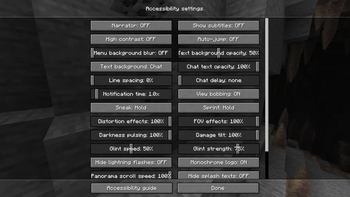
A lightweight resource pack for Minecraft Java Edition 1. 21. 11 that converts the default English (US) language file from widespread Title Case to consistent, readable sentence case.
This pack replaces only `en_us.json`. No textures, models, sounds, or gameplay mechanics are changed.
Minecraft’s default UI capitalizes nearly everything (“Diamond Sword”, “Monster Hunter”), which is visually loud and inconsistent with normal English usage.
This pack aims to: - Improve readability - Make UI text feel more natural - Preserve Minecraft’s established terminology and proper nouns - Stay stylistically consistent across the entire game
## What this pack changes
Only text capitalization is modified. Specifically:
- Item and block names
- UI labels, menus, and buttons
- Advancement titles and descriptions
- Tooltips, subtitles, and system messages
No wording, punctuation, or formatting logic is altered.
## Capitalization rules used
This pack follows a strict and consistent rule set:
### Sentence case - Most strings use sentence case: - “Diamond sword” - “Pause menu” - “Monster hunter” - “Crafting a new look”
### Proper nouns preserved The following always remain capitalized: - Minecraft, Mojang, Microsoft - Java (e.g. “Java Virtual Machine”) - Realm / Realms - Snapshot / Snapshots - PvP - The Nether, The End, Overworld - Ender (always capitalized)
### Mob names in sentences - Generic mobs are lowercase in sentences: - villager, breeze, phantom, zombie, skeleton, etc. - Boss / titled mobs stay capitalized everywhere: - Ender Dragon - Wither - Elder Guardian
Examples: - “Kill a breeze with a deflected breeze-shot wind charge” - “Follow an eye of Ender” - “Look at the Ender Dragon through a spyglass”
### Items, blocks, and variants - Items and blocks use sentence case: - “Weathered copper golem statue” - “Block of amethyst” - Canonical entity names are lowercased when used adjectivally: - “copper golem statue” (not “Copper Golem statue”)
### Other rules - Difficulty names are lowercase in sentences: - peaceful, easy, normal, hard - Keyboard keys are capitalized: - Enter, Escape, Shift - Acronyms remain uppercase: - TNT, CPU, GPU, ID, GUI
### Creative and artistic content untouched The following are intentionally preserved: - Music disc titles - Artist names - Painting titles - Lore-style proper names
## Compatibility
- Minecraft version: Java Edition 1. 21. 11
- Mod loaders: Vanilla, Fabric, Forge, NeoForge, Quilt
- Language: English (US) only
- Conflicts: None (only replaces `en_us.json`)
## Installation
Downloadable on (https://modrinth.com/resourcepack/kris-texts)
1. Download the resource pack `.zip` 2. Place it into your `resourcepacks` folder 3. Launch Minecraft 4. Go to Options → Resource Packs 5. Enable the pack 6. Ensure English (US) is selected under Options → Language
Created by Kris - (https://www.kristianbenko.com/)
Free to use and modify. Credit appreciated but not required.
📊 Mod Details
- Game
- Minecraft Resource Packs
- Author
- Christmaskris
- Version
- 1.1
- Downloads
- 82
- Endorsements
- 1
- Category
- locale
- Created
- 6/29/2025
- Updated
- 1/24/2026
- Game Versions
- 1.21.11
- Tags
- locale, simplistic, vanilla-like
🔧 How to Install Minecraft Resource Packs Mods
Download from Modrinth. Use Prism Launcher or drop into your mods folder.
📖 Full step-by-step install guide for Minecraft Resource Packs →
Visit the official mod page for specific installation instructions for this mod.
🎮 Need cheat codes or console commands? Check ur gaming wiki for Minecraft Resource Packs commands, item IDs, and more.
❓ Frequently Asked Questions
Which Minecraft Resource Packs versions does Kris's texts support?
The author lists 1.21.11. Other versions may work but are untested by the author.
What is the latest version of Kris's texts?
Version 1.1, published 2026-01-24 with 82 downloads recorded at the source.
Keep browsing — more Minecraft Resource Packs mods await