Inverted-Enderman
🟡 Updated this year🖼️ Gallery (4 images)
🔍 Analysis
- 🏆 #66 of 141 entities mods in this game by downloads
📋 About This Mod
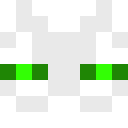
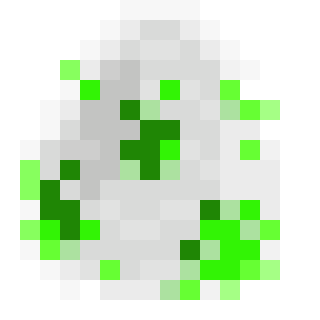
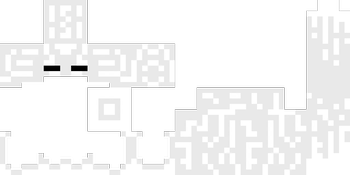
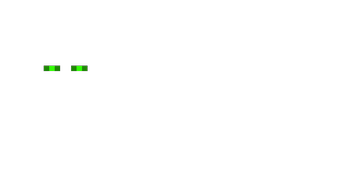
# Inverted Enderman – Minecraft Resource Pack A simple Minecraft resource pack that inverts the classic Enderman look — turning its dark, void-like appearance into a bright inverted variant with a clean, eerie twist. Endermen, but flipped. --- ## 👁️ What This Pack Does * Recolors the **Enderman texture** using inverted colors * Turns the Enderman body from **black → white** * Changes Enderman eyes from **purple → green** * Also changes its Spawn Egg * Keeps the original model and behavior unchanged * Lightweight & client-side only --- ## 🧪 Why This Exists? Because sometimes the void deserves a remix. --- ## 🛠 Installation 1. Download or clone this resource pack. 2. Put the folder or `.zip` into: 3. Launch Minecraft → **Options** → **Resource Packs** 4. Enable the pack. 5. Done. --- ## 📁 Pack Scope This pack only affects: * Enderman entity texture * Eye color rework (inverted palette) No gameplay changes. No mechanics altered. Pure visual experiment. --- ## ⚠ Notes * Multiplayer friendly (client-side only) * Works in survival & creative * Future Minecraft updates may require texture path fixes or adjustments --- ## ⚪⚫ Green eyes in the void hit different.
# Inverted Enderman – Minecraft Resource Pack
A simple Minecraft resource pack that inverts the classic Enderman look — turning its dark, void-like appearance into a bright inverted variant with a clean, eerie twist.
Endermen, but flipped.
## 👁️ What This Pack Does
Recolors the Enderman texture using inverted colors Turns the Enderman body from black → white Changes Enderman eyes from purple → green Also changes its Spawn Egg Keeps the original model and behavior unchanged Lightweight & client-side only
## 🧪 Why This Exists?
Because sometimes the void deserves a remix.
## 🛠 Installation
1. Download or clone this resource pack. 2. Put the folder or `.zip` into: 3. Launch Minecraft → Options → Resource Packs 4. Enable the pack. 5. Done.
## 📁 Pack Scope
This pack only affects:
Enderman entity texture Eye color rework (inverted palette)
No gameplay changes. No mechanics altered. Pure visual experiment.
Multiplayer friendly (client-side only) Works in survival & creative * Future Minecraft updates may require texture path fixes or adjustments
## ⚪⚫ Green eyes in the void hit different.
📊 Mod Details
- Game
- Minecraft Resource Packs
- Author
- Ryokurei
- Version
- 1.0.0
- Downloads
- 203
- Endorsements
- 0
- Category
- entities
- Created
- 5/26/2026
- Updated
- 5/23/2026
- Game Versions
- 1.21, 1.21.1, 24w33a, 24w34a, 24w35a
- Tags
- entities, simplistic, themed
🔧 How to Install Minecraft Resource Packs Mods
Download from Modrinth. Use Prism Launcher or drop into your mods folder.
📖 Full step-by-step install guide for Minecraft Resource Packs →
Visit the official mod page for specific installation instructions for this mod.
🎮 Need cheat codes or console commands? Check ur gaming wiki for Minecraft Resource Packs commands, item IDs, and more.
❓ Frequently Asked Questions
Which Minecraft Resource Packs versions does Inverted-Enderman support?
The author lists 1.21, 1.21.1, 24w33a, 24w34a, 24w35a, 24w36a. Other versions may work but are untested by the author.
What is the latest version of Inverted-Enderman?
Version 1.0.0, published 2026-05-23 with 203 downloads recorded at the source.
Keep browsing — more Minecraft Resource Packs mods await