Hardcore hearts
🟡 Updated this year🖼️ Gallery (1 images)
🔍 Analysis
- 🏆 #177 of 321 gui mods in this game by downloads
📋 About This Mod
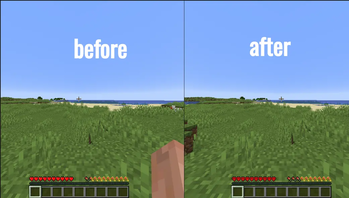
This resource pack replaces the classic Survival health bar with the iconic, dark-styled hearts from Hardcore mode.
### How to install: 1. Download the .zip file from the website to your computer. 2. Launch Minecraft, go to Options, and select Resource Packs. 3. Click the Open Pack Folder button. 4. Drag and drop the downloaded .zip file into the opened folder, then activate it in-game using the arrow icon.
📊 Mod Details
- Game
- Minecraft Resource Packs
- Author
- Wejszyn
- Version
- 1.0.0
- Downloads
- 115
- Endorsements
- 3
- Category
- gui
- Created
- 7/19/2026
- Updated
- 7/19/2026
- Game Versions
- 26.2
- Tags
- gui, vanilla-like
🔧 How to Install Minecraft Resource Packs Mods
Download from Modrinth. Use Prism Launcher or drop into your mods folder.
📖 Full step-by-step install guide for Minecraft Resource Packs →
Visit the official mod page for specific installation instructions for this mod.
🎮 Need cheat codes or console commands? Check ur gaming wiki for Minecraft Resource Packs commands, item IDs, and more.
❓ Frequently Asked Questions
Which Minecraft Resource Packs versions does Hardcore hearts support?
The author lists 26.2. Other versions may work but are untested by the author.
What is the latest version of Hardcore hearts?
Version 1.0.0, published 2026-07-19 with 115 downloads recorded at the source.
Keep browsing — more Minecraft Resource Packs mods await