Golden apple counter
🟡 Updated this year🖼️ Gallery (1 images)
🔍 Analysis
- 🏆 #165 of 297 combat mods in this game by downloads
📋 About This Mod
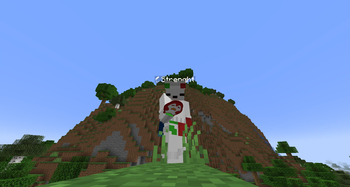
## Penguin Gapple Pack ### Overview: The **Penguin Gapple Pack** enhances your Minecraft experience by replacing the Golden Apple icon with a **colored penguin** that changes based on your stack size. Instead of hovering over your hotbar to check how many gapples you have, the penguin's color gives you an instant visual cue — red, orange, yellow, or green depending on the amount. ### Why It's Useful in PvP: In PvP, knowing your Golden Apple count — or your enemy's — can be the difference between winning and losing a fight. This texture pack allows you to: - **Enhanced Awareness:** Instantly read your own gapple count at a glance without wasting time hovering over your inventory. - **Enemy Tracking:** Spot how many gapples your opponent is holding purely through visual cues — a critical advantage in fast-paced fights. - **Improved Strategy:** Adjust your combat decisions based on real-time information. Knowing your enemy is running low on gapples can completely change how you approach a fight. ### Color Ranges: - 🔴 **1–16** → Red - 🟠 **17–32** → Orange - 🟡 **33–48** → Yellow - 🟢 **49–64** → Green ### Requirements: - **OptiFine:** Essential for enabling Custom Item Textures (CIT). - **CIT Resewn (for Fabric):** Allows for dynamic texture changes based on item stack size. ### Installation Instructions: **For OptiFine:** - Visit the OptiFine website and download the version compatible with your Minecraft version. - Run the downloaded file to install OptiFine. **For Fabric (CIT Resewn):** - Go to the CIT Resewn page on Modrinth and download the version that matches your Minecraft version. - Place the downloaded `.jar` file into your Minecraft `mods` folder. ### 📂 Locating the Resource Packs Folder - Open your Minecraft Launcher and launch the game. - Navigate to the main menu, then click **Options** > **Resource Packs**. - Click **Open Resource Pack Folder**. - Drag and drop the texture pack `.zip` file into this folder, then activate it.
## Penguin Gapple Pack ### Overview: The Penguin Gapple Pack enhances your Minecraft experience by replacing the Golden Apple icon with a colored penguin that changes based on your stack size. Instead of hovering over your hotbar to check how many gapples you have, the penguin's color gives you an instant visual cue — red, orange, yellow, or green depending on the amount.
### Why It's Useful in PvP: In PvP, knowing your Golden Apple count — or your enemy's — can be the difference between winning and losing a fight. This texture pack allows you to: - Enhanced Awareness: Instantly read your own gapple count at a glance without wasting time hovering over your inventory. - Enemy Tracking: Spot how many gapples your opponent is holding purely through visual cues — a critical advantage in fast-paced fights. - Improved Strategy: Adjust your combat decisions based on real-time information. Knowing your enemy is running low on gapples can completely change how you approach a fight.
### Color Ranges: - 🔴 1–16 → Red - 🟠 17–32 → Orange - 🟡 33–48 → Yellow - 🟢 49–64 → Green
### Requirements: - OptiFine: Essential for enabling Custom Item Textures (CIT). - CIT Resewn (for Fabric): Allows for dynamic texture changes based on item stack size.
### Installation Instructions: For OptiFine: - Visit the OptiFine website and download the version compatible with your Minecraft version. - Run the downloaded file to install OptiFine.
For Fabric (CIT Resewn): - Go to the CIT Resewn page on Modrinth and download the version that matches your Minecraft version. - Place the downloaded `.jar` file into your Minecraft `mods` folder.
### 📂 Locating the Resource Packs Folder - Open your Minecraft Launcher and launch the game. - Navigate to the main menu, then click Options > Resource Packs. - Click Open Resource Pack Folder. - Drag and drop the texture pack `.zip` file into this folder, then activate it.
📊 Mod Details
- Game
- Minecraft Resource Packs
- Author
- Strenqht
- Version
- 1.16.x
- Downloads
- 190
- Endorsements
- 0
- Category
- combat
- Created
- 5/31/2026
- Updated
- 7/26/2026
- Game Versions
- 1.16, 1.16.1, 1.16.2, 1.16.3, 1.16.4
- Tags
- combat, equipment, items
🔧 How to Install Minecraft Resource Packs Mods
Download from Modrinth. Use Prism Launcher or drop into your mods folder.
📖 Full step-by-step install guide for Minecraft Resource Packs →
Visit the official mod page for specific installation instructions for this mod.
🎮 Need cheat codes or console commands? Check ur gaming wiki for Minecraft Resource Packs commands, item IDs, and more.
❓ Frequently Asked Questions
Which Minecraft Resource Packs versions does Golden apple counter support?
The author lists 1.16, 1.16.1, 1.16.2, 1.16.3, 1.16.4, 1.16.5. Other versions may work but are untested by the author.
What is the latest version of Golden apple counter?
Version 1.16.x, published 2026-07-26 with 190 downloads recorded at the source.
Keep browsing — more Minecraft Resource Packs mods await