FullBright+
🟡 Updated this year🖼️ Gallery (6 images)
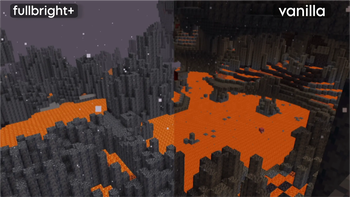
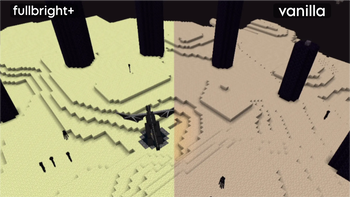
🔍 Analysis
- 👍 0.0% endorsement rate
- 🏆 #272 of 364 minecraft mods in this game by downloads
📋 About This Mod
!(https://cdn.modrinth.com/data/cached_images/2d4ebfca4cfb0b97e810ca79d8f5b703ed8e275b.png)
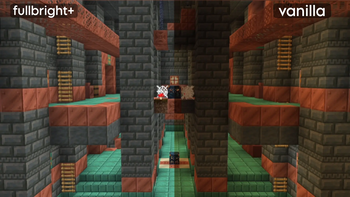
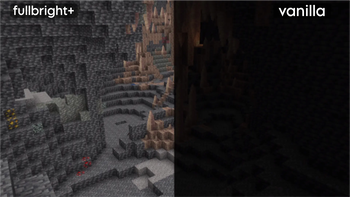
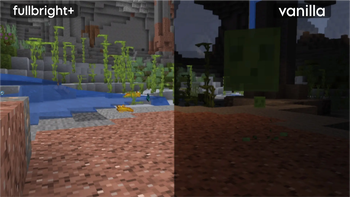
> Light up your Minecraft world with FullBright+ — a lightweight, vanilla-friendly resource pack that removes darkness while keeping the original Minecraft look intact.
## ✨ Features
- Always Bright
- Explore caves, mines, and the night without struggling to see in the dark.
- 100% Vanilla Style
- Preserves Minecraft's original textures and aesthetic—only the lighting changes.
- Wide Compatibility
- Works with Vanilla Minecraft, OptiFine, and Sodium (using PolyTone).
- Lightweight Performance
- No shaders, no unnecessary effects, and virtually no impact on FPS.
- Perfect for Exploration
- Spend less time placing torches and more time exploring, mining, and building.
## 🌿 Why Use FullBright+?
FullBright+ is designed for players who want better visibility without changing Minecraft's classic appearance. Whether you're mining deep underground, exploring at night, or working on large builds, it keeps everything bright and easy to see.
### Great for: - Mine without constantly placing torches. - Explore caves and underground structures with ease. - Build comfortably at any time of day. - Enjoy a cleaner, distraction-free Minecraft experience.
FullBright+ offers the perfect balance between improved visibility and the classic vanilla experience.
## 📦 Installation
1. Download the FullBright+ resource pack (`.zip`). 2. Move the file to your Resource Packs folder. 3. Open Minecraft and go to Options → Resource Packs. 4. Enable FullBright+.
> Note for Sodium users: Install PolyTone for full compatibility.
📊 Mod Details
- Game
- Minecraft Resource Packs
- Author
- Syntrix
- Version
- MC26.3-snapshot
- Downloads
- 29,558
- Endorsements
- 3
- Category
- minecraft
- Created
- 3/16/2026
- Updated
- 8/6/2026
- Game Versions
- 26.3-snapshot-1, 26.3-snapshot-2, 26.3-snapshot-3, 26.3-snapshot-4
- Tags
- simplistic, utility, vanilla-like
🔧 How to Install Minecraft Resource Packs Mods
Download from Modrinth. Use Prism Launcher or drop into your mods folder.
📖 Full step-by-step install guide for Minecraft Resource Packs →
Visit the official mod page for specific installation instructions for this mod.
🎮 Need cheat codes or console commands? Check ur gaming wiki for Minecraft Resource Packs commands, item IDs, and more.
❓ Frequently Asked Questions
Which Minecraft Resource Packs versions does FullBright+ support?
The author lists 26.3-snapshot-1, 26.3-snapshot-2, 26.3-snapshot-3, 26.3-snapshot-4. Other versions may work but are untested by the author.
What is the latest version of FullBright+?
Version MC26.3-snapshot, published 2026-08-06 with 29,558 downloads recorded at the source.
Keep browsing — more Minecraft Resource Packs mods await