FullBright Dark-GUI Supreme
🟠 Updated over a year ago🖼️ Gallery (6 images)
🔍 Analysis
- 👍 0.0% endorsement rate
- 🏆 #90 of 662 16x mods in this game by downloads
📋 About This Mod
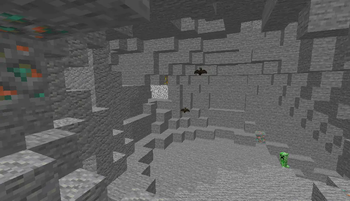
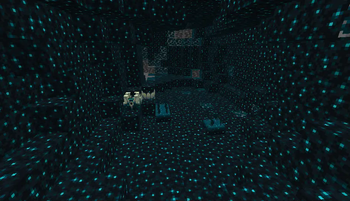
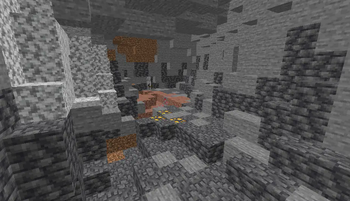
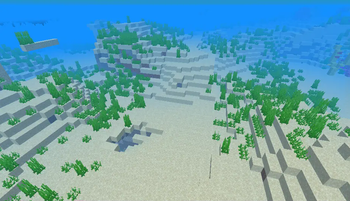
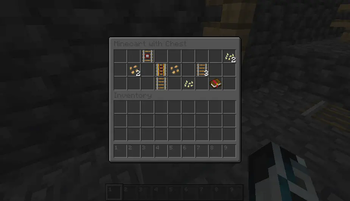
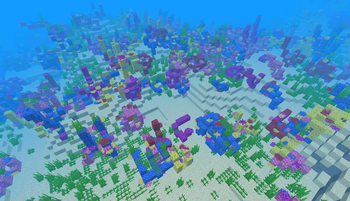
# **Full Bright Dark GUI Supreme Resource Pack** ## **Overview** #### The Full Bright Dark GUI Animated Mobs resource pack is designed to enhance your Minecraft experience by addressing common visibility challenges. Whether you’re exploring dimly lit caves, venturing into the Nether, or battling mobs at night, this pack ensures that you’ll never miss a thing. ## **Key Features** ### 1. **Enhanced Visibility** **Illuminate the Darkness:** Even without cheats, this resource pack brightens up dark areas, allowing you to see clearly where you couldn’t before. **Spot Hidden Items:** No more squinting in the shadows! With Full Bright, you’ll easily spot chests, ores, and other valuable items. **Outsmart Hostile Mobs:** Those sneaky creepers won’t catch you off guard anymore. Navigate dungeons and nighttime environments with ease. ### 2. **Accessibility** **Leveling the Playing Field:** Some players struggle with dimly lit areas due to real-life vision challenges. Full Bright ensures that everyone can explore Minecraft on equal footing. **No Commands Needed:** Forget typing commands in chat. Once installed, Full Bright automatically provides unlimited light, making it accessible to all players. ### 3. **Fair Play (But Also a Little Cheeky)** **Technically Cheating:** If you have perfect eyesight, Full Bright can give you an edge. Complete dungeons effortlessly and avoid enemies in the dark. **Be Mindful:** While it’s tempting to appear as a Minecraft master, remember that Full Bright is banned on some multiplayer servers. Play fair and follow server rules. ## **Installation** **Download the Full Bright Dark GUI resource pack.** **Download OPTIFINE** **Launch Minecraft.** **Go to Options > Resource Packs.** **Click Open Resource Pack Folder.** **Move the downloaded pack into the folder.** **Select the pack in the resource pack list.** **Enjoy your well-lit adventures!** Remember, Full Bright isn’t just about convenience; it’s about making Minecraft accessible and enjoyable for all players. So go ahead, light up your world, and embark on epic quests with confidence! 🌟🔦 ## The Author **I am InventoStarz. I am a good coder and designer. I like to provide a lot of Minecraft Content.** (https://youtube.com/@AIvortx) (https://creations-inventostarz.pages.dev) **Discord Link:** (https://discord.gg/uYjttvug) ## Links ### Modrinth **Links:** (https://modrinth.com/resourcepack/fullbright-dark-gui-supreme) ### CurseForge **Links:** (https://www.curseforge.com/minecraft/texture-packs/fullbright-dark-gui-supreme) **Give More Suggestions And Ideas For More New Features On The Discord Suggestions Sections!** (https://cdn.modrinth.com/data/cached_images/10f15f491071adcb2ee90678acd0ac761054cab2.png)](https://discord.gg/uYjttvug)
# Full Bright Dark GUI Supreme Resource Pack ## Overview #### The Full Bright Dark GUI Animated Mobs resource pack is designed to enhance your Minecraft experience by addressing common visibility challenges. Whether you’re exploring dimly lit caves, venturing into the Nether, or battling mobs at night, this pack ensures that you’ll never miss a thing.
## Key Features ### 1. Enhanced Visibility
Illuminate the Darkness: Even without cheats, this resource pack brightens up dark areas, allowing you to see clearly where you couldn’t before. Spot Hidden Items: No more squinting in the shadows! With Full Bright, you’ll easily spot chests, ores, and other valuable items. Outsmart Hostile Mobs: Those sneaky creepers won’t catch you off guard anymore. Navigate dungeons and nighttime environments with ease. ### 2. Accessibility Leveling the Playing Field: Some players struggle with dimly lit areas due to real-life vision challenges. Full Bright ensures that everyone can explore Minecraft on equal footing. No Commands Needed: Forget typing commands in chat. Once installed, Full Bright automatically provides unlimited light, making it accessible to all players. ### 3. Fair Play (But Also a Little Cheeky) Technically Cheating: If you have perfect eyesight, Full Bright can give you an edge. Complete dungeons effortlessly and avoid enemies in the dark. Be Mindful: While it’s tempting to appear as a Minecraft master, remember that Full Bright is banned on some multiplayer servers. Play fair and follow server rules.
## Installation Download the Full Bright Dark GUI resource pack. Download OPTIFINE Launch Minecraft. Go to Options > Resource Packs. Click Open Resource Pack Folder. Move the downloaded pack into the folder. Select the pack in the resource pack list. Enjoy your well-lit adventures! Remember, Full Bright isn’t just about convenience; it’s about making Minecraft accessible and enjoyable for all players. So go ahead, light up your world, and embark on epic quests with confidence! 🌟🔦
## The Author
I am InventoStarz. I am a good coder and designer. I like to provide a lot of Minecraft Content.
[Also Do Subscribe to My Channel](https://youtube.com/@AIvortx)
[Visit The Official Website Now!](https://creations-inventostarz.pages.dev)
Discord Link: [Discord](https://discord.gg/uYjttvug)
## Links ### Modrinth
Links: [Editions](https://modrinth.com/resourcepack/fullbright-dark-gui-supreme)
### CurseForge
Links: [CurseForge's Editions](https://www.curseforge.com/minecraft/texture-packs/fullbright-dark-gui-supreme)
Give More Suggestions And Ideas For More New Features On The Discord Suggestions Sections!
[!(https://cdn.modrinth.com/data/cached_images/10f15f491071adcb2ee90678acd0ac761054cab2.png)](https://discord.gg/uYjttvug)
📊 Mod Details
- Game
- Minecraft Resource Packs
- Author
- InventoXtar
- Version
- 6.0
- Downloads
- 3,835
- Endorsements
- 0
- Category
- 16x
- Created
- 3/14/2024
- Updated
- 4/3/2025
- Game Versions
- 1.20, 1.20.1, 1.20.2, 1.20.3, 1.20.4
- Tags
- 16x, core-shaders, entities
🔧 How to Install Minecraft Resource Packs Mods
Download from Modrinth. Use Prism Launcher or drop into your mods folder.
📖 Full step-by-step install guide for Minecraft Resource Packs →
Visit the official mod page for specific installation instructions for this mod.
🎮 Need cheat codes or console commands? Check ur gaming wiki for Minecraft Resource Packs commands, item IDs, and more.
❓ Frequently Asked Questions
Which Minecraft Resource Packs versions does FullBright Dark-GUI Supreme support?
The author lists 1.20, 1.20.1, 1.20.2, 1.20.3, 1.20.4, 1.20.5. Other versions may work but are untested by the author.
What is the latest version of FullBright Dark-GUI Supreme?
Version 6.0, published 2025-04-03 with 3,835 downloads recorded at the source.
Keep browsing — more Minecraft Resource Packs mods await