FryedCheese_Blue
🟡 Updated this year🖼️ Gallery (10 images)
🔍 Analysis
- 🏆 #9 of 108 entities mods in this game by downloads
📋 About This Mod
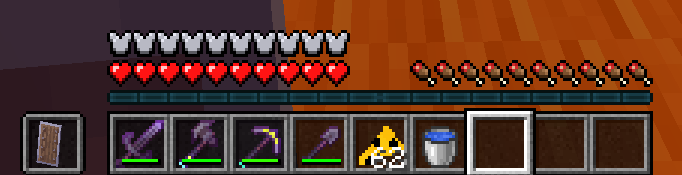
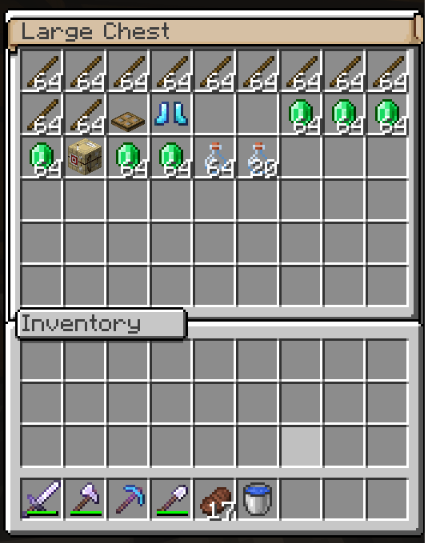
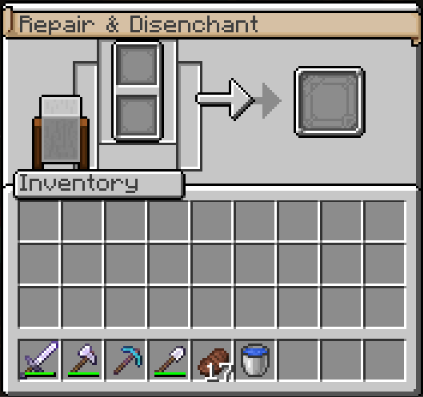
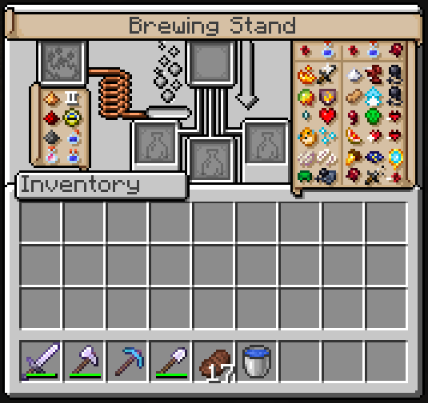
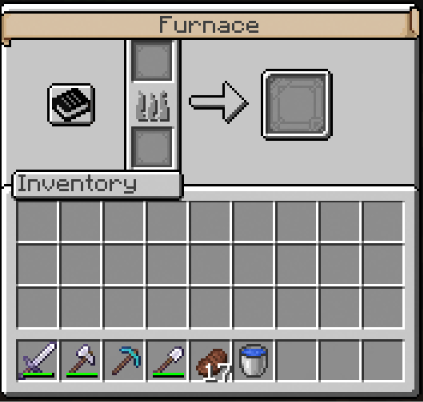
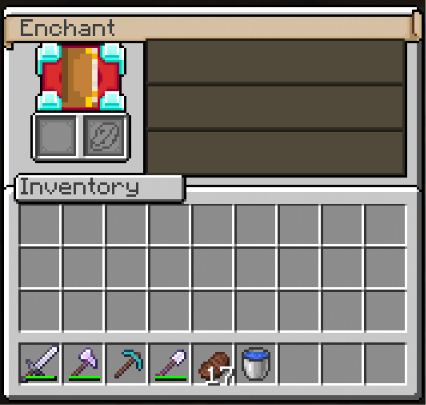
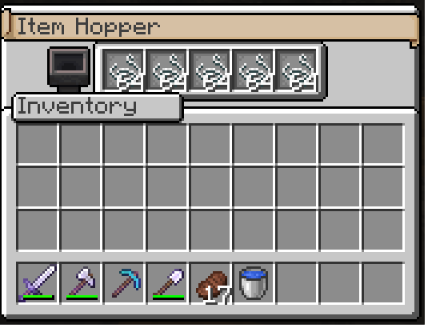
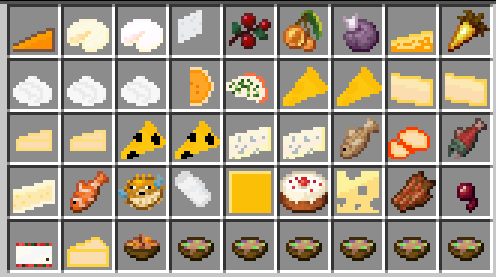
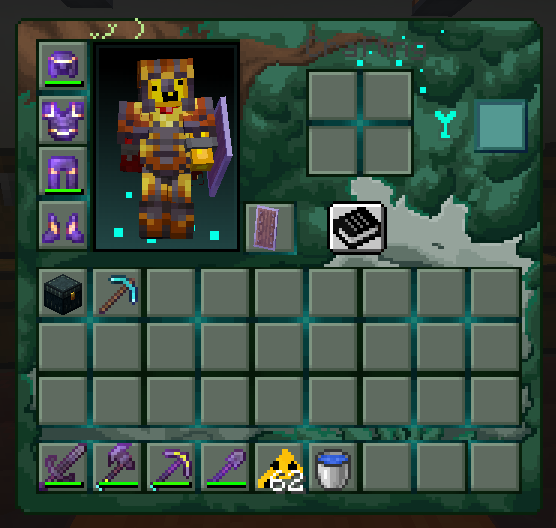
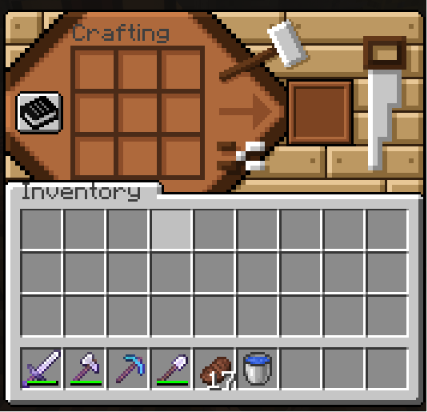
FryedCheese_blue FryedCheese_blue is a bold visual overhaul pack designed to elevate your Minecraft experience with custom green-and-cyan dark interfaces, refined netherite gear, and custom cheese items. Built with a rich forest-and-cyan aesthetic, this pack introduces sleek dark slots, glowing accents, and modernized pixel art while keeping the core game feel intact. Whether you're managing complex inventories, navigating dark caves, or competing on multiplayer servers, FryedCheese_blue delivers a clean, stylized look built for style and clarity. Key Features Warped Forest GUI & Custom Menus Cyan-Glow Overhaul: Container menus feature a custom dark green moss/bark backdrop with glowing cyan accent lines separating inventory slots. Modern Readability: High-contrast dark slots make your items, weapons, and armor stand out instantly. Custom HUD & Hotbar: Includes stylized dark hotbar slots, clean off-hand indicators, and custom XP bar borders. Custom Cheese & Food Textures Cheese Visuals: Replaced standard foods with custom cheese icons—from cheese wedges and slices to melted varieties. Refined Inventory Sprites: Upgraded tool and food sprites with sharper pixel art outlines. Upgraded Netherite & Tool Textures Purple Netherite Gear: Netherite weapons, tools, and armor feature vibrant deep-purple textures with cyan/blue handle accents. Clean Visuals: Uncluttered hotbar items give your toolset a high-end, upgraded feel. Built For Every Player Survival Explorers: Enjoy a stylized dark interface that makes organizing gear and checking durability simple and clean. Vanilla Plus Fans: Experience a fresh aesthetic that completely transforms menus without breaking standard gameplay mechanics. Installation Guide Download the .zip file for your Minecraft version. Launch Minecraft and go to Options > Resource Packs. Click Open Pack Folder and drop the downloaded file inside. Move FryedCheese_blue to the top of your active resource pack list and click Done!
FryedCheese_blue
FryedCheese_blue is a bold visual overhaul pack designed to elevate your Minecraft experience with custom green-and-cyan dark interfaces, refined netherite gear, and custom cheese items. Built with a rich forest-and-cyan aesthetic, this pack introduces sleek dark slots, glowing accents, and modernized pixel art while keeping the core game feel intact.
Whether you're managing complex inventories, navigating dark caves, or competing on multiplayer servers, FryedCheese_blue delivers a clean, stylized look built for style and clarity. Key Features Warped Forest GUI & Custom Menus
Cyan-Glow Overhaul: Container menus feature a custom dark green moss/bark backdrop with glowing cyan accent lines separating inventory slots.
Modern Readability: High-contrast dark slots make your items, weapons, and armor stand out instantly.
Custom HUD & Hotbar: Includes stylized dark hotbar slots, clean off-hand indicators, and custom XP bar borders.
Custom Cheese & Food Textures
Cheese Visuals: Replaced standard foods with custom cheese icons—from cheese wedges and slices to melted varieties.
Refined Inventory Sprites: Upgraded tool and food sprites with sharper pixel art outlines.
Upgraded Netherite & Tool Textures
Purple Netherite Gear: Netherite weapons, tools, and armor feature vibrant deep-purple textures with cyan/blue handle accents.
Clean Visuals: Uncluttered hotbar items give your toolset a high-end, upgraded feel.
Built For Every Player
Survival Explorers: Enjoy a stylized dark interface that makes organizing gear and checking durability simple and clean.
Vanilla Plus Fans: Experience a fresh aesthetic that completely transforms menus without breaking standard gameplay mechanics.
Installation Guide
Download the .zip file for your Minecraft version.
Launch Minecraft and go to Options > Resource Packs.
Click Open Pack Folder and drop the downloaded file inside.
Move FryedCheese_blue to the top of your active resource pack list and click Done!
📊 Mod Details
- Game
- Minecraft Resource Packs
- Author
- FryedCheese
- Version
- 1.1
- Downloads
- 86
- Endorsements
- 1
- Category
- entities
- Created
- 7/30/2026
- Updated
- 7/30/2026
- Game Versions
- 1.21.11
- Tags
- entities, gui, items
🔧 How to Install Minecraft Resource Packs Mods
Download from Modrinth. Use Prism Launcher or drop into your mods folder.
📖 Full step-by-step install guide for Minecraft Resource Packs →
Visit the official mod page for specific installation instructions for this mod.
🎮 Need cheat codes or console commands? Check ur gaming wiki for Minecraft Resource Packs commands, item IDs, and more.
❓ Frequently Asked Questions
Which Minecraft Resource Packs versions does FryedCheese_Blue support?
The author lists 1.21.11. Other versions may work but are untested by the author.
What is the latest version of FryedCheese_Blue?
Version 1.1, published 2026-07-30 with 86 downloads recorded at the source.
Keep browsing — more Minecraft Resource Packs mods await