Firefighter Kit
🟡 Updated this year🖼️ Gallery (4 images)


🔍 Analysis
- 👍 0.6% endorsement rate
- 🏆 #245 of 674 16x mods in this game by downloads
📋 About This Mod
<center><img alt="Firefighter Kit" src="https://cdn.modrinth.com/data/6c0f0EHL/images/bc07bab0013c0b7f005618932f5b3023aec8941b.png"></center> ## Description This pack replaces the textures of the armor and axes with the texture of firefighter kit. This can set the situation on the servers, help in roleplay with the players. And it's also fun :) | Item (Diamond and Netherite) | Required name | |-----------------------------------------|:---------------------------:| | Axe | Firefighter Axe | | Axe | Firefighter Hammer | | Shovel | Firefighter Shovel | | Helmet | Firefighter Helmet | | Chestplate | Firefighter Jacket Gloved | | Chestplate | Firefighter Jacket | | Leggings | Firefighter Pants | | Boots | Firefighter Boots | ## Installing The resource pack must be placed in the resourcepacks folder in the .minecraft directory Default: * Windows: **C:\\Users\\%USERNAME%\\AppData\\Roaming\\.minecraft\\resourcepacks\\** * Linux: **~/.minecraft/resourcepacks** Next, in Minecraft, go to **** -> **** -> Select the desired pack -> **** ## Requirements * Minecraft version above **1.14** * Installed (https://optifine.net/downloads) (If you using Forge) * Installed (https://modrinth.com/mod/cit-resewn) (If you using Fabric) ## Feedback You can contact us via (mailto:mystyzero@gmail.com) ## Finance/referal support (https://img.shields.io/badge/aéza%20vps%20hosting-%E2%82%AC4.94%2Fmo%2B-purple?style=for-the-badge&logo=linux)](https://aeza.net/?ref=724303) <img src="https://cdn.modrinth.com/data/bZTgH6Lk/images/e6ee8090f49140f4bb1ba886d26c795ced9a79ad.png" width=160 heght=48></img> ``` TGjiLho2eUMRAMPf6PUZs16EF2cvphnv8d ``` <img src="https://cdn.modrinth.com/data/bZTgH6Lk/images/1fa354a88c1846b75d48d6a8988e0731a5271251.png" width=160 heght=48></img> ``` 1dvL4mQf7cMmXhLc3A2tiyymVDF19TJnV ``` or USDC-Polygon ``` 0x390a54d13f62d62b4ee366aa23d4b0e0244c496f ``` ## My (our) projects <a href="https://modrinth.com/resourcepack/giac" title="GUI Icons as Cells"><img src="https://cdn-raw.modrinth.com/data/OPyn7IN9/28b201026d565cd5ca45426ab73ede6ef707eba9.png" width="64" height="64"></img></a> <a href="https://modrinth.com/resourcepack/bettertoolposition" title="BetterToolPosition"><img src="https://cdn.modrinth.com/data/bZTgH6Lk/8b7bdc707522ffe3dba0e329d543e24689ea851d.png" width="64" height="64"></img></a> <a href="https://modrinth.com/resourcepack/alt-swords-classic" title="Alt-Swords Classic"><img src="https://cdn-raw.modrinth.com/data/OYHTUzqk/3ff31c40daf54682cccbc41c26ab7de27c1eefd1.png" width="64" height="64"></img></a> <a href="https://modrinth.com/resourcepack/simple-banhammer" title="Simple Banhammer"><img src="https://cdn.modrinth.com/data/sGuB2CEM/7f35224407c2b5166dcd37725b744d01d6fe383d.png" width="64" height="64"></img></a> <a href="https://modrinth.com/resourcepack/alt-swords" title="Alt-Swords"><img src="https://cdn-raw.modrinth.com/data/b3wxEHWx/184afd4e15db29981dca7c28a5bdcfa57fd8a918.png" width="64" height="64"></img></a> <a href="https://modrinth.com/resourcepack/totems_o_players" title="Totems'o'players"><img src="https://cdn-raw.modrinth.com/data/lhXx6Sw8/524d5de9d0f8b6b8cd4f5731f1a376487e7f99ff.png" width="64" height="64"></img></a> <a href="https://modrinth.com/resourcepack/totems_o_players_3d" title="Totems'o'players 3D"><img src="https://cdn.modrinth.com/data/FFNNbNu2/7d21c5a2e03f198a18ef02900636bf9c0c6d5c2d.png" width="64" height="64"></img></a> <a href="https://modrinth.com/project/create-weapon-pack" title="Create: Weapon Pack"><img src="https://cdn.modrinth.com/data/WYqq2oLg/7dec424352ef6f5d14dea154230b516aea667201.png" width="64" height="64"></img></a> <a href="https://modrinth.com/resourcepack/ccwp" title="Create: Weapon Pack"><img src="https://cdn.modrinth.com/data/KoK8Rd39/9bae7392e8ca1c5b739d1e3cefbe7c0310364f3d.png" width="64" height="64"></img></a> <a href="https://modrinth.com/resourcepack/spears2cues" title="Spears to Cues"><img src="https://cdn.modrinth.com/data/CezlDir8/1fdb002a98d3e58030e6cb52289526b5c03496b3.png" width="64" height="64"></img></a>

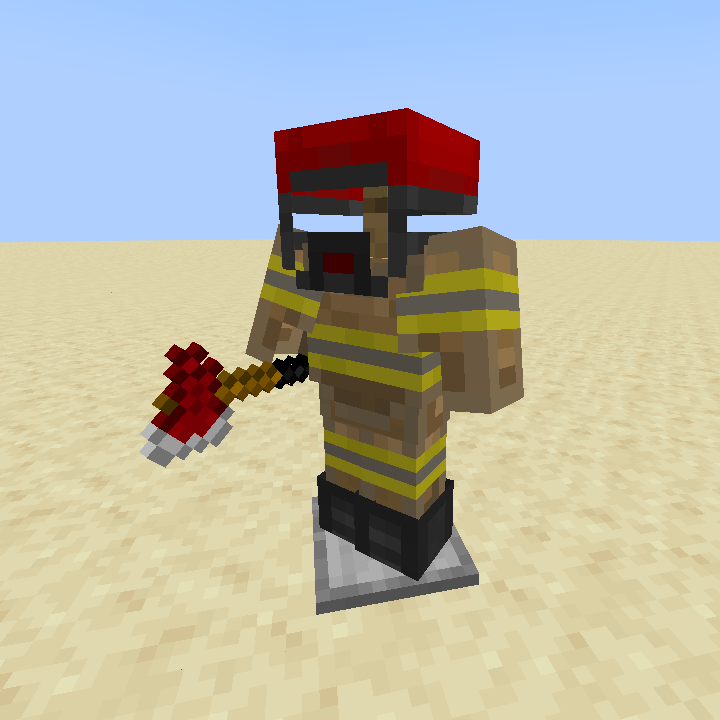
## Description This pack replaces the textures of the armor and axes with the texture of firefighter kit. This can set the situation on the servers, help in roleplay with the players. And it's also fun :)
| Item (Diamond and Netherite) | Required name | |-----------------------------------------|:---------------------------:| | Axe | Firefighter Axe | | Axe | Firefighter Hammer | | Shovel | Firefighter Shovel | | Helmet | Firefighter Helmet | | Chestplate | Firefighter Jacket Gloved | | Chestplate | Firefighter Jacket | | Leggings | Firefighter Pants | | Boots | Firefighter Boots |
## Installing The resource pack must be placed in the resourcepacks folder in the .minecraft directory
Default: Windows: C:\\Users\\%USERNAME%\\AppData\\Roaming\\.minecraft\\resourcepacks\\ Linux: ~/.minecraft/resourcepacks
Next, in Minecraft, go to -> -> Select the desired pack ->
## Requirements Minecraft version above 1. 14 Installed (https://optifine.net/downloads) (If you using Forge) * Installed (https://modrinth.com/mod/cit-resewn) (If you using Fabric)
## Feedback You can contact us via (mailto:mystyzero@gmail.com)
## Finance/referal support [](https://aeza.net/?ref=724303)
 ```
TGjiLho2eUMRAMPf6PUZs16EF2cvphnv8d
```
```
TGjiLho2eUMRAMPf6PUZs16EF2cvphnv8d
```
 ```
1dvL4mQf7cMmXhLc3A2tiyymVDF19TJnV
```
or USDC-Polygon
```
0x390a54d13f62d62b4ee366aa23d4b0e0244c496f
```
```
1dvL4mQf7cMmXhLc3A2tiyymVDF19TJnV
```
or USDC-Polygon
```
0x390a54d13f62d62b4ee366aa23d4b0e0244c496f
```
## My (our) projects

📊 Mod Details
- Game
- Minecraft Resource Packs
- Author
- Mysty
- Version
- 1.1
- Downloads
- 532
- Endorsements
- 3
- Category
- 16x
- Created
- 1/16/2024
- Updated
- 11/16/2025
- Game Versions
- 1.14, 1.14.1, 1.14.2, 1.14.3, 1.14.4
- Tags
- 16x, items, vanilla-like
🔧 How to Install Minecraft Resource Packs Mods
Download from Modrinth. Use Prism Launcher or drop into your mods folder.
📖 Full step-by-step install guide for Minecraft Resource Packs →
Visit the official mod page for specific installation instructions for this mod.
🎮 Need cheat codes or console commands? Check ur gaming wiki for Minecraft Resource Packs commands, item IDs, and more.
❓ Frequently Asked Questions
Which Minecraft Resource Packs versions does Firefighter Kit support?
The author lists 1.14, 1.14.1, 1.14.2, 1.14.3, 1.14.4, 1.15. Other versions may work but are untested by the author.
What is the latest version of Firefighter Kit?
Version 1.1, published 2025-11-16 with 532 downloads recorded at the source.
Keep browsing — more Minecraft Resource Packs mods await