Fancy Hotbar (Blue)
🟡 Updated this year🖼️ Gallery (4 images)



🔍 Analysis
- 🏆 #444 of 650 16x mods in this game by downloads
📋 About This Mod
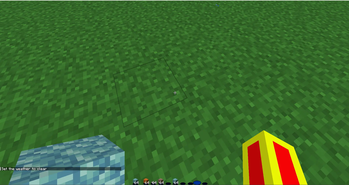
This texture pack is a simple UI redesign that swaps the default Minecraft hotbar for a clean, blue, water-inspired look. It’s made for players who want their interface to feel calmer, smoother, and a bit more aesthetic without changing how the game actually plays.
The hotbar is styled around a water theme, using soft blue tones and gentle shading to give it a fresh and polished feel. The design is inspired by the look of water surfaces and reflections, keeping everything subtle and easy on the eyes. It fits naturally into Minecraft’s style while still standing out from the vanilla UI.
Just like the original version, this pack only changes the hotbar. No blocks, no items, no extra effects. Because of that, it’s lightweight and performance-friendly, and it works well alongside other resource packs. You can stack it with your favorite textures or shaders without worrying about conflicts or lag.
Visibility is still a top priority. The hotbar slots remain clear and readable, so you won’t have any trouble seeing what item you’re holding during combat, building, or exploration. The goal is to make the UI look better without sacrificing usability.
This blue hotbar is perfect for players who prefer cooler color palettes or water-themed setups. It also works great for content creators who want a clean, modern UI for recordings and screenshots. It’s a small change, but it adds a noticeable layer of style to everyday gameplay.
If you’re looking for a calm, water-inspired UI upgrade that stays true to Minecraft’s feel, this texture pack is an easy choice. Simple, clean, and easy to use — just drop it in and enjoy a more relaxing look every time you play.
📊 Mod Details
- Game
- Minecraft Resource Packs
- Author
- mcwarriorxd
- Version
- 1.1.0
- Downloads
- 289
- Endorsements
- 0
- Category
- 16x
- Created
- 1/22/2026
- Updated
- 1/17/2026
- Game Versions
- 1.21.11
- Tags
- 16x, gui, simplistic
🔧 How to Install Minecraft Resource Packs Mods
Download from Modrinth. Use Prism Launcher or drop into your mods folder.
📖 Full step-by-step install guide for Minecraft Resource Packs →
Visit the official mod page for specific installation instructions for this mod.
🎮 Need cheat codes or console commands? Check ur gaming wiki for Minecraft Resource Packs commands, item IDs, and more.
❓ Frequently Asked Questions
Which Minecraft Resource Packs versions does Fancy Hotbar (Blue) support?
The author lists 1.21.11. Other versions may work but are untested by the author.
What is the latest version of Fancy Hotbar (Blue)?
Version 1.1.0, published 2026-01-17 with 289 downloads recorded at the source.
Keep browsing — more Minecraft Resource Packs mods await