Evol's 3D Totems - Angels or Demons?
🟡 Updated this year🖼️ Gallery (12 images)





🔍 Analysis
- 🏆 #108 of 117 items mods in this game by downloads
📋 About This Mod
# Evol's 3D Totems - Angels or Demons? Welcome to the **Evol's 3D Totems - Angels or Demons?** resource pack! This pack enhances the vanilla Totem of Undying by offering three distinct 3D models to choose from: a classic vanilla-like version, an angelic totem, or a demonic totem. Choose your style and add a unique flair to your Minecraft survival. ## Features - **Three Unique 3D Totem Models:** - **Vanilla-like Totem (Default):** A 3D model that stays true to the classic Minecraft aesthetic. - **Angelic Totem:** A celestial design featuring glowing wings and a holy aura, perfect for those who walk the path of light. - **Demonic Totem:** A fearsome design with dark, jagged features and an ominous glow, for those who embrace the shadows. - **Immersive Experience:** Adds depth and character to the Totem of Undying, making each save from death more thematic. - **Seamless Integration:** Designed to blend well with the existing Minecraft aesthetic while providing a refreshing visual update. ## Installation 1. **Download:** Download the `Evols_Totems_Angels_or_Demons_V1.00.zip` file. 2. **Locate Resource Packs Folder:** - Open Minecraft. - Go to `Options` -> `Resource Packs`. - Click on `Open Pack Folder`. 3. **Move the Pack:** Drag and drop the downloaded `.zip` file into the opened resource packs folder. - **DO NOT UNZIP THE FILE.** 4. **Activate:** - Return to Minecraft's `Resource Packs` screen. - You should see the pack in the list of available packs on the left. - Click the arrow button to move it to the "Selected Resource Packs" list on the right. 5. **Enjoy!** Click `Done` and your new totem will be active in-game. The default model is the vanilla-like version. ## How to Choose Your Totem Model This pack includes all three models, with the vanilla-like version active by default. To switch to the Angel or Demon model, you will need to rename some files inside the `.zip` pack. 1. **Open the ZIP file:** Navigate to the `Evols_Totems_Angels_or_Demons_V1.00.zip` file. You can open it with a program like 7-Zip or WinRAR without unzipping the entire folder. 2. **Go to the Item Models Directory:** Inside the zip, navigate to the following path: `assets/minecraft/models/item/` 3. **Rename the Files:** You will see three files: - `totem_of_undying.json` (This is the active vanilla model) - `totem_of_undying.json.angel` - `totem_of_undying.json.demon` To change the active model, you need to rename the files. The game will only load the file named exactly `totem_of_undying.json`. **To use the DEMON totem:** - Rename the current `totem_of_undying.json` to `totem_of_undying.json.vanilla`. - Rename `totem_of_undying.json.demon` to `totem_of_undying.json`. **To use the ANGEL totem:** - Rename the current `totem_of_undying.json` to `totem_of_undying.json.vanilla`. - Rename `totem_of_undying.json.angel` to `totem_of_undying.json`. 4. **Save and Reload:** Save the changes in your zip archiver. In Minecraft, you may need to reload your resource packs by pressing `F3 + T` or by deselecting and reselecting the pack in the menu. ## Compatibility - Requires Minecraft version 1.19 or higher. - Compatible with most other resource packs that do not modify the `totem_of_undying` model or texture. ## Support & Feedback If you encounter any issues or have suggestions, please visit my (https://modrinth.com/user/Evol-Luci). ## Credits - **Creator:** Luci_Evol - **Original Demonic Totem:** By (https://modrinth.com/resourcepack/douxprs-3d-totem-of-undying) (updated and re-textured by Luci_Evol). - **Original Angelic Totem:** By Luci_Evol (Heavily inspired by douxPR). ## License This resource pack is licensed under . See the `LICENSE.md` file for full details.
# Evol's 3D Totems - Angels or Demons?
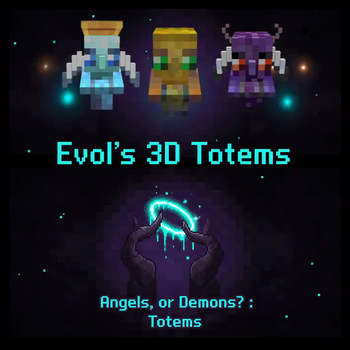
Welcome to the Evol's 3D Totems - Angels or Demons? resource pack! This pack enhances the vanilla Totem of Undying by offering three distinct 3D models to choose from: a classic vanilla-like version, an angelic totem, or a demonic totem. Choose your style and add a unique flair to your Minecraft survival.
## Features
- Three Unique 3D Totem Models:
- - Vanilla-like Totem (Default): A 3D model that stays true to the classic Minecraft aesthetic.
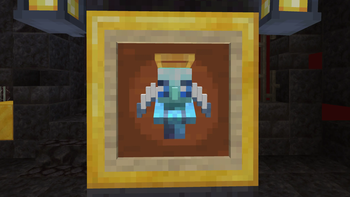
- - Angelic Totem: A celestial design featuring glowing wings and a holy aura, perfect for those who walk the path of light.
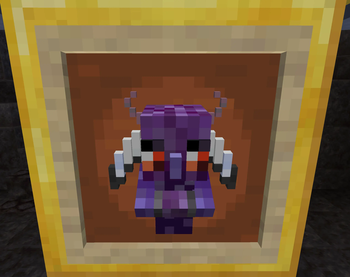
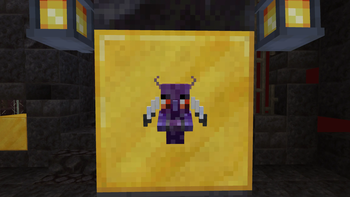
- - Demonic Totem: A fearsome design with dark, jagged features and an ominous glow, for those who embrace the shadows.
- Immersive Experience: Adds depth and character to the Totem of Undying, making each save from death more thematic.
- Seamless Integration: Designed to blend well with the existing Minecraft aesthetic while providing a refreshing visual update.
## Installation
1. Download: Download the `Evols_Totems_Angels_or_Demons_V1. 00.zip` file. 2. Locate Resource Packs Folder: - Open Minecraft. - Go to `Options` -> `Resource Packs`. - Click on `Open Pack Folder`. 3. Move the Pack: Drag and drop the downloaded `.zip` file into the opened resource packs folder. - DO NOT UNZIP THE FILE. 4. Activate: - Return to Minecraft's `Resource Packs` screen. - You should see the pack in the list of available packs on the left. - Click the arrow button to move it to the "Selected Resource Packs" list on the right. 5. Enjoy! Click `Done` and your new totem will be active in-game. The default model is the vanilla-like version.
## How to Choose Your Totem Model
This pack includes all three models, with the vanilla-like version active by default. To switch to the Angel or Demon model, you will need to rename some files inside the `.zip` pack.
1. Open the ZIP file: Navigate to the `Evols_Totems_Angels_or_Demons_V1. 00.zip` file. You can open it with a program like 7-Zip or WinRAR without unzipping the entire folder. 2. Go to the Item Models Directory: Inside the zip, navigate to the following path: `assets/minecraft/models/item/` 3. Rename the Files: You will see three files: - `totem_of_undying.json` (This is the active vanilla model) - `totem_of_undying.json.angel` - `totem_of_undying.json.demon` To change the active model, you need to rename the files. The game will only load the file named exactly `totem_of_undying.json`. To use the DEMON totem: - Rename the current `totem_of_undying.json` to `totem_of_undying.json.vanilla`. - Rename `totem_of_undying.json.demon` to `totem_of_undying.json`. To use the ANGEL totem: - Rename the current `totem_of_undying.json` to `totem_of_undying.json.vanilla`. - Rename `totem_of_undying.json.angel` to `totem_of_undying.json`. 4. Save and Reload: Save the changes in your zip archiver. In Minecraft, you may need to reload your resource packs by pressing `F3 + T` or by deselecting and reselecting the pack in the menu.
## Compatibility
- Requires Minecraft version 1. 19 or higher.
- Compatible with most other resource packs that do not modify the `totem_of_undying` model or texture.
## Support & Feedback
If you encounter any issues or have suggestions, please visit my (https://modrinth.com/user/Evol-Luci).
- Creator: Luci_Evol
- Original Demonic Totem: By (https://modrinth.com/resourcepack/douxprs-3d-totem-of-undying) (updated and re-textured by Luci_Evol).
- Original Angelic Totem: By Luci_Evol (Heavily inspired by douxPR).
This resource pack is licensed under . See the `LICENSE.md` file for full details.
📊 Mod Details
- Game
- Minecraft Resource Packs
- Author
- Evol-Luci
- Version
- 1.0.2
- Downloads
- 423
- Endorsements
- 6
- Category
- items
- Created
- 9/17/2025
- Updated
- 10/17/2025
- Game Versions
- 1.19, 1.19.1, 1.19.2, 1.19.3, 1.19.4
- Tags
- items, models, vanilla-like
🔧 How to Install Minecraft Resource Packs Mods
Download from Modrinth. Use Prism Launcher or drop into your mods folder.
📖 Full step-by-step install guide for Minecraft Resource Packs →
Visit the official mod page for specific installation instructions for this mod.
🎮 Need cheat codes or console commands? Check ur gaming wiki for Minecraft Resource Packs commands, item IDs, and more.
❓ Frequently Asked Questions
Which Minecraft Resource Packs versions does Evol's 3D Totems - Angels or Demons? support?
The author lists 1.19, 1.19.1, 1.19.2, 1.19.3, 1.19.4, 1.20. Other versions may work but are untested by the author.
What is the latest version of Evol's 3D Totems - Angels or Demons??
Version 1.0.2, published 2025-10-17 with 423 downloads recorded at the source.
Keep browsing — more Minecraft Resource Packs mods await