Doll 3D Totem
⚪ Last updated 2024🖼️ Gallery (5 images)
🔍 Analysis
- 👍 0.2% endorsement rate
- 🏆 #32 of 55 equipment mods in this game by downloads
📋 About This Mod
## !(https://cdn.modrinth.com/data/cached_images/83b7a85e8ab867f58fd8cf26f9dcba0f406482c0.png) Meaning of Project | Смысл проекта!(https://cdn.modrinth.com/data/cached_images/83b7a85e8ab867f58fd8cf26f9dcba0f406482c0.png)
### EN
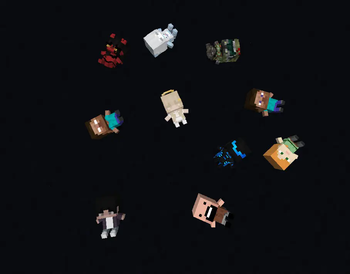
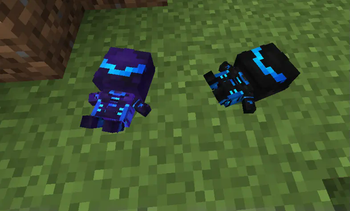
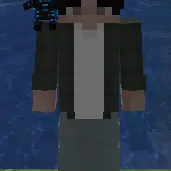
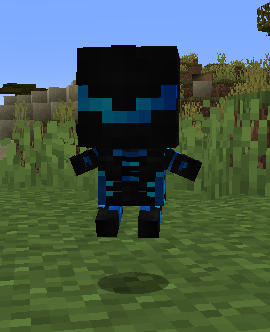
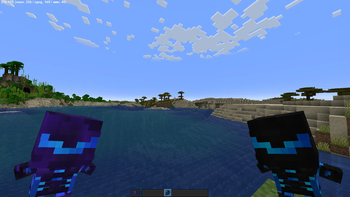
This resource pack was created to replace the usual Totem of Undying with a Doll, which can be changed by applying any skin suitable for the player’s model to it. The resource pack also has a function for changing the skin by renaming the item, here is a list of available skins:
List
|Name|Description| |---------------------|:---------------------:| |Alex|the official standard skin of Mojang.| |Angel|a spiritual being who communicates the will of God and has supernatural powers.| |Doomguy|a character from the DOOM series of games.| |Efronskaya|the first tester of this resource pack.| |Herobrine|the legend and Minecraft creepypasta.| |Master Chief|a character from the Halo series of games.| |Notch|the creator of Minecraft.| |Steve|the official default skin of Mojang.| |TheReizi|the creator of this resource pack.| |Demongirl|supernatural being inferior to the gods.|
### RU
Данный ресурспак создан для замены обычного Тотема Бессмертия на Куклу, которую можно изменить наложением на нее любой подходящий для модельки игрока скин. Также у ресурспака есть функция изменения скина через переименовывание предмета, вот список доступных скинов:
Список
|Название|Описание| |---------------------|:---------------------:| |Alex|официальный стандартный скин Mojang.| |Angel|духовное существо, сообщающее волю Бога и обладающее сверхъестественными возможностями.| |Doomguy|персонаж из серии игр 'DOOM'.| |Efronskaya|первый тестер данного ресурспака.| |Herobrine|легенда и крипипаста Minecraft.| |Master Chief|персонаж из серии игр 'Halo'.| |Notch|создатель Minecraft.| |Steve|официальный стандартный скин Mojang.| |TheReizi|создатель данного ресурспака.| |Demongirl|сверхъестественное существо, занимающее низшее по сравнению с богами положение.|
## 💡Requirements for Use | Требованию к использованию💡 - Forge - OptiFine 1. 7. 2-1. 21. 1 for Forge CIT | Для Forge CIT - Forge CIT 1. 20. 1 for rename | Для переименовывния - Fabric - Fabric API 1. 14-26. 2 for CIT Resewn | Для CIT Resewn - OptiFine 1. 7. 2-1. 21. 1 for OptiFabric | Для OptiFabric - OptiFabric 1. 14-1. 20. 4 for CIT Resewn | Для CIT Resewn - (https://modrinth.com/mod/cit-resewn) 1. 17-1. 20. 4 for rename | Для переименовывния - (https://modrinth.com/mod/cit-resewn-continuation) 1. 21. 11-26. 2 for rename | Для переименовывния - Hat Command 1. 17-1. 20. 4 for the command /hat | Для команды /hat
## ❗️How to Project Works | Принцип работы проекта❗️ ### Using a Totem | Использование тотема
### Changing Totems in Appearance | Изменение тотемов внешне !(https://cdn.modrinth.com/data/cached_images/446dc44f7dbacd5536b599e2ef0d3683518c57ea.png)
## 🔧Project Changing | Изменения проекта🔧 ### EN REPLACING THE SOUND OF USING TOTEM 1. in the assets\minecraft\sounds\item\totem\ folder, replace the sound file use_totem.ogg with another one with the same name and format. REPLACING THE MAIN SKIN WITH A TOTEM 1. in the assets\minecraft\textures\item\ folder there are 2 PNG files totem and totem_of_undying, which contain the skin for the player. !(https://cdn.modrinth.com/data/cached_images/ec13601953f14706a73f31e487e124532843f024.png) 2. It is required to replace these 2 PNG files with other same PNG files, leaving the same name. 3. you need to copy this folder (item), delete the 'items' folder and paste the 'item' folder from the clipboard, then rename the pasted folder to 'items'. ADDING YOUR SKINS TO THE TOTEM 1. in the assets\minecraft\optifine\cit\dolls folder, create a new folder with the name of the doll, which will be displayed in the game. 2. Add a skin in PNG format and a name in English lowercase letters to the folder. 3. copy 2 files (with .json and .properties format) from the 'TheReizi' folder and paste them into your folder. 4. open a file with .json format and in line 4 instead of ./thereizi write ./name of the PNG file without '.png' and save. 5. open the file with the .properties format, in the 3rd line after 'model=' write name of the PNG file without '.png' 6. in line 4 of the same file, write instead of '(TheReizi)' - (name of your folder from step 1) and save. 7. in the game itself, change and rename the totem to the name of your folder from step 1 and that’s it!
### RU **ЗАМЕНА ЗВУКА ИСПОЛЬЗОВАНИЯ ТОТЕМА
📊 Mod Details
- Game
- Minecraft Resource Packs
- Author
- Reizi
- Version
- v3.1
- Downloads
- 33,167
- Endorsements
- 56
- Category
- equipment
- Created
- 2/18/2024
- Updated
- 4/24/2024
- Game Versions
- 1.11, 1.11.1, 1.11.2, 1.12, 1.12.1
- Tags
- equipment, items, models
🔧 How to Install Minecraft Resource Packs Mods
Download from Modrinth. Use Prism Launcher or drop into your mods folder.
📖 Full step-by-step install guide for Minecraft Resource Packs →
Visit the official mod page for specific installation instructions for this mod.
🎮 Need cheat codes or console commands? Check ur gaming wiki for Minecraft Resource Packs commands, item IDs, and more.
❓ Frequently Asked Questions
Which Minecraft Resource Packs versions does Doll 3D Totem support?
The author lists 1.11, 1.11.1, 1.11.2, 1.12, 1.12.1, 1.12.2. Other versions may work but are untested by the author.
What is the latest version of Doll 3D Totem?
Version v3.1, published 2024-04-24 with 33,167 downloads recorded at the source.
Keep browsing — more Minecraft Resource Packs mods await