Deep Origins Overlays
🟡 Updated this year🖼️ Gallery (7 images)

🔍 Analysis
- 👍 0.3% endorsement rate
- 🏆 #382 of 695 16x mods in this game by downloads
📋 About This Mod
<br> <center> <img src="https://cdn.modrinth.com/data/cached_images/7003875f328d0ec6222ab39b7d9094d1cdf25b23.png" alt="Deep Origins Overlays"> <br> <br> <a href="https://www.curseforge.com/minecraft/texture-packs/deep-origins-overlays"><img src="https://raw.githubusercontent.com/intergrav/devins-badges/0a3449fd26bf1375d2c5c26f096c8f30aa358766/assets/compact/available/curseforge_vector.svg" alt="Available on Curseforge"></a> <a href="https://github.com/devoneox/deep-origins-overlays-reworked"><img src="https://raw.githubusercontent.com/intergrav/devins-badges/0a3449fd26bf1375d2c5c26f096c8f30aa358766/assets/compact/available/github_vector.svg" alt="Available on Github"></a> <a href="https://discord.gg/Rma6zdg9zS"><img src="https://raw.githubusercontent.com/intergrav/devins-badges/0a3449fd26bf1375d2c5c26f096c8f30aa358766/assets/compact/social/discord-plural_vector.svg" alt="Chat with us on Discord"></a> </center> <br> <hr> <br> !(https://raw.githubusercontent.com/devoxxel/devoxxel-images/refs/heads/main/titles/png/OVERVIEW.png)\ **Deep Origins Overlays : Reworked** adds overlays between blocks to enhance your Minecraft experience while keeping Vanilla aesthetics. <br> <center> **This pack requires Fusion 1.3.2 or higher to work.**\ Download Respackopts to customize the resourcepack in-game _(optional)_. <a href="https://modrinth.com/mod/fusion-connected-textures"><img src="https://raw.githubusercontent.com/CelestialAbyss/badges/d452eae438c1c64229c54b7f78edf8f8b9cb533a/fusion/requires/compact_vector.svg" alt="Download Fusion"></a> <a href="https://modrinth.com/mod/respackopts"><img src="https://raw.githubusercontent.com/devoxxel/devoxxel-images/bf5610243a9d7f9af959c2385c284bc0bb72e138/customize_with_respackopts/compact/compact_vector.svg" alt="Download Respackopts"></a> </center> <br> <hr> <br> !(https://raw.githubusercontent.com/devoxxel/devoxxel-images/refs/heads/main/titles/png/supported_features.png) <center> <table> <tr> <th>Build</th> <th> Reworked (v2) </th> </tr> <tr> <th>Dependency</th> <th>Fusion 1.3.2+</th> </tr> <tr> <th>Full block overlays</th> <th>✅</th> </tr> <tr> <th>Partial block overlays</th> <th>✅</th> </tr> <tr> <th>Non-solid block overlays</th> <th>✅</th> </tr> <tr> <th> Connected blocks <br> (Sandstone) </th> <th>✅</th> </tr> <tr> <th> Snow layers and <br> moss carpet overhangs </th> <th>✅</th> </tr> <tr> <th> Pack customization <br> with Respackopts </th> <th>✅</th> </tr> </table> </center> <br> <hr> <br> !(https://raw.githubusercontent.com/devoxxel/devoxxel-images/refs/heads/main/titles/png/how_to_install.png) 1. **Download (https://modrinth.com/mod/fusion-connected-textures/versions)**. 2. **Download Deep Origins Overlays**. The download file should be a `.zip` compressed file with the following naming scheme : `Deep Origins Overlays §8v2.0-b3`. 3. **Launch Minecraft**. Go to _Options... > Resource Packs... > Open Pack Folder_ 4. A folder should open in the explorer. **Move the downloaded file to the newly opened folder**. 5. The pack should appear in the _Available_ section. **Click on the pack's icon** to move it into the _Selected_ section. Make sure it is at the top to prevent any conflicts with other resourcepacks. 6. **Click on _Done_**. Your pack is successfully installed ! <br> <hr> <br> !(https://raw.githubusercontent.com/devoxxel/devoxxel-images/refs/heads/main/titles/png/in_game_pack_customization.png)\ **Download (https://modrinth.com/mod/respackopts)** (v4.0.0+), (https://modrinth.com/mod/cloth-config) and (https://modrinth.com/mod/libjf). Make sure these 3 mods are installed when you launch the game. !(https://cdn.modrinth.com/data/cached_images/889f80353bef09247efd8dfaca25ad1fc45e3c3f_0.webp) In the _Resourcepacks_ page, you should see **a button next to the pack's icon**. This is to open the pack's options panel. !(https://cdn.modrinth.com/data/cached_images/4a2668a26d5ec6fc970e9e6e5deb01b5e87c38bd_0.webp) ### Available options - **Dirt path and farmland overlays**\ Default : `True`\ Allows blocks to overlay on dirt paths and farmland. - **Allow block overlays on themselves**\ Default : `False`\ Allows blocks to overlay on themselves. - **Connected sandstone**\ Default : `False`\ Allows sandstone and red sandstone to connect to other blocks. <details> <summary>Moss and snow overhangs</summary> - **Moss carpet overhangs**\ Default : `True`\ Allows moss carpets (and pale moss carpets) to overhang on blocks below them. - **Snow layer overhangs**\ Default : `True`\ Allows snow layers to overhang on blocks




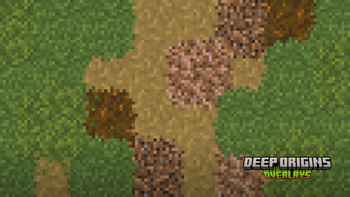
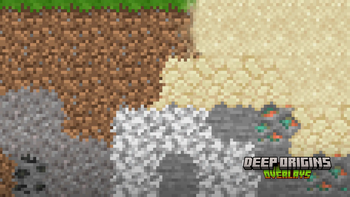
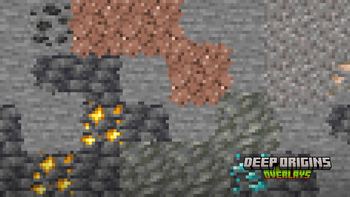
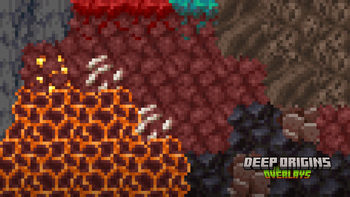
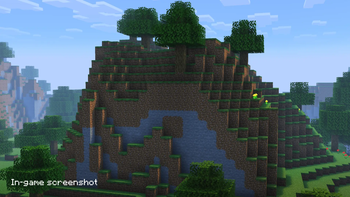
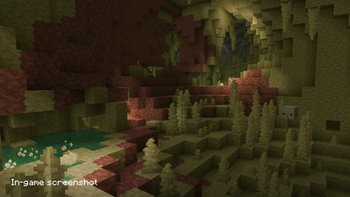
!(https://raw.githubusercontent.com/devoxxel/devoxxel-images/refs/heads/main/titles/png/OVERVIEW.png)\ Deep Origins Overlays : Reworked adds overlays between blocks to enhance your Minecraft experience while keeping Vanilla aesthetics.
This pack requires Fusion 1. 3. 2 or higher to work.\ Download Respackopts to customize the resourcepack in-game _(optional)_.


!(https://raw.githubusercontent.com/devoxxel/devoxxel-images/refs/heads/main/titles/png/supported_features.png)
| Build | Reworked (v2) |
|---|---|
| Dependency | Fusion 1. 3. 2+ |
| Full block overlays | ✅ |
| Partial block overlays | ✅ |
| Non-solid block overlays | ✅ |
|
Connected blocks (Sandstone) |
✅ |
|
Snow layers and moss carpet overhangs |
✅ |
|
Pack customization with Respackopts |
✅ |
!(https://raw.githubusercontent.com/devoxxel/devoxxel-images/refs/heads/main/titles/png/how_to_install.png) 1. Download (https://modrinth.com/mod/fusion-connected-textures/versions)**. 2. Download Deep Origins Overlays. The download file should be a `.zip` compressed file with the following naming scheme : `Deep Origins Overlays §8v2. 0-b3`. 3. Launch Minecraft. Go to _Options... > Resource Packs... > Open Pack Folder_ 4. A folder should open in the explorer. Move the downloaded file to the newly opened folder. 5. The pack should appear in the _Available_ section. Click on the pack's icon to move it into the _Selected_ section. Make sure it is at the top to prevent any conflicts with other resourcepacks. 6. Click on _Done_. Your pack is successfully installed !
!(https://raw.githubusercontent.com/devoxxel/devoxxel-images/refs/heads/main/titles/png/in_game_pack_customization.png)\ Download (https://modrinth.com/mod/respackopts)** (v4. 0. 0+), (https://modrinth.com/mod/cloth-config) and (https://modrinth.com/mod/libjf). Make sure these 3 mods are installed when you launch the game.
!(https://cdn.modrinth.com/data/cached_images/889f80353bef09247efd8dfaca25ad1fc45e3c3f_0.webp)
In the _Resourcepacks_ page, you should see a button next to the pack's icon. This is to open the pack's options panel.
!(https://cdn.modrinth.com/data/cached_images/4a2668a26d5ec6fc970e9e6e5deb01b5e87c38bd_0.webp)
### Available options
- Dirt path and farmland overlays\
- Default : `True`\
- Allows blocks to overlay on dirt paths and farmland.
- Allow block overlays on themselves\
- Default : `False`\
- Allows blocks to overlay on themselves.
- Connected sandstone\
- Default : `False`\
- Allows sandstone and red sandstone to connect to other blocks.
Moss and snow overhangs
- Moss carpet overhangs\
- Default : `True`\
- Allows moss carpets (and pale moss carpets) to overhang on blocks below them.
- Snow layer overhangs\
- Default : `True`\
- Allows snow layers to overhang on blocks
📊 Mod Details
- Game
- Minecraft Resource Packs
- Author
- Devoxxel
- Version
- v2.0-b3a
- Downloads
- 47,292
- Endorsements
- 132
- Category
- 16x
- Created
- 2/25/2024
- Updated
- 7/22/2026
- Game Versions
- 1.20, 1.20.1, 1.20.2, 1.20.3, 1.20.4
- Tags
- 16x, tweaks, vanilla-like
🔧 How to Install Minecraft Resource Packs Mods
Download from Modrinth. Use Prism Launcher or drop into your mods folder.
📖 Full step-by-step install guide for Minecraft Resource Packs →
Visit the official mod page for specific installation instructions for this mod.
🎮 Need cheat codes or console commands? Check ur gaming wiki for Minecraft Resource Packs commands, item IDs, and more.
❓ Frequently Asked Questions
Which Minecraft Resource Packs versions does Deep Origins Overlays support?
The author lists 1.20, 1.20.1, 1.20.2, 1.20.3, 1.20.4, 1.20.5. Other versions may work but are untested by the author.
What is the latest version of Deep Origins Overlays?
Version v2.0-b3a, published 2026-07-22 with 47,292 downloads recorded at the source.
Keep browsing — more Minecraft Resource Packs mods await