Customizable 3D Doll Item
🟠 Updated over a year ago🖼️ Gallery (7 images)
🔍 Analysis
- 👍 0.0% endorsement rate
- 🏆 #90 of 213 decoration mods in this game by downloads
📋 About This Mod
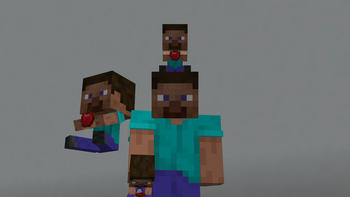
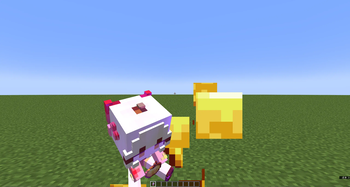
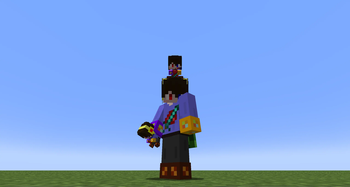
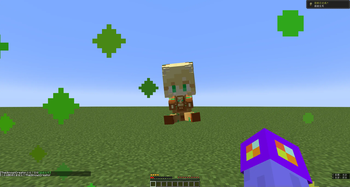
Heavily modified from (https://www.bilibili.com/video/BV1Zw411S7DS/?spm_id_from=333.1387.homepage.video_card.click&vd_source=19d7270f8ca54520dc485bb7aaed9421). **You can customize any item into a sitting doll holding an item. This requires some basic Minecraft resource pack skills. Should work for most of the Minecraft versions.** ## Highlights - Both the item and the doll is 3D (also for the 2nd layer of the skin). - Fully customizable as long as you know how to make resource packs. You can even use this model on a block item. You can also use Blockbench to change the doll's pos or add some decorations. _Item textures should be **16x or lower (best 16x)**. Skins should be **64x or lower (best 64x)**._ ## Steps to customize: 1. Open the resource pack .zip file (or decompress it if you can't directly modify files in a .zip). 2. Go to _"assets\minecraft\textures\item\doll\"_ and put a skin file in .png here (assume it's named as **newton.png**). 3. (_If you don't want to change the item's texture (so it stays vanilla or from another resource pack you enabled), skip this step._)\ Go to _"assets\minecraft\textures\item\"_ and put the desired item texture in .png here (assume it's named as **apple.png**). 4. Go to _"assets\minecraft\models\item\"_. If the skin you just put is classic (arm with 4 pixels), copy **classic.json** and paste it here. If the skin is slim (arm with 3 pixels), copy **slim.json**. Rename the pasted file to the item whose model you want to change. For example, you want to change "minecraft:apple", then you rename the file to **apple.json**. 5. Open the .json file, look for the following (_"doll_slim": "item/doll/slim"_ if your skin is slim): ```json "textures": { "doll_wide": "item/doll/classic", "particle": "item/whatever", "item": "item/whatever" } ``` > For **"doll_wide"** or **"doll_slim"**: Change _"item/doll/classic"_ into the file path of your skin (without ".png"). > > For **"particle"**: This controls such as the particle when you eat this item. You can change _"item/whatever"_ into the texture file path of this item (without ".png"). > > For **"item"**: This is the item texture the doll holds. Change _"item/whatever"_ into the texture file path of this item (without ".png"). !(https://cdn.modrinth.com/data/cached_images/dac5779725e03abc2d2af51de7af756cf03d8afb.png) **You can repeat steps 2~5 to modify the models of several items. You can then put the resource pack into the resource pack folder and enable it.**
Heavily modified from [千虑智者's version](https://www.bilibili.com/video/BV1Zw411S7DS/?spm_id_from=333. 1387.homepage.video_card.click&vd_source=19d7270f8ca54520dc485bb7aaed9421).
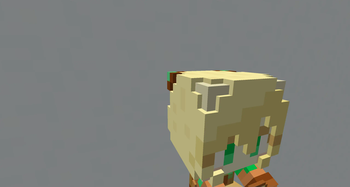
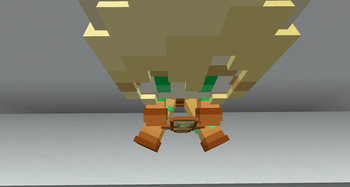
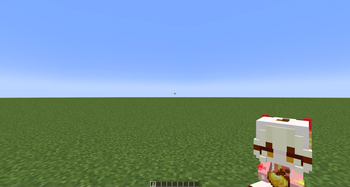
You can customize any item into a sitting doll holding an item. This requires some basic Minecraft resource pack skills. Should work for most of the Minecraft versions. ## Highlights - Both the item and the doll is 3D (also for the 2nd layer of the skin). - Fully customizable as long as you know how to make resource packs. You can even use this model on a block item. You can also use Blockbench to change the doll's pos or add some decorations.
_Item textures should be 16x or lower (best 16x). Skins should be 64x or lower (best 64x)._ ## Steps to customize: 1. Open the resource pack .zip file (or decompress it if you can't directly modify files in a .zip). 2. Go to _"assets\minecraft\textures\item\doll\"_ and put a skin file in .png here (assume it's named as newton.png). 3. (_If you don't want to change the item's texture (so it stays vanilla or from another resource pack you enabled), skip this step._)\ Go to _"assets\minecraft\textures\item\"_ and put the desired item texture in .png here (assume it's named as apple.png). 4. Go to _"assets\minecraft\models\item\"_. If the skin you just put is classic (arm with 4 pixels), copy classic.json and paste it here. If the skin is slim (arm with 3 pixels), copy slim.json. Rename the pasted file to the item whose model you want to change. For example, you want to change "minecraft:apple", then you rename the file to apple.json. 5. Open the .json file, look for the following (_"doll_slim": "item/doll/slim"_ if your skin is slim): ```json "textures": { "doll_wide": "item/doll/classic", "particle": "item/whatever", "item": "item/whatever" } ``` > For "doll_wide" or "doll_slim": Change _"item/doll/classic"_ into the file path of your skin (without ".png"). > > For "particle": This controls such as the particle when you eat this item. You can change _"item/whatever"_ into the texture file path of this item (without ".png"). > > For "item": This is the item texture the doll holds. Change _"item/whatever"_ into the texture file path of this item (without ".png").
!(https://cdn.modrinth.com/data/cached_images/dac5779725e03abc2d2af51de7af756cf03d8afb.png)
You can repeat steps 2~5 to modify the models of several items. You can then put the resource pack into the resource pack folder and enable it.
📊 Mod Details
- Game
- Minecraft Resource Packs
- Author
- TheUknownCreator
- Version
- 1.0
- Downloads
- 544
- Endorsements
- 0
- Category
- decoration
- Created
- 4/8/2025
- Updated
- 4/5/2025
- Game Versions
- 1.20.5, 1.20.6, 1.21, 1.21.1, 1.21.2
- Tags
- decoration, models, vanilla-like
🔧 How to Install Minecraft Resource Packs Mods
Download from Modrinth. Use Prism Launcher or drop into your mods folder.
📖 Full step-by-step install guide for Minecraft Resource Packs →
Visit the official mod page for specific installation instructions for this mod.
🎮 Need cheat codes or console commands? Check ur gaming wiki for Minecraft Resource Packs commands, item IDs, and more.
❓ Frequently Asked Questions
Which Minecraft Resource Packs versions does Customizable 3D Doll Item support?
The author lists 1.20.5, 1.20.6, 1.21, 1.21.1, 1.21.2, 1.21.3. Other versions may work but are untested by the author.
What is the latest version of Customizable 3D Doll Item?
Version 1.0, published 2025-04-05 with 544 downloads recorded at the source.
Keep browsing — more Minecraft Resource Packs mods await