custom 3d totem pack
🟡 Updated this year🖼️ Gallery (3 images)
🔍 Analysis
- 🏆 #8 of 71 equipment mods in this game by downloads
📋 About This Mod
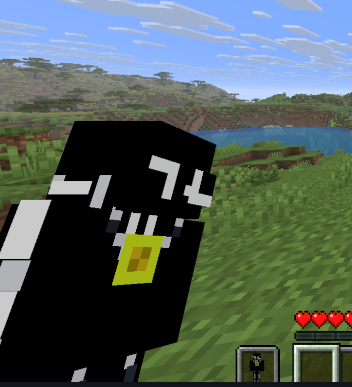
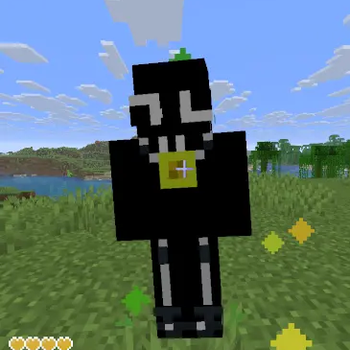
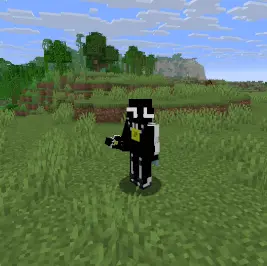
# 🌟 Features * **3D Model:** A completely custom-made 3D model for the Totem of Undying. * **Vanilla Style:** Designed to fit perfectly with Minecraft's default textures. * **Low Impact:** Optimized model that won't lag your game. # 🛠️ How to Use 1. download your skin from namemc or other 2. Open the ZIP file and navigate to: `assets/minecraft/textures/item` Replace the existing `totem_of_undying.png` with your own skin (rename your skin to `totem_of_undying.png` first!). 3. add the ZIP file into minecraft 4. enjoy! 5. change the desc, photo, and name by first right clicking the file and clicking rename and change the name to whatever you want and second to change the desc go inside the folder and locate pack.mcmeta and change it to what ever you want and lastly to change the photo locate pack.png and change the picture and also you needed to copy paste the photo only and notes # 📝 Notes * This pack is a **Resource Pack**, not a mod. * It works on versions 1.20.1 and above. * Feel free to use this in your modpacks!
# 🌟 Features 3D Model: A completely custom-made 3D model for the Totem of Undying. Vanilla Style: Designed to fit perfectly with Minecraft's default textures. Low Impact: Optimized model that won't lag your game.
# 🛠️ How to Use 1. download your skin from namemc or other 2. Open the ZIP file and navigate to: `assets/minecraft/textures/item` Replace the existing `totem_of_undying.png` with your own skin (rename your skin to `totem_of_undying.png` first!). 3. add the ZIP file into minecraft 4. enjoy! 5. change the desc, photo, and name by first right clicking the file and clicking rename and change the name to whatever you want and second to change the desc go inside the folder and locate pack.mcmeta and change it to what ever you want and lastly to change the photo locate pack.png and change the picture and also you needed to copy paste the photo only and notes
# 📝 Notes This pack is a Resource Pack, not a mod. It works on versions 1. 20. 1 and above. Feel free to use this in your modpacks!
📊 Mod Details
- Game
- Minecraft Resource Packs
- Author
- Creatives
- Version
- 26.1
- Downloads
- 141
- Endorsements
- 0
- Category
- equipment
- Created
- 2/2/2026
- Updated
- 7/20/2026
- Game Versions
- 26.1
- Tags
- equipment, vanilla-like
🔧 How to Install Minecraft Resource Packs Mods
Download from Modrinth. Use Prism Launcher or drop into your mods folder.
📖 Full step-by-step install guide for Minecraft Resource Packs →
Visit the official mod page for specific installation instructions for this mod.
🎮 Need cheat codes or console commands? Check ur gaming wiki for Minecraft Resource Packs commands, item IDs, and more.
❓ Frequently Asked Questions
Which Minecraft Resource Packs versions does custom 3d totem pack support?
The author lists 26.1. Other versions may work but are untested by the author.
What is the latest version of custom 3d totem pack?
Version 26.1, published 2026-07-20 with 141 downloads recorded at the source.
Keep browsing — more Minecraft Resource Packs mods await