CreateWorldUICompatibility
🟡 Updated this year🖼️ Gallery (3 images)
🔍 Analysis
- 🏆 #114 of 170 decoration mods in this game by downloads
📋 About This Mod
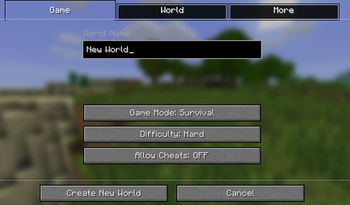
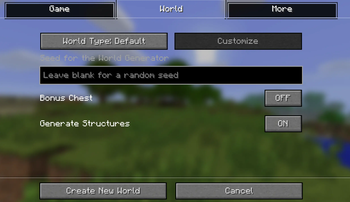
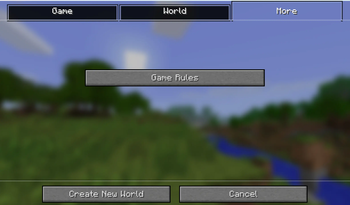
# CreateWorldUI Compatibility ## 🌟 Overview This resource pack enhances the visual experience of **CreateWorldUI** by adding full compatibility with **ClearMyBackground**. When all three are used together, the 1.7.10 / 1.12.2 world creation screen gains a **1.20.5+‑style look**, combining a panoramic background with clean, transparent tab buttons. It’s a small pack, but it completes the modern UI experience that CreateWorldUI aims to bring to classic Minecraft. --- ## ✨ What This Pack Adds - **Transparent tab buttons** styled after modern versions - **Visual adjustments** to match ClearMyBackground’s panoramic world‑creation view - **A unified, modern look** that blends CreateWorldUI’s layout with high‑version aesthetics - **A closer match to Minecraft 1.20.5+**, rather than the 1.17–1.20.4 style CreateWorldUI alone provides --- ## 📦 Requirements - **(https://modrinth.com/project/dCSw6pVW)** - **(https://github.com/RuiXuqi/ClearMyBackground)** (Using all three together unlocks the full visual upgrade.) --- ## 🎨 Why Use This Pack? If you want your 1.7.10 / 1.12.2 world creation screen to look like **the newest versions of Minecraft**, this pack completes the transformation—bringing panoramic visuals, transparency, and a cleaner modern feel.
# CreateWorldUI Compatibility ## 🌟 Overview This resource pack enhances the visual experience of CreateWorldUI by adding full compatibility with ClearMyBackground. When all three are used together, the 1. 7. 10 / 1. 12. 2 world creation screen gains a 1. 20. 5+‑style look, combining a panoramic background with clean, transparent tab buttons.
It’s a small pack, but it completes the modern UI experience that CreateWorldUI aims to bring to classic Minecraft.
## ✨ What This Pack Adds - Transparent tab buttons styled after modern versions - Visual adjustments to match ClearMyBackground’s panoramic world‑creation view - A unified, modern look that blends CreateWorldUI’s layout with high‑version aesthetics - A closer match to Minecraft 1. 20. 5+, rather than the 1. 17–1. 20. 4 style CreateWorldUI alone provides
## 📦 Requirements - (https://modrinth.com/project/dCSw6pVW)** - (https://github.com/RuiXuqi/ClearMyBackground)** (Using all three together unlocks the full visual upgrade.)
## 🎨 Why Use This Pack? If you want your 1. 7. 10 / 1. 12. 2 world creation screen to look like the newest versions of Minecraft, this pack completes the transformation—bringing panoramic visuals, transparency, and a cleaner modern feel.
📊 Mod Details
- Game
- Minecraft Resource Packs
- Author
- Seniye
- Version
- 3.1
- Downloads
- 57
- Endorsements
- 1
- Category
- decoration
- Created
- 4/24/2026
- Updated
- 8/18/2026
- Game Versions
- 1.6.1, 1.6.2, 1.6.4, 1.7.2, 1.7.3
- Tags
- decoration, tweaks
🔧 How to Install Minecraft Resource Packs Mods
Download from Modrinth. Use Prism Launcher or drop into your mods folder.
📖 Full step-by-step install guide for Minecraft Resource Packs →
Visit the official mod page for specific installation instructions for this mod.
🎮 Need cheat codes or console commands? Check ur gaming wiki for Minecraft Resource Packs commands, item IDs, and more.
❓ Frequently Asked Questions
Which Minecraft Resource Packs versions does CreateWorldUICompatibility support?
The author lists 1.6.1, 1.6.2, 1.6.4, 1.7.2, 1.7.3, 1.7.4. Other versions may work but are untested by the author.
What is the latest version of CreateWorldUICompatibility?
Version 3.1, published 2026-08-18 with 57 downloads recorded at the source.
Keep browsing — more Minecraft Resource Packs mods await