Contrast Pack
🟡 Updated this year🖼️ Gallery (12 images)
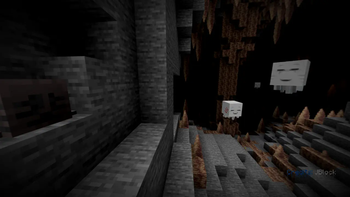
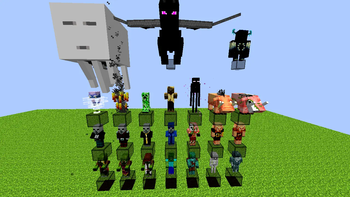
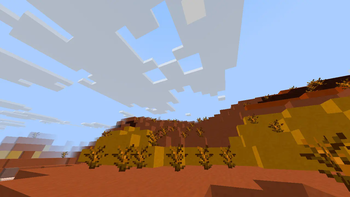
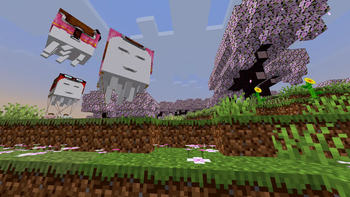
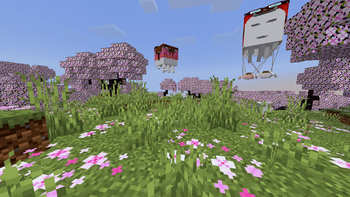
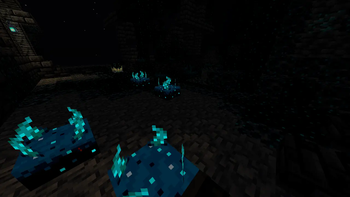
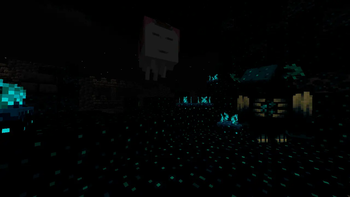
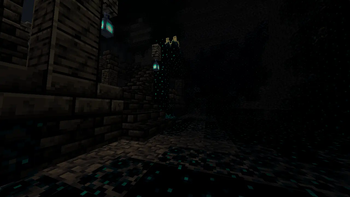

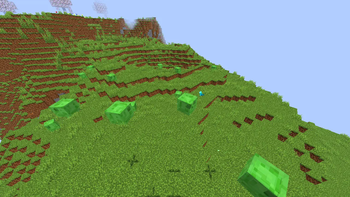

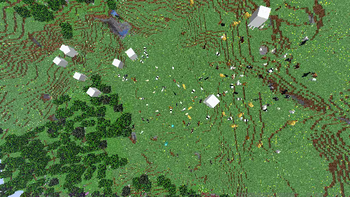
🔍 Analysis
- 👍 0.1% endorsement rate
- 🏆 #326 of 662 16x mods in this game by downloads
📋 About This Mod
<p align="center"> <img src="https://cdn.modrinth.com/data/cached_images/e36e43593d47619481925501e20b5e729331381a.png" alt="Banner" width="512"> </p> Increase the contrast of textures, making them look deeper or more vibrant. Shadows appear sharper, lights brighter, giving the game a bold retro touch. Perfect for players who enjoy a clean, pixel look. With simple rendering tweaks and texture changes, it adds more depth and detail, sometimes even a shader‑like feel—without using shaders. ### 🎨 Features: - More vibrant and deeper colors. - Support for vanilla: mobs, blocks, entities, and more. - Vanilla standard (16x) lightweight, ideal for low‑spec PCs. - For players who enjoy using features like Optifine or Continuity: certain versions include compatibility with connected glass through the ConnectedBlocks function. --- ### ⛏ Utility: This pack works perfectly in both single-player worlds and vanilla servers. It doesn’t alter gameplay directly, so it won’t add or remove anything that changes your vanilla experience — only visual improvements. If you’d like to keep the vanilla essence but make it a little more vibrant and colorful, this might be the one to try! --- ## 🎬 See It in Action !(https://cdn.modrinth.com/data/cached_images/76e1a22b817309f477c860728b7a514153b882dd.png) !(https://cdn.modrinth.com/data/cached_images/a5357f82c9f8426d59ae57ec7a7ab3ab1f442e80.png) --- **✨ Compatible with Minecraft Java:** - 26.1.x - 1.21.x - 1.20.x (https://modrinth.com/resourcepack/contrastpack/versions) --- <a href="https://www.youtube.com/@JBlockMC"> <img src="https://cdn.modrinth.com/data/cached_images/86f59f733917663fa2fc949c4f1884b8b6a27bde_0.webp" alt="YouTube Button" width="256"> </a> <br> <a href="https://discord.gg/wKPPYBvXzV"> <img src="https://cdn.modrinth.com/data/cached_images/8d5b3075197c6abc0008bd58b7872b72f034b0d3.png" alt="Discord Button" width="235"> </a>

Increase the contrast of textures, making them look deeper or more vibrant. Shadows appear sharper, lights brighter, giving the game a bold retro touch. Perfect for players who enjoy a clean, pixel look.
With simple rendering tweaks and texture changes, it adds more depth and detail, sometimes even a shader‑like feel—without using shaders.
### 🎨 Features: - More vibrant and deeper colors. - Support for vanilla: mobs, blocks, entities, and more. - Vanilla standard (16x) lightweight, ideal for low‑spec PCs. - For players who enjoy using features like Optifine or Continuity: certain versions include compatibility with connected glass through the ConnectedBlocks function.
### ⛏ Utility: This pack works perfectly in both single-player worlds and vanilla servers. It doesn’t alter gameplay directly, so it won’t add or remove anything that changes your vanilla experience — only visual improvements.
If you’d like to keep the vanilla essence but make it a little more vibrant and colorful, this might be the one to try!
## 🎬 See It in Action
!(https://cdn.modrinth.com/data/cached_images/76e1a22b817309f477c860728b7a514153b882dd.png) !(https://cdn.modrinth.com/data/cached_images/a5357f82c9f8426d59ae57ec7a7ab3ab1f442e80.png)
✨ Compatible with Minecraft Java: - 26. 1.x - 1. 21.x - 1. 20.x
[📥 Download it now and rediscover Minecraft in a more colorful, vibrant way!](https://modrinth.com/resourcepack/contrastpack/versions)


📊 Mod Details
- Game
- Minecraft Resource Packs
- Author
- JBlock
- Version
- v26.1
- Downloads
- 2,920
- Endorsements
- 3
- Category
- 16x
- Created
- 10/12/2024
- Updated
- 6/14/2026
- Game Versions
- 26.1, 26.1.1, 26.1.2
- Tags
- 16x, simplistic, vanilla-like
🔧 How to Install Minecraft Resource Packs Mods
Download from Modrinth. Use Prism Launcher or drop into your mods folder.
📖 Full step-by-step install guide for Minecraft Resource Packs →
Visit the official mod page for specific installation instructions for this mod.
🎮 Need cheat codes or console commands? Check ur gaming wiki for Minecraft Resource Packs commands, item IDs, and more.
❓ Frequently Asked Questions
Which Minecraft Resource Packs versions does Contrast Pack support?
The author lists 26.1, 26.1.1, 26.1.2. Other versions may work but are untested by the author.
What is the latest version of Contrast Pack?
Version v26.1, published 2026-06-14 with 2,920 downloads recorded at the source.
Keep browsing — more Minecraft Resource Packs mods await