Split Compass Textures
🟠 Updated over a year ago🖼️ Gallery (2 images)
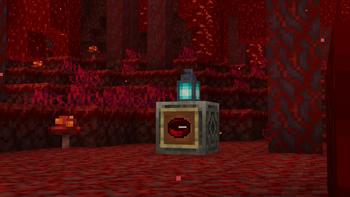
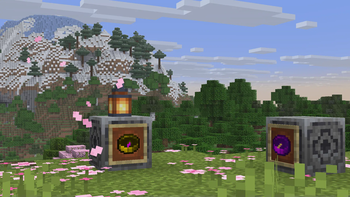
🔍 Analysis
- 🏆 #185 of 386 minecraft mods in this game by downloads
📋 About This Mod
# What Is This? This pack is a resource for other pack creators! **The compass texture and the needle texture are separated for easier editing of the compass texture.** However in this process a lot of customization came from the internal rework, allowing for **different base textures and needle colors based on the state of the compass!** (Pointing to spawn, pointing to a lodestone, and pointing # How Do I Use It? In the assets/minecraft/items folder, you will find example_compass.json and compass.json. If you want to add a new compass, simply copy the example_compass.json and rename it to whatever you need, such as copper_compass. From there, the custom compass is built on a _lot_ of states. One states for every direction it points. One snippet looks like this ``` { "model": { "type": "minecraft:composite", "models": } ] } ``` To properly edit the compass to make a new one, you can change ```minecraft:item/example_compass``` to the base model of your custom compass! To change the needle texture, you can change ```minecraft:item/needle_16``` to your custom needle! **Keep in mind that you will need to make 32 total textures for a needle to function properly.** 32 is a lot of textures, so it may be easier to change the color of it instead. You can do this by replacing ```"value": 16451071``` to another decimal color. **It has to be a decimal color. There are converters online for hexadecimal to decimal.** The easiest way to make a custom compass is to open the item.json in most text editors, even Windows Notepad will work. Simply find the "Replace" function and replace "example" with the keyword for your compass. This will make all of the "example" textures turn into your custom compass textures, given they exist. Wanna test your compass in-game? Follow this command for the example_compass, and edit it for your own custom compass by replacing ```example_compass``` with item.json of your compass! ```/give @p minecraft:compass``` # Future Plans In the future I plan to do this same process for the recovery compass as well as the clock, so stay tuned if you want a custom clock or recovery compass! These won't be for a little while, as I originally made this for my own datapack & texturepack that will be coming soon!
# What Is This? This pack is a resource for other pack creators! The compass texture and the needle texture are separated for easier editing of the compass texture. However in this process a lot of customization came from the internal rework, allowing for different base textures and needle colors based on the state of the compass! (Pointing to spawn, pointing to a lodestone, and pointing
# How Do I Use It? In the assets/minecraft/items folder, you will find example_compass.json and compass.json. If you want to add a new compass, simply copy the example_compass.json and rename it to whatever you need, such as copper_compass. From there, the custom compass is built on a _lot_ of states. One states for every direction it points. One snippet looks like this
``` { "model": { "type": "minecraft:composite", "models": [ { "type": "minecraft:model", "model": "minecraft:item/example_compass" }, { "type": "minecraft:model", "model": "minecraft:item/needle_16", "tints": [ { "type": "minecraft:constant", "value": 16451071 } ] } ] } ```
To properly edit the compass to make a new one, you can change ```minecraft:item/example_compass``` to the base model of your custom compass! To change the needle texture, you can change ```minecraft:item/needle_16``` to your custom needle! Keep in mind that you will need to make 32 total textures for a needle to function properly. 32 is a lot of textures, so it may be easier to change the color of it instead. You can do this by replacing ```"value": 16451071``` to another decimal color. It has to be a decimal color. There are converters online for hexadecimal to decimal.
The easiest way to make a custom compass is to open the item.json in most text editors, even Windows Notepad will work. Simply find the "Replace" function and replace "example" with the keyword for your compass. This will make all of the "example" textures turn into your custom compass textures, given they exist.
Wanna test your compass in-game? Follow this command for the example_compass, and edit it for your own custom compass by replacing ```example_compass``` with item.json of your compass!
```/give @p minecraft:compass```
# Future Plans In the future I plan to do this same process for the recovery compass as well as the clock, so stay tuned if you want a custom clock or recovery compass! These won't be for a little while, as I originally made this for my own datapack & texturepack that will be coming soon!
📊 Mod Details
- Game
- Minecraft Resource Packs
- Author
- Snuckyy
- Version
- 0.1.0
- Downloads
- 65
- Endorsements
- 2
- Category
- minecraft
- Created
- 7/13/2025
- Updated
- 7/2/2025
- Game Versions
- 1.21.4, 1.21.5, 1.21.6, 1.21.7
- Tags
- models, tweaks, utility
🔧 How to Install Minecraft Resource Packs Mods
Download from Modrinth. Use Prism Launcher or drop into your mods folder.
📖 Full step-by-step install guide for Minecraft Resource Packs →
Visit the official mod page for specific installation instructions for this mod.
🎮 Need cheat codes or console commands? Check ur gaming wiki for Minecraft Resource Packs commands, item IDs, and more.
❓ Frequently Asked Questions
Which Minecraft Resource Packs versions does Split Compass Textures support?
The author lists 1.21.4, 1.21.5, 1.21.6, 1.21.7. Other versions may work but are untested by the author.
What is the latest version of Split Compass Textures?
Version 0.1.0, published 2025-07-02 with 65 downloads recorded at the source.
Keep browsing — more Minecraft Resource Packs mods await