Clean Main Menu(No Logo)
🟠 Updated over a year ago🖼️ Gallery (1 images)
🔍 Analysis
- 👍 0.1% endorsement rate
- 🏆 #112 of 233 gui mods in this game by downloads
📋 About This Mod
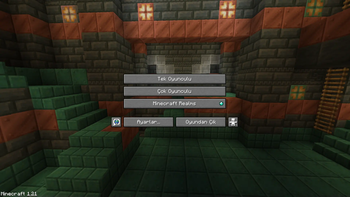
# **Clean Main Menu(No Logo)** ### This resource pack removes the logo from the main menu and provides a cleaner look. !(https://cdn.modrinth.com/data/cached_images/e0152786264e0805bceb8bf3075b0d5e0f3fa1cc.png) _Note: In order for the splash text to disappear, you must enter and exit a world/server when you first activate the texture pack._ ## How To Install Download the zip file and place it in your ``.minecraft/resourcepacks`` folder ### Where is the .minecraft/resourcepacks folder? - In Windows it is usually ``%AppData%\.minecraft\resourcepacks`` - In Linux it is usually ``$HOME/.minecraft/resourcepacks`` - On MacOS it is usually ``~/Library/Application Support/minecraft/resourcepacks`` ## 🌐 ITITAN Hosting (https://raw.githubusercontent.com/3geETR/images/refs/heads/main/Other/ititan.png)](https://ititanhosting.com/game/minecraft) ## Feedback and Request **_If you have a request or feedback, please write them in the comments section below._**
# Clean Main Menu(No Logo)
### This resource pack removes the logo from the main menu and provides a cleaner look. !(https://cdn.modrinth.com/data/cached_images/e0152786264e0805bceb8bf3075b0d5e0f3fa1cc.png)
_Note: In order for the splash text to disappear, you must enter and exit a world/server when you first activate the texture pack._
## How To Install
Download the zip file and place it in your ``.minecraft/resourcepacks`` folder ### Where is the .minecraft/resourcepacks folder? - In Windows it is usually ``%AppData%\.minecraft\resourcepacks`` - In Linux it is usually ``$HOME/.minecraft/resourcepacks`` - On MacOS it is usually ``~/Library/Application Support/minecraft/resourcepacks``
## 🌐 ITITAN Hosting [!(https://raw.githubusercontent.com/3geETR/images/refs/heads/main/Other/ititan.png)](https://ititanhosting.com/game/minecraft)
## Feedback and Request _If you have a request or feedback, please write them in the comments section below._
📊 Mod Details
- Game
- Minecraft Resource Packs
- Author
- 3geE
- Version
- 1.1
- Downloads
- 2,878
- Endorsements
- 3
- Category
- gui
- Created
- 8/12/2024
- Updated
- 8/20/2025
- Game Versions
- 1.20.1, 1.20.2, 1.20.3, 1.20.4, 1.20.5
- Tags
- gui, tweaks, utility
🔧 How to Install Minecraft Resource Packs Mods
Download from Modrinth. Use Prism Launcher or drop into your mods folder.
📖 Full step-by-step install guide for Minecraft Resource Packs →
Visit the official mod page for specific installation instructions for this mod.
🎮 Need cheat codes or console commands? Check ur gaming wiki for Minecraft Resource Packs commands, item IDs, and more.
❓ Frequently Asked Questions
Which Minecraft Resource Packs versions does Clean Main Menu(No Logo) support?
The author lists 1.20.1, 1.20.2, 1.20.3, 1.20.4, 1.20.5, 1.20.6. Other versions may work but are untested by the author.
What is the latest version of Clean Main Menu(No Logo)?
Version 1.1, published 2025-08-20 with 2,878 downloads recorded at the source.
Keep browsing — more Minecraft Resource Packs mods await