ChillByte – No Pumpkin Overlay
🟡 Updated this year🖼️ Gallery (1 images)
🔍 Analysis
- 🏆 #43 of 386 minecraft mods in this game by downloads
📋 About This Mod
--- <p align="center"> <img src="https://cdn.modrinth.com/data/cached_images/f9fc980815c2308fb8df66d3be6fd69a3c8a7739.webp" alt="ChillByte – No Pumpkin Overlay Featured Image" width="100%" > </p> --- **ChillByte – No Pumpkin Overlay** is a lightweight texture pack that removes the dark pumpkin overlay when wearing a carved pumpkin, allowing you to see your screen clearly. --- <p align="center"> <a href="https://modrinth.com/resourcepack/chillbyte-no-pumpkin-overlay" rel="noopener nofollow ugc"> <img src="https://i.imgur.com/tkYBV4Y.png" alt="Modrinth Icon" width="50"> </a> <a href="https://www.curseforge.com/minecraft/texture-packs/chillbyte-no-pumpkin-overlay" rel="noopener nofollow ugc"> <img src="https://i.imgur.com/DKccFbz.png" alt="CurseForge Icon" width="50"> </a> <a href="https://discord.gg/CPBFV3dytW" rel="noopener nofollow ugc"> <img src="https://raw.githubusercontent.com/PrecisionZero/PrecisionStudios/refs/heads/main/Modrinth%20Elements/DiscordIcon.png" alt="Discord Icon" width="50"> </a> </p> --- ## ✨ Features - Removes the screen overlay when wearing a carved pumpkin - Gives you a clear, unobstructed view while wearing a pumpkin - Lightweight client-side resource pack - No performance impact - Works with Vanilla, Sodium, and OptiFine --- ## 📦 Installation 1. Download the `.zip` file 2. Open Minecraft → Options → Resource Packs → Open Pack Folder 3. Paste the `.zip` file into the folder 4. Close and re-open the Resource Packs menu 5. Enable **ChillByte – No Pumpkin Overlay** from the list --- ## 📸 Screenshots | With | Without | |--------|--------| | <img src="https://cdn.modrinth.com/data/cached_images/8adfb00b2c9b64f1338fece3d2437e7c97198175.jpeg" width="400"> | <img src="https://cdn.modrinth.com/data/cached_images/a39cedc426211a723875e80ef9a48180a87b8186.jpeg" width="400"> | | (https://cdn.modrinth.com/data/cached_images/8adfb00b2c9b64f1338fece3d2437e7c97198175.jpeg) | (https://cdn.modrinth.com/data/cached_images/a39cedc426211a723875e80ef9a48180a87b8186.jpeg) | --- ## 🧩 Compatibility - Minecraft 1.8.9+ - Works without any mods - Compatible with Sodium, OptiFine, and other mods --- ## 📁 The Collection Any pack downloaded from PrecisionZero or ChillByte will completely work with all other packs from us. Our texture packs are designed in a way that no pack would clash with each other, ensuring a reliable and seamless experience. ### Discover the PrecisionStudios Collection | | | |---|---| | <a href="https://precisionzero.carrd.co/" rel="noopener nofollow ugc"><img src="https://cdn.modrinth.com/data/cached_images/79a97ff10c642af47ab445f9fb36cf1c6af329ed.webp" alt="PrecisionZero Banner" width="100%"></a> | <a href="https://chillbyte.carrd.co/" rel="noopener nofollow ugc"><img src="https://cdn.modrinth.com/data/cached_images/66c8c57b60a2fd14669a1a23c6bff1269062276d.webp" alt="ChillByte Banner" width="100%"></a> | --- ## 📧 Contact For any concerns regarding ChillByte – No Pumpkin Overlay, contact me at: precisionzero.creator@gmail.com --- ## 🔒 License Licensed as All Rights Reserved (ARR) under PrecisionZero
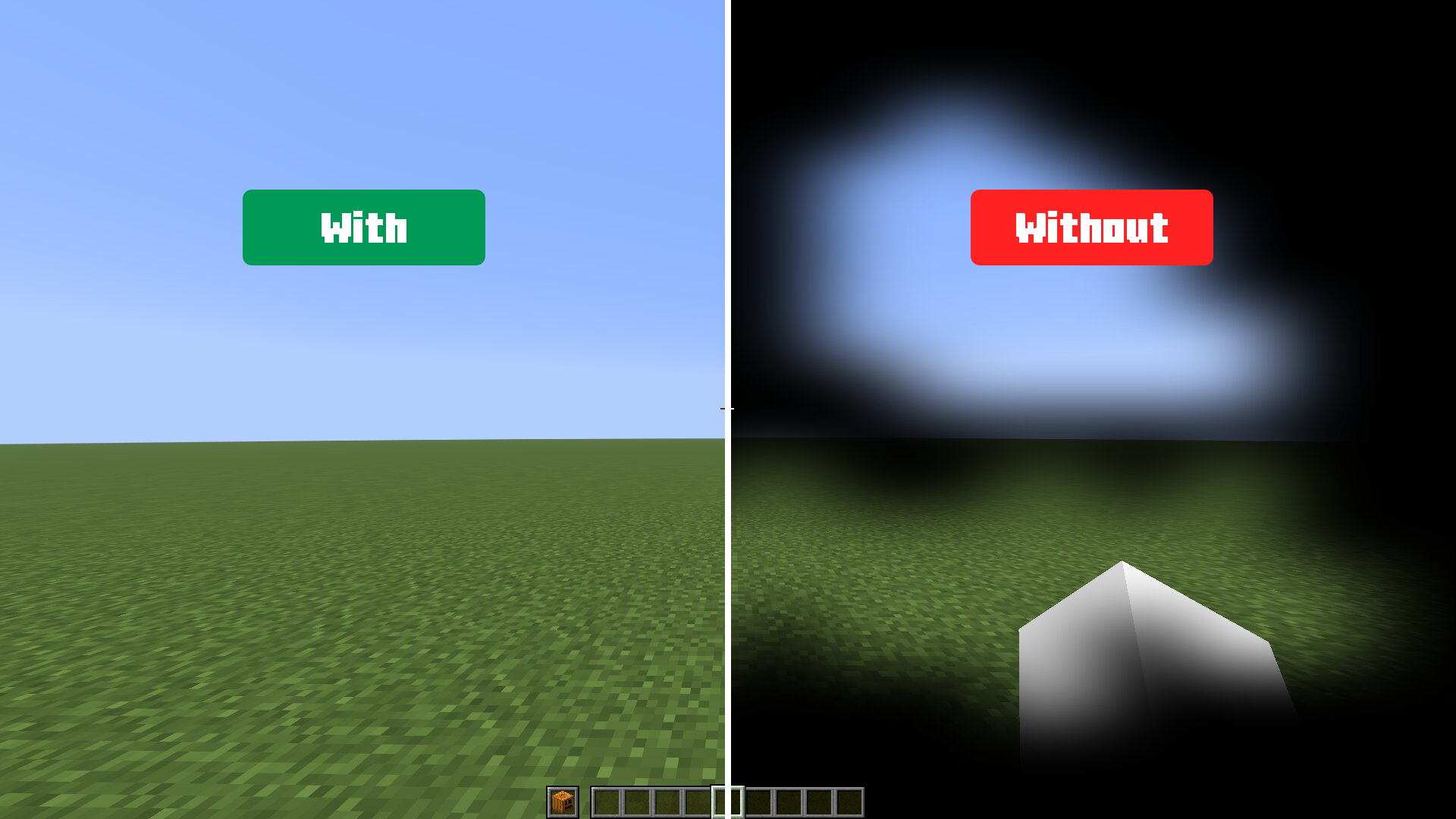
ChillByte – No Pumpkin Overlay is a lightweight texture pack that removes the dark pumpkin overlay when wearing a carved pumpkin, allowing you to see your screen clearly.



## ✨ Features - Removes the screen overlay when wearing a carved pumpkin - Gives you a clear, unobstructed view while wearing a pumpkin - Lightweight client-side resource pack - No performance impact - Works with Vanilla, Sodium, and OptiFine
## 📦 Installation 1. Download the `.zip` file 2. Open Minecraft → Options → Resource Packs → Open Pack Folder 3. Paste the `.zip` file into the folder 4. Close and re-open the Resource Packs menu 5. Enable ChillByte – No Pumpkin Overlay from the list
## 📸 Screenshots
| With | Without |
|--------|--------|
|  |
|  |
| (https://cdn.modrinth.com/data/cached_images/8adfb00b2c9b64f1338fece3d2437e7c97198175.jpeg) | (https://cdn.modrinth.com/data/cached_images/a39cedc426211a723875e80ef9a48180a87b8186.jpeg) |
|
| (https://cdn.modrinth.com/data/cached_images/8adfb00b2c9b64f1338fece3d2437e7c97198175.jpeg) | (https://cdn.modrinth.com/data/cached_images/a39cedc426211a723875e80ef9a48180a87b8186.jpeg) |
## 🧩 Compatibility
- Minecraft 1. 8. 9+
- Works without any mods
- Compatible with Sodium, OptiFine, and other mods
## 📁 The Collection
Any pack downloaded from PrecisionZero or ChillByte will completely work with all other packs from us. Our texture packs are designed in a way that no pack would clash with each other, ensuring a reliable and seamless experience.
### Discover the PrecisionStudios Collection
| | |
|---|---|
|  |
|  |
|
## 📧 Contact For any concerns regarding ChillByte – No Pumpkin Overlay, contact me at: precisionzero.creator@gmail.com
## 🔒 License Licensed as All Rights Reserved (ARR) under PrecisionZero
📊 Mod Details
- Game
- Minecraft Resource Packs
- Author
- ChillByte
- Version
- 1.0.0
- Downloads
- 83
- Endorsements
- 0
- Category
- minecraft
- Created
- 8/1/2026
- Updated
- 7/30/2026
- Game Versions
- 1.8.9, 15w49b, 15w50a, 15w51a, 15w51b
- Tags
- tweaks, utility, vanilla-like
🔧 How to Install Minecraft Resource Packs Mods
Download from Modrinth. Use Prism Launcher or drop into your mods folder.
📖 Full step-by-step install guide for Minecraft Resource Packs →
Visit the official mod page for specific installation instructions for this mod.
🎮 Need cheat codes or console commands? Check ur gaming wiki for Minecraft Resource Packs commands, item IDs, and more.
❓ Frequently Asked Questions
Which Minecraft Resource Packs versions does ChillByte – No Pumpkin Overlay support?
The author lists 1.8.9, 15w49b, 15w50a, 15w51a, 15w51b, 16w02a. Other versions may work but are untested by the author.
What is the latest version of ChillByte – No Pumpkin Overlay?
Version 1.0.0, published 2026-07-30 with 83 downloads recorded at the source.
Keep browsing — more Minecraft Resource Packs mods await