Changed UI
🟡 Updated this year🖼️ Gallery (2 images)
🔍 Analysis
- 👍 0.0% endorsement rate
- 🏆 #208 of 644 16x mods in this game by downloads
📋 About This Mod
# Changed UI Textures The "Gooey" UI from the changed mod, now in vanilla! ## What does it add? This resource packs adds the "gooey" hearts and inventory you get while being a latex creature in the Changed Minecraft Mod: !(https://cdn.modrinth.com/data/cached_images/92675a499780009b7b1c78d5ffe3e5043740e63f.png) !(https://cdn.modrinth.com/data/cached_images/c3b931b1085698e917a3cc7dd57838cbeaceef2a.png) ## How do I change the color of the hearts and the inventory? To do this and change the hue or color of the icons, you can follow these steps! 1. Download your desired version 2. Extract the zip into an empty folder: On windows: (https://support.microsoft.com/en-us/windows/zip-and-unzip-files-8d28fa72-f2f9-712f-67df-f80cf89fd4e5) On unix-based systems (terminal): Run this on your terminal: unzip ChangedUI-Version.zip, Change the version name for your downloaded version 3. On the resourcepack file hiearchy, open this folder: changed-textures\assets\minecraft\textures\gui 4. Edit the icons.png file as you want! To edit the inventory: Complete steps 1-3, but instead of staying on \gui, open the folder named: "container" and edit the inventory.png file in there. # Credits Credit to the main changed mod artists for making the base infected / latex textures, I edited them to make them more complete, and not just keep the main hearts
# Changed UI Textures
The "Gooey" UI from the changed mod, now in vanilla!
## What does it add?
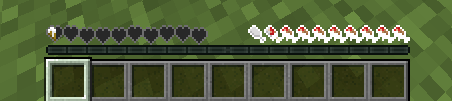
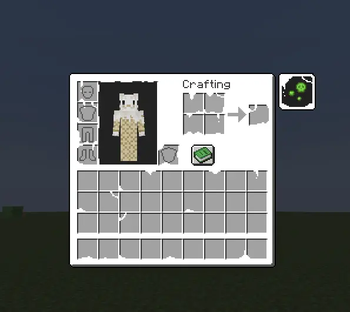
This resource packs adds the "gooey" hearts and inventory you get while being a latex creature in the Changed Minecraft Mod:
!(https://cdn.modrinth.com/data/cached_images/92675a499780009b7b1c78d5ffe3e5043740e63f.png)
!(https://cdn.modrinth.com/data/cached_images/c3b931b1085698e917a3cc7dd57838cbeaceef2a.png)
## How do I change the color of the hearts and the inventory?
To do this and change the hue or color of the icons, you can follow these steps!
1. Download your desired version 2. Extract the zip into an empty folder: On windows: (https://support.microsoft.com/en-us/windows/zip-and-unzip-files-8d28fa72-f2f9-712f-67df-f80cf89fd4e5) On unix-based systems (terminal): Run this on your terminal: unzip ChangedUI-Version.zip, Change the version name for your downloaded version 3. On the resourcepack file hiearchy, open this folder: changed-textures\assets\minecraft\textures\gui 4. Edit the icons.png file as you want!
To edit the inventory:
Complete steps 1-3, but instead of staying on \gui, open the folder named: "container" and edit the inventory.png file in there.
# Credits Credit to the main changed mod artists for making the base infected / latex textures, I edited them to make them more complete, and not just keep the main hearts
📊 Mod Details
- Game
- Minecraft Resource Packs
- Author
- gootraxian
- Version
- 26.1-26.1.2
- Downloads
- 8,991
- Endorsements
- 3
- Category
- 16x
- Created
- 4/16/2026
- Updated
- 4/21/2026
- Game Versions
- 26.1, 26.1.1, 26.1.2
- Tags
- 16x, gui, themed
🔧 How to Install Minecraft Resource Packs Mods
Download from Modrinth. Use Prism Launcher or drop into your mods folder.
📖 Full step-by-step install guide for Minecraft Resource Packs →
Visit the official mod page for specific installation instructions for this mod.
🎮 Need cheat codes or console commands? Check ur gaming wiki for Minecraft Resource Packs commands, item IDs, and more.
❓ Frequently Asked Questions
Which Minecraft Resource Packs versions does Changed UI support?
The author lists 26.1, 26.1.1, 26.1.2. Other versions may work but are untested by the author.
What is the latest version of Changed UI?
Version 26.1-26.1.2, published 2026-04-21 with 8,991 downloads recorded at the source.
Keep browsing — more Minecraft Resource Packs mods await